

MGDominguez
August 12, 2026

1Password for Safari does not integrate with main app

  • August 12, 2026
  • 26 replies
  • 74 views

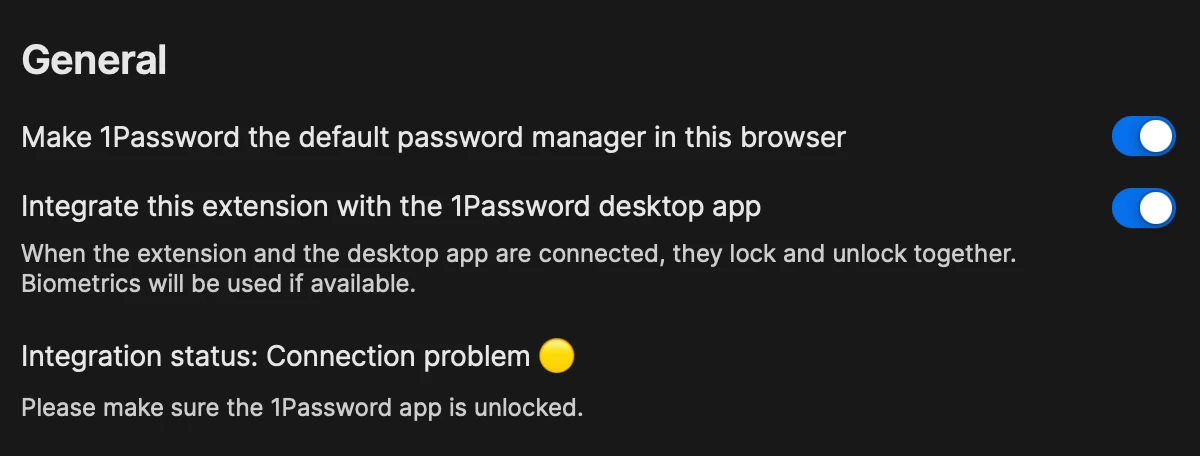
Today I noticed that the 1Password for Safari extension does not connect with the app. Even with the app unlocked, the extension asks for my password every time. I followed the recommended steps from this similar post, but after steps 4 from the browser section, I still see a yellow indicator. There was an update for the main app, but it did not make a difference, the issue persists.


The integration works without issue on my other browser, Zen, it’s failing only on Safari.


Versions:

macOS: Tahoe 26.6.1

1Password: 1Password for Mac 8.12.32 (81232033)

1Password for Safari: 8.12.29.1 (81229001)


Pinned Reply By 1P_Dave

Hello folks,

Our development team has released an update that fixes an issue where 1Password for Safari may remain locked or show an app integration error even when the 1Password for Mac desktop app is unlocked. Please update to version 8.12.33 of the desktop app:

We sincerely apologize for the inconvenience and appreciate your patience while we worked to resolve this issue. If you still see an issue with app integration in Safari after updating 1Password then please reply in this thread and the team and I can help further. 

-Dave

26 replies

Gilles
August 12, 2026

See image

the browser (safari) extension of 1 password does not unlock automatically

and I see this error message in the 1Pasword Safri settings

How do I fix this


MindTooth
August 12, 2026

Another month, another bug with Safari.  Shame really.  I remember back in 2008 when I started using 1Password, it just worked with the Apple platform.  Not so much these days..

I hope a quick fix is in the making.  Really annoying.

August 12, 2026

macOS 27 beta 5, 1Password 8.12.32, 1Password for Safari 8.12.29. All working fine under macOS 26.6.1. Upgraded Mac to macOS 27 beta 5 and now the extension cannot communicate with the desktop app.


Desktop app is set for Browser integration and is unlocked. I've quit browser and relaunched, quit desktop app and relaunched, restarted the Mac. It’s just broken.

August 12, 2026

Update: I installed the TestFlight version of 1Password for Safari (8.12.32) and now it works fine under macOS 27 beta 5.

1P_Dave
1Password Employee
1Password Employee
August 12, 2026

Hello everyone,

Our team is investigating an issue that prevents app integration in Safari from working with the latest versions of the 1Password for Mac desktop app. We’re working to release a fix as soon as possible.

For the time being, until a fix is released, you can unlock 1Password for Safari using your account password. Alternatively, you can use our new macOS AutoFill feature to fill your login credentials instead: macOS AutoFill is now available to everyone!

The issue only affects 1Password for Safari and other browsers are not affected. I’m sorry for the disruption caused and I’ll update this thread as soon as I have more to share.

-Dave

August 12, 2026

Presumably Apple system update to 26.6.1 or safari to 26.6 has broken TouchID for the Safari extension. Have tried every suggested fix or remedy. Last time topic was considered seems to be about a year ago. Suggestions, fix or estimated time to fix? thanks

August 12, 2026

Although both were working yesterday, today both my Safari and Chrome browser extensions cannot connect to the desktop app. I see another topic that mentions that the Safari issue is known by the developers at 1Password. So I thought I better add another topic to say I get the exact same behavior in Chrome. I believe Chrome also updated itself this morning to version 151.0.7922.109.

When looking at the extension settings in both browsers I see the same yellow indicator and the message Integration Status: Connection Problem. The desktop app is indeed open and logged into both of my 1Password accounts.

1P_Dave
1Password Employee
1Password Employee
August 12, 2026

@bigsablept 

I’ve merged your thread into the existing discussion in order to keep the conversation in the same places. I’m sorry that you’re running into app integration issues with 1Password in the browser. 

Regarding Safari, please see my pinned reply here.

I haven’t seen any other reports involving Chrome, can you do the following:

The above steps won’t fix the issue in Safari, our developers are working on a fix. If you still see the issue in Chrome after trying those steps then let me know. 

-Dave

August 12, 2026

@1P_Dave Thanks for the reply. I uninstalled the 1Password Chrome extension and reinstalled it. Then I toggled the “Integrate with the browser” setting in the desktop app to off. I quit the desktop app and Chrome. Then I toggled that setting back on in the desktop app. Now the Chrome extension is working. So perhaps Chrome didn’t pull the latest extension version with its own update? I’m not sure, but now I am in the same camp as the others - my Safari 1Password extension cannot connect to the desktop app.

MGDominguez
August 12, 2026

It might be the “default” integration. At the moment, running the most recent versions of 1Password, macOS, Safari and Zen Browser, Safari does not work. Zen Browser does work, but I configured that using the “Connect to Additional Browsers” feature.


August 12, 2026

I think I may have to turn off all the 1Password updates.  A new update seems to break things more often than it makes them better.  And to add insult to injury, they raised the prices while reducing the quality of the product.  I feel like we should get refunds for every day something like this doesn't work.

johnnygoodface
August 12, 2026

I had a yellow circle. I had to click on the 3 dots on the right, and sign out and sign back in.  Curiously, the circle is still yellow now (I haven’t reboot yet) but the extension is working now. 

Edit: STILL NOT WORKING. Even with main app unlocked, the extension still thinks the main app is locked. 


August 12, 2026

I have the same “connection problem” all of a sudden. Logging out/in in the extension did however not help. I always need to unlock the browser extension with the full password event though the app is unlocked. Started one or two days ago.

johnnygoodface
August 12, 2026

I hate entering my password manually into the extension: I'm always afraid it might be a malware that replaced the 1Password extension