
September 18, 2026
Question

1password not working well with subdomains

  • September 18, 2026
  • 5 replies
  • 8 views

Hi

I have a VPS with a number of services, each on a separate subdomain.

The issue is that 1password keeps showing me the wrong login.

Example

Passwords saved on: n8n.vps.com, blog.vps.com, coolify.vps.com

When I open n8n.vps.com for example, it shows me the login for blog.vps.com

In the example below, it’s showing me the login for designer.vps.com instead of the n8n login.

And it becomes annoying when 
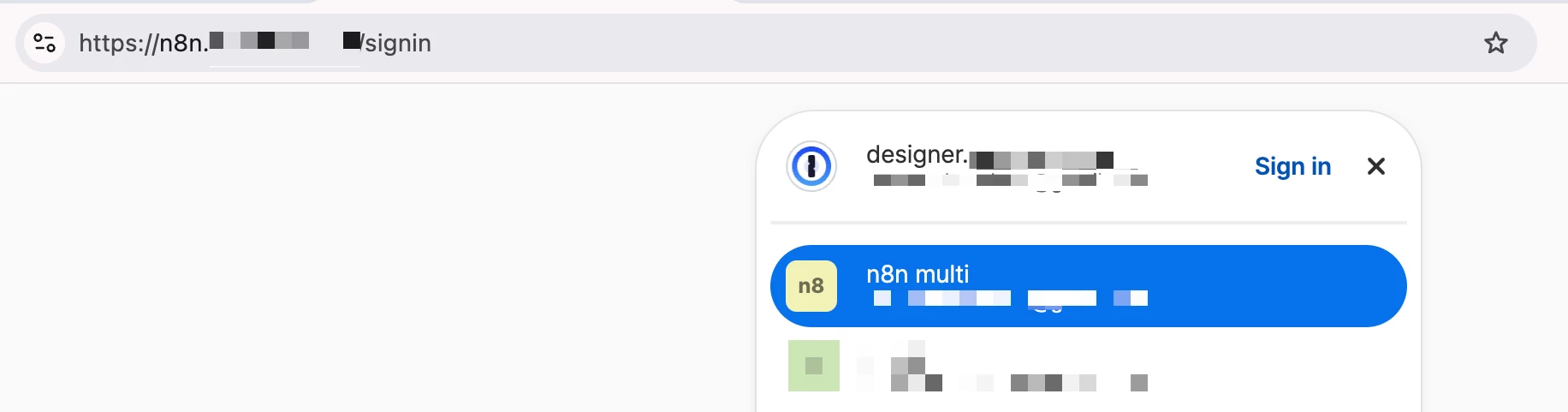
Is this a known issue?

I think the priority should be fixed. When a login matches the subdomain exactly, it should have priority over other logins from the same domain.

I hope you can fix this soon

PS: Interestingly, the “Open And Fill” feature seems to pick up the right subdomain.

Best regards

5 replies

ChrisC1P
1Password Employee
1Password Employee
September 18, 2026

Hi ​@unlocomqx thanks for reaching out!


You can configure the autofill behaviour of your different login items to only fill on specific domains: Change where a login is suggested and filled | 1Password Support


Does the behaviour improve after setting your login items to Only fill on this exact host?


Let me know if you have any questions.

unlocomqxAuthor
September 18, 2026

Hi ​@ChrisC1P, thank you for your reply.

Tbh, It’s not convenient to go through my logins and change their settings.

The extension just has to prioritize the login that matches the current subdomain exactly.

Currently, I think it picks the first login that matches the current domain. (the first alphabetically)

Example with explanation

I hope you can improve the logic. Please tell me if something is not clear.

Thank you

September 30, 2026

Hi ​@ChrisC1P, thank you for your reply.

Tbh, It’s not convenient to go through my logins and change their settings.

The extension just has to prioritize the login that matches the current subdomain exactly.

Currently, I think it picks the first login that matches the current domain. (the first alphabetically)

Example with explanation

I hope you can improve the logic. Please tell me if something is not clear.

Thank you

Absolutely agree and support this enhancements. We are running it for our agency and have similar issues, we use lots of subdomains and the tool cannot properly identify the correct login because it defaults to “domain” and not “subdomain” URL matching. Thank you for this and I hope the new update will address and fix this issue.