
August 26, 2026
Question

1Password Stuck Updating on iOS

  • August 26, 2026
  • 3 replies
  • 2 views

For about 3-4 months now (possibly longer, not sure), 1Password won’t update fluidly on iPadOS for some reason. The app downloads from the App Store, the progress bar fills about 75%. But then it gets stuck there and the app doesn’t finish updating unless I restart my device.


I am using iPad Pro M1 (13”), on iPadOS 27 Beta latest. I did come across the same problem on iPadOS 26 Stable so probably not a beta thing.
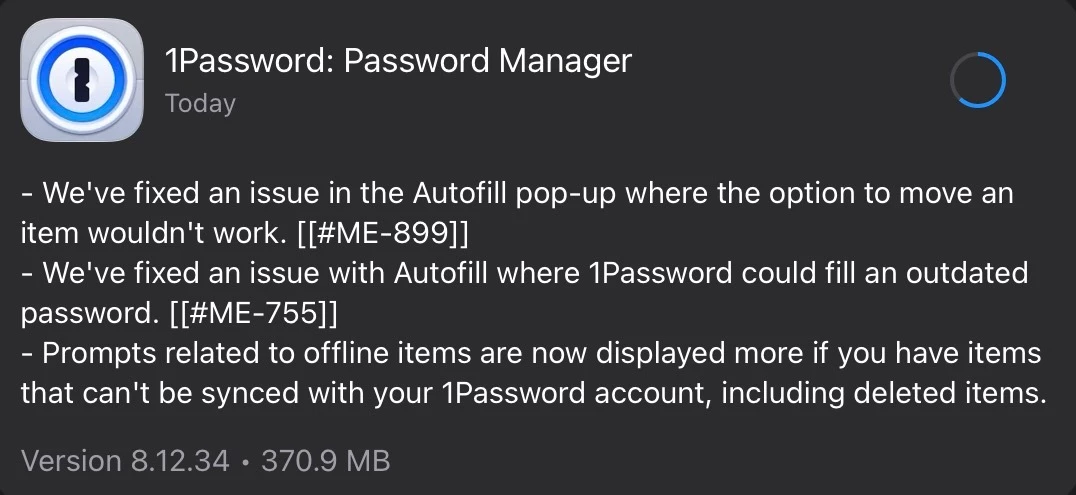


3 replies

1P_Dave
1Password Employee
1Password Employee
August 26, 2026

Hello ​@AndyMycroft! 👋

I’m sorry that you’re having trouble updating 1Password on your iPad. Updates and installations from the App Store are managed by iPadOS, so you may need to contact Apple Support if the update continues to hang. In the meantime, the community and I will do everything we can to help.

Could you tell me the following: 

  1. Does the issue only occur with 1Password for iOS? Or does it occur with other apps as well? 
  2. When the update process freezes, are you still able to open the 1Password app? And, if you check the version, is the new version installed or the old version? 
  3. When the issue occurs, are you running low on storage space on your iPad: iPadOS > Settings > General > iPad Storage? 

I look forward to hearing from you. 

-Dave

August 27, 2026

Hi Dave,

  1. Yes, the issue only happens with 1Password on iOS. All other apps update just fine.
  2. Indeed, I am able to open the 1Password App while it’s stuck in that 75% status. If I go to Settings->About, it shows the previous version (before the current update) of 1Password installed.
    Interestingly, when I restart my iPad, the 1Password App icon blurs out and shows installing status (can’t open it at this point). And then it installs normally to the latest version.
  3. i have about 148 GB of available space left so I don’t think it’s related to storage.

I have also tried a clean uninstall and reinstall. The app downloads and installs alright but then the same issue occurs while updating to a newer version.

Thanks for looking into this!

1P_Dave
1Password Employee
1Password Employee
August 28, 2026

@AndyMycroft 

Thank you for the reply. I’d be curious to see if the following gets things working again: 

  1. Long-press the 1Password icon and choose Pause Download.
  2. Wait several seconds, long-press it again, then choose Resume Download.

Would you also be able to contact Apple Support to ask why the update from the App Store may be hanging? We’re happy to continue investigating from the 1Password side, but as far as I’m aware, the update process itself is handled entirely by iOS so it would be good to check with Apple as well.

-Dave