
July 7, 2026

How to hide the browser right click context menu?

  • July 7, 2026
  • 7 replies
  • 11 views

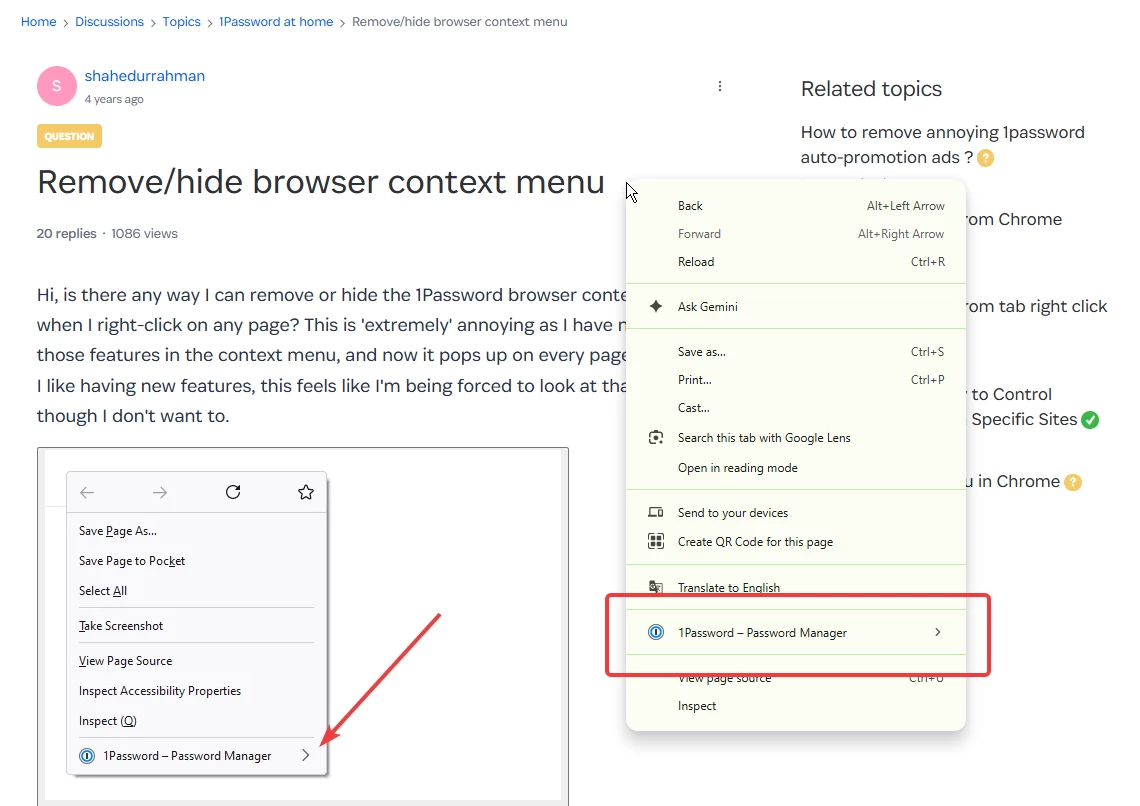
Is it possible now to hide the right click context menu item in browser? I have no use of it and I would like to hide it on all websites. 

** Yes, I have been asking this for 4 years now. I would be very happy if you tell me that this has been implemented and I just don’t know where that settings is 🙏


Pinned Reply By 1P_Dave

Hello ​@shahedurrahman! 👋

There isn't a setting to hide the 1Password option from the context menu while 1Password in the browser is installed and enabled.

That being said, I’ve let the team know that you’re still interested in seeing an option to turn off the context menu option be added in the future. Thank you for the feedback! 

-Dave

7 replies

1P_Dave
1Password Employee
1P_DavePinned
1Password Employee
July 7, 2026

Hello ​@shahedurrahman! 👋

There isn't a setting to hide the 1Password option from the context menu while 1Password in the browser is installed and enabled.

That being said, I’ve let the team know that you’re still interested in seeing an option to turn off the context menu option be added in the future. Thank you for the feedback! 

-Dave

July 8, 2026

Thank you Dave, but suggesting to disable or uninstall the extension is hilarious.

I’m sorry if I’m sounding harsh, but right click context menu on a browser is used all the time while using a browser and I don’t want to see 1Password injecting itself there without any option to turn if off. It’s on my face all the time even if don’t want to. 

I hope the team will consider adding an option to turn it off.

1P_Dave
1Password Employee
1Password Employee
July 8, 2026

Thanks again for the feedback! 

-Dave

August 24, 2026

Okay, I have just signed up to tell you how fundamentally stupid this is.

Let me just preface this with: I am a huge supporter and loyal customer of 1Password, have been using it personally for many years, and have been adopting the enterprise version at different companies I have worked at. You guys develop an awesome product and keep adding awesome features like the Fastmail integration, CLI, etc. Also, I like the fact that you regularly undertake audits and publish the reports (Cure53 haven’t had a go at version 8 yet, have they?), but I digress. What I am trying to say is that, usually, I would be the first to say that you guys absolutely have your heads screwed on right.

Now, it absolutely baffles me that such a simple omission still has not been fixed. Like, if a user ever needs that “hide on this page” feature (I personally never had to in all those years), which apparently only exists in the context menu, they can just toggle it back on, can’t they?

While I would personally also like not to have another (to me) unnecessary item in my browser’s context menu, the thing that drives me crazy is the length of the entry. Instead of “1Password”, it has to be “1Password - Password Manager”. The length of the entry causes the browser’s context menu to grow comically wide.

I usually run the beta version on Windows, Linux, and Mac. Naturally, I would also like to use the beta version of the browser extension alongside it. However, of course, there is an additional “beta” added to the entry.

I get that you didn’t directly pick the name for the context menu entry. As far as I am aware, if an extension creates multiple entries—as you essentially do—they get automatically grouped under the extension’s name. I also get that you want the extension name to explicitly state “Password Manager” for SEO/marketing/discovery purposes. Fair enough. There is a simple fix, though: just let us disable the entry (please!).

1P_Dave
1Password Employee
1Password Employee
August 24, 2026

​@PwnieXpress 

Welcome to the community and thank you for the feedback! I’ve filed it as a feature request with our product team for consideration for future updates to 1Password. 

-Dave

September 9, 2026

Hi Dave, anything much more concrete? Like the feature request was actually considered and we can expect it in any future release? Please don’t bother to reply if your answer is “I can’t disclose anything about product planning or future releases”. Thanks.

1P_Dave
1Password Employee
1Password Employee
September 21, 2026

​@shahedurrahman 

The feature request has been shared with our team, and our product team will evaluate it for a future version of 1Password based on customer demand and how it aligns with our broader roadmap. However, as far as I’m aware, it is not currently under active development.

-Dave