
September 8, 2026
Solved

Is there a point switching to passkeys on websites that does not support deletion of the current password?

  • September 8, 2026
  • 6 replies
  • 17 views

A login's security is as strong as its weakest part. Therefore, if the password cannot be deleted from a website, is there a point to switching to a passkey on such website?

When passwords aren't deleted, 1Password may offer the password first (not the passkey), the account is still subject to phishing, and a website breach can expose the user’s data.
Best answer by 1P_Dave

​@rahavd 

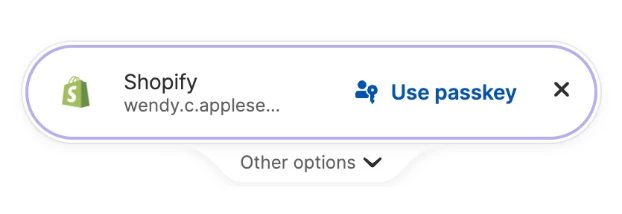
The website must first request a passkey before 1Password can offer to sign you in with a saved passkey. Websites handle this in different ways. Some request a passkey automatically when you visit the sign-in page, while others require you to click a Sign in with passkey button on the page. 

Once the website makes the request, 1Password recognizes it and offers to sign you in with your saved passkey: 

Could you please clarify if there is a way to configure the system so that the passkey acts as the primary, default authentication method?

Not on the 1Password end of things. Some websites, like Google, allow you to default to a passkey for sign-in. 

-Dave

6 replies

1P_Dave
1Password Employee
1Password Employee
September 8, 2026

Hello ​@rahavd! 👋

Thank you for the question! For the moment, many websites still don't offer the ability to fully remove your password after adding a passkey so you'll be able to sign in using either your passkey or your password in most places. Continue to follow best practices and make sure that all of your passwords are strong and unique: Use the password generator to change and strengthen your passwords

Passkeys, which are resistant to phishing, are still useful even if the password is still active. A passkey can only be used on the website that it was made for, so when you choose to sign in using a passkey instead of a password you’re still benefiting from that phishing resistance. Signing in with a passkey is also smoother, and requires fewer steps, than signing in with a password which requires the filling of a username, password, as well as one-time password (for two-factor authentication) where needed. 

I hope that helps! 

-Dave

rahavdAuthor
September 8, 2026

Thank you for the information. However, this standard overview doesn't quite address the core of my question. I am familiar with how passkeys function.

My specific concern is with the user experience during login. Currently, some services defaults to prompting for a standard password first, rather than offering the passkey as the primary option. Because of this, it is unclear how the passkey integration adds value if the workflow still relies on traditional password entry by default (whether handled by the service or 1Password).

Could you please clarify if there is a way to configure the system so that the passkey acts as the primary, default authentication method?

1P_Dave
1Password Employee
1P_DaveAnswer
1Password Employee
September 9, 2026

​@rahavd 

The website must first request a passkey before 1Password can offer to sign you in with a saved passkey. Websites handle this in different ways. Some request a passkey automatically when you visit the sign-in page, while others require you to click a Sign in with passkey button on the page. 

Once the website makes the request, 1Password recognizes it and offers to sign you in with your saved passkey: 

Could you please clarify if there is a way to configure the system so that the passkey acts as the primary, default authentication method?

Not on the 1Password end of things. Some websites, like Google, allow you to default to a passkey for sign-in. 

-Dave

AJCxZ0
September 8, 2026

if the password cannot be deleted from a website, is there a point to switching to a passkey on such website?


Yes, there is, but the value depends on how the web site has configured authentication and the options which you have chosen.

Currently the passkey is rarely used for identification and authentication, but as a second factor authenticatior. If that second factor is required, then the passkey is currently the most secure non-physical authenticator, else the second factor is rather pointless.

Using the passkey as  (identification and) authentication is extremely convenient, even if the web site provides no was to prevent identification with a username and weak authentication with a password which may be leaked then abused before reported in Watchtower and/or HIBP.

rahavdAuthor
September 8, 2026

Thank you. I want to make sure I fully understand your proposed authentication flow. Are you suggesting letting 1Password provide the 2nd factor instead of a different authentication app?

AJCxZ0
September 12, 2026

I did not propose an authentication flow; rather, I described how passkeys are used in the identification and authentication process in order to illustrate their function and the almost certain irrelevance of the disclosure of a password when a passkey is used. I hoped that this fully answered your somewhat oddly worded question (due to the implication of “switched”)..

I made no suggestion, however an “authentication app” usually provides TOTP, not passkeys, for a second factor. I prefer using 1Password to store and provide all factors, understanding that this is not the most secure option, but is the most convenient acceptably secure option.