Request: Properly support 'sign-in with' for canada.ca, GCKey, and adjacent federal goverment citizen login
At present it is incredibly clunky and confusing to save Canadian federal government login information in 1Password. The lack of proper integration within 1Password results in duplication of entries in ways that are difficult to keep track of and frequently lead to the saving of stale information in the duplicates that haven’t been updated.
canada.ca and the many services provided under its purview are centered around GCKey/Securekey login and/or Interac sign-in SSO.
All of the various services provided under the umbrella of canada.ca have their own configurations for 2FA, verification questions, and the like, despite all sharing the root GCKey login information.
The lack of ‘sign-in with’ being present for GCKey, despite how long its between around, and despite 1Password originally being a Canadian company is kind of.. disappointing. I mean, we shouldn’t really need to be asking for this one should we? Lets be real 😅
The ‘sign-in with’ option is the minimum bar.
Beyond that whats also really needed is coherent recognition and support for all of the various security question models required and offered through these government websites.
This webpage provides a full structure but doesn’t summarize well the various authentication, 2FA, MFA, and verification question requirements for each service: https://www.canada.ca/en/government/sign-in-online-account.html
Examples that nearly every citizen uses that could be better supported in 1Password:
- CRA: Canadian Revenue Agency: cra-arc.gc.ca via canada.ca.
- Uses any of a dedicated CRA user ID/password, Provincial Partner login( AB, BC only), or sign-in partners (bank logins using interac sign-in)
- Requires its own unique OTP 2FA
- Requires a unique set of 7 security questions
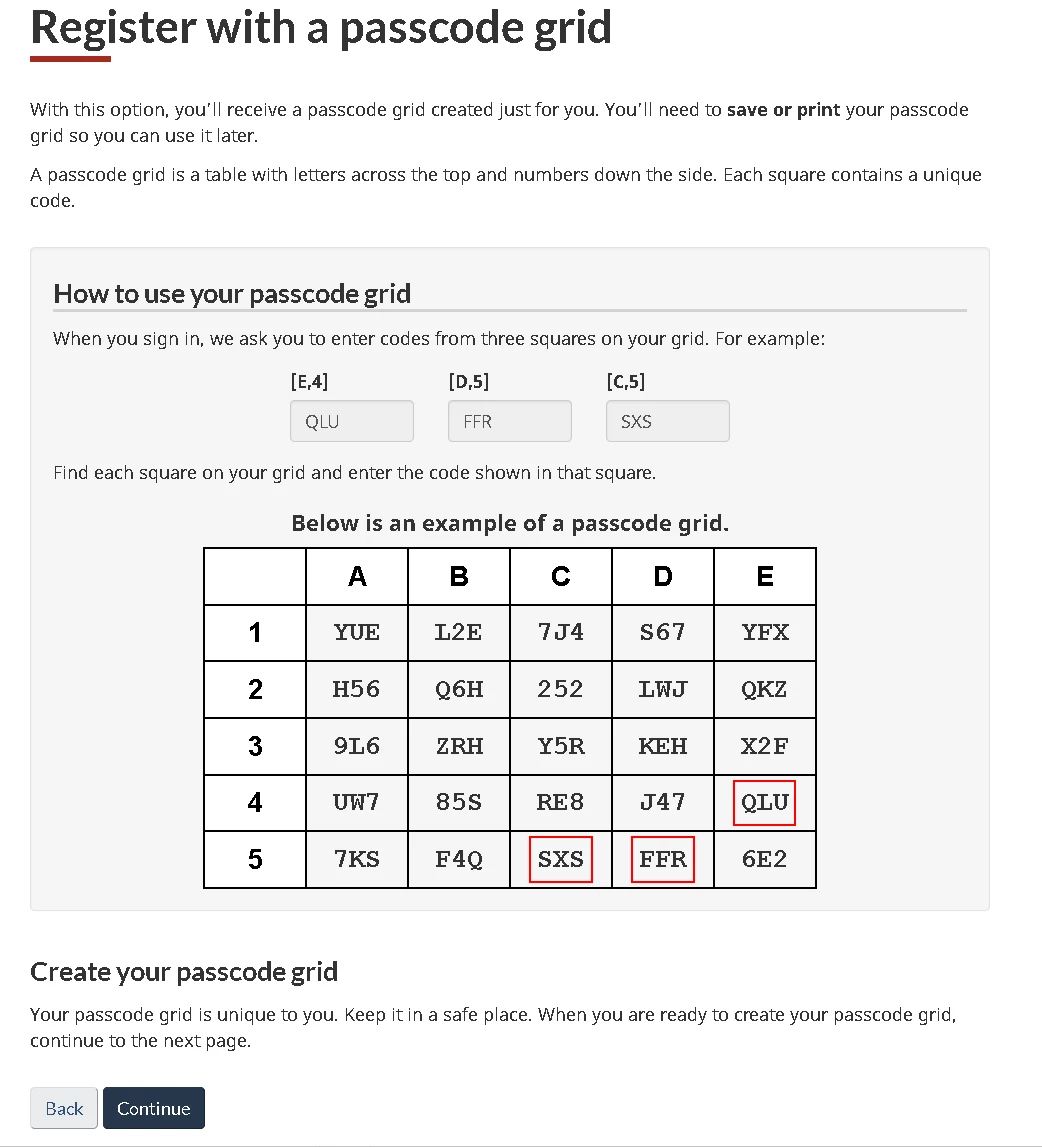
- Additionally requires either SMS verification or an MFA option that requires keeping a record of a 5 x 5 grid (A to E, 1 to 5) that has unique 3-character random ID’s contained in each cell. My current solution is saving each box in text fields labelled A1…E5 with the corresponding code for manual referencing.
- Service Canada:
- Uses any of GCKey user ID/password, sign-in partners (bank logins using interac sign-in), or Provincial Partner login (AB, BC only)
- Requires its own unique OTP 2FA token
- Requires its own unique verification questions
- Additionally requires either SMS verification or an MFA option that requires keeping a record of a 5 x 5 grid (A to E, 1 to 5) that has unique 3-character random ID’s contained in each cell. My current solution is saving each box in text fields labelled A1…E5 with the corresponding code for manual referencing.
- IRCC: Immigration, Refugees, and Citizenship Canada (The ‘new’ soon to be required place for passports, visa, work permits, etc)
- Uses GCKey or sign-in partners (bank logins using interac sign-in)
- Requires its own unique OTP 2FA token
- Requires its own unique verification questions (3 in total)
Passcode grid example: