
August 4, 2025
Solved

Slow Response on 1Password M4 Mac

  • August 4, 2025
  • 2 replies
  • 77 views

Hello,

I was running 1Password for Mac 8.11.2 (81102021) on my i9 MacBook Pro 2019.

Since Upgrading to my Macbook Pro 14" M4 Apple Silicon Same version of Sequoia 15.5 it has been very slow to open and retrieve my information.

I have done a check for updates and nothing new comes down for 1Password.

I have noted a few other posts one said it fixed itself, others the moderator asks is they using the Apple Silicon Version?

Do I need to Remove the Current version and Install again from scratch?
Best answer by 1P_SimonH

Hi @Lesbo,

You're exactly right that 1Password should have updated itself to the Apple silicon version. Could you please do a quick check to see if it is the issue of running the Intel version?
 

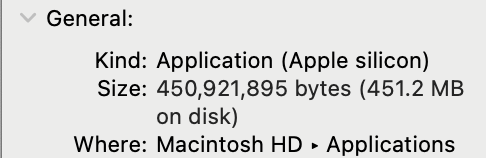
To find this, open your Applications folder, right click on 1Password, then select Get Info. In the Kind field, it'll say "Apple silicon" if you're running that version. 


If you discover you're running the Intel version and need help switching, just let me know!

2 replies

1P_SimonH
1P_SimonHAnswer
Community Manager
August 4, 2025

Hi @Lesbo,

You're exactly right that 1Password should have updated itself to the Apple silicon version. Could you please do a quick check to see if it is the issue of running the Intel version?
 

To find this, open your Applications folder, right click on 1Password, then select Get Info. In the Kind field, it'll say "Apple silicon" if you're running that version. 


If you discover you're running the Intel version and need help switching, just let me know!

LesboAuthor
August 4, 2025

Hi,
Thanks for the response, I suspected this may have been the case, I should have tried it first.
I deleted 1Password, downloaded, and installed again now it is the Apple Silicon Version now, it is now a lot faster.