

May 2, 2023
Question

Touch ID option disabled after Mac restored from Time Machine

  • May 2, 2023
  • 4 replies
  • 339 views

I recently had the logic board replaced in my MacBook Pro. I restored the Mac from a Time Machine backup that was roughly 6 days old. When I launched 1P, I got the message stating a I'd used a newer version. I followed the instructions https://1password.community/discussion/129049/warning-popup-on-launch to resolve the issue.

After setting up TouchID, I rebooted a few times and after each reboot, the option to enable TouchID in 1P remains disabled.
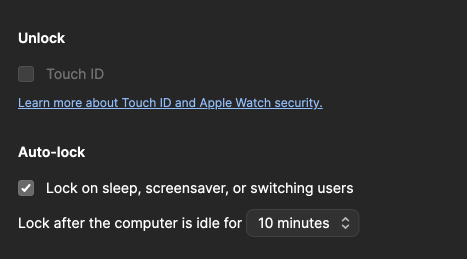
I've tried numerous reboots, toggling all the TouchID settings on/off, but nothing seems to take.

Suggestions? Thank you!


1Password Version: 8.10.4
Extension Version: 2.10.0
OS Version: 13.3.1
Browser:_ Chrome

4 replies

May 3, 2023

I completely removed 1P from the machine, rebooted, reinstalled, and TouchID is back.

1P_Tommy
1Password Employee
May 3, 2023

Sounds good @4nthony If you have any other questions please let us know. My best guess would be that the restore did not bring over something that was needed. We would need a diagnostics report to look deeper. With you having replaced the installation that would not be possible now. I am glad that you were able to get going again.

May 3, 2023

I was looking through some of the other posts in the forum that mentioned biometrics and the "EnrollmentChanged" log entry. I had the same entry in my log file and had to recreate my fingerprints for TouchID (my previous fingerprints didn't show up after the restore). I'm guessing that is what was causing the EnrollmentChanged log entry and preventing 1P from allowing TouchID to be enabled. Cheers!

1P_Dave
1Password Employee
May 3, 2023

I'm happy that you were able to figure things out. 🙂

-Dave