
“Unlock with device” does not seem to work on Mac
I would like to type my master password once per day, and thereafter have 1Password stay unlocked as the Mac is unlocked. I have the impression that “Unlock app with Mac password” and “Unlock with device” should mean that. However, for the last few months (I do not remember exactly when the changed options were released), I find myself needing to type the password multiple times per day on the same device.
I am on macOS 15.7.9 and currently use 1Password for Mac 8.12.34 (81234034). Here is a screenshot of my relevant settings:
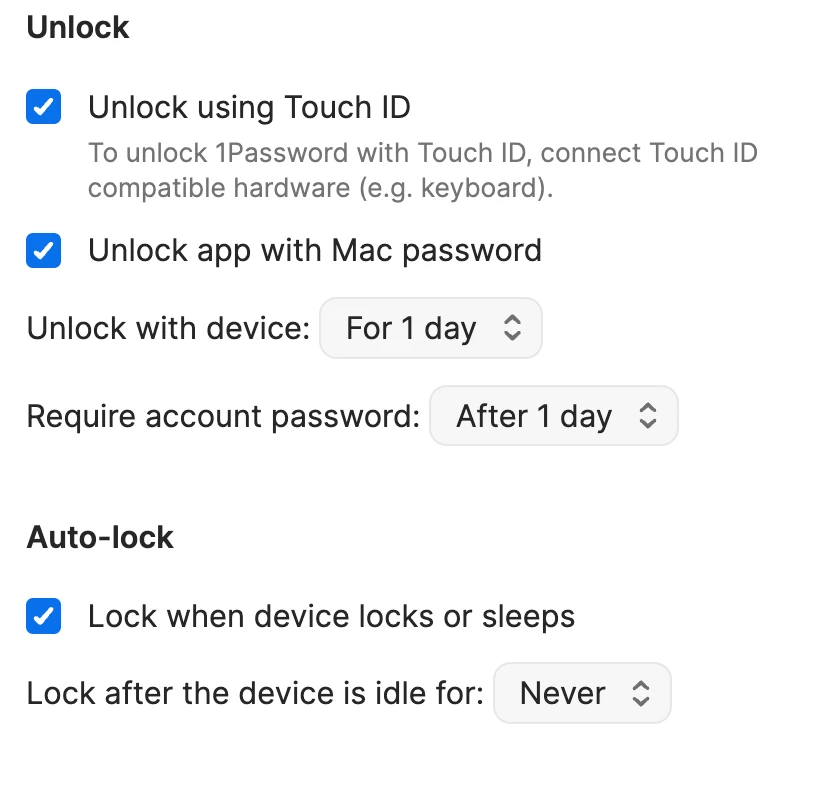
Here is a simple recipe for demonstrating what does not work as I expect.
- Begin with 1Password unlocked and in focus.
- Select Apple menu () → Lock Screen.
- Log in again into the Mac using the Mac password.
Result: the Mac logs back in with 1Password in focus and logged out. It says, “That didn’t work. Please try again.” Which, by the way, is what I always see on the lock screen. I don’t know if that is what is supposed to happen for everybody on the log out screen even before I try the password, or whether it is a clue that something somewhere is amiss.
Anyway, I would be glad if I can restore the behavior to need to type the master password once a day. In fact, the description of the “Balanced” preset says just that: “Unlock 1Password once a day, then it unlocks with your device.” It is unclear why choosing this preset sets “Unlock with device” from 1 day to 8 hours and “Require account password” from 1 day to 30 days. Regardless, even if I try applying that preset without editing it, including those settings that seem to conflict the description, and then retry the recipe above, I still get the same result.