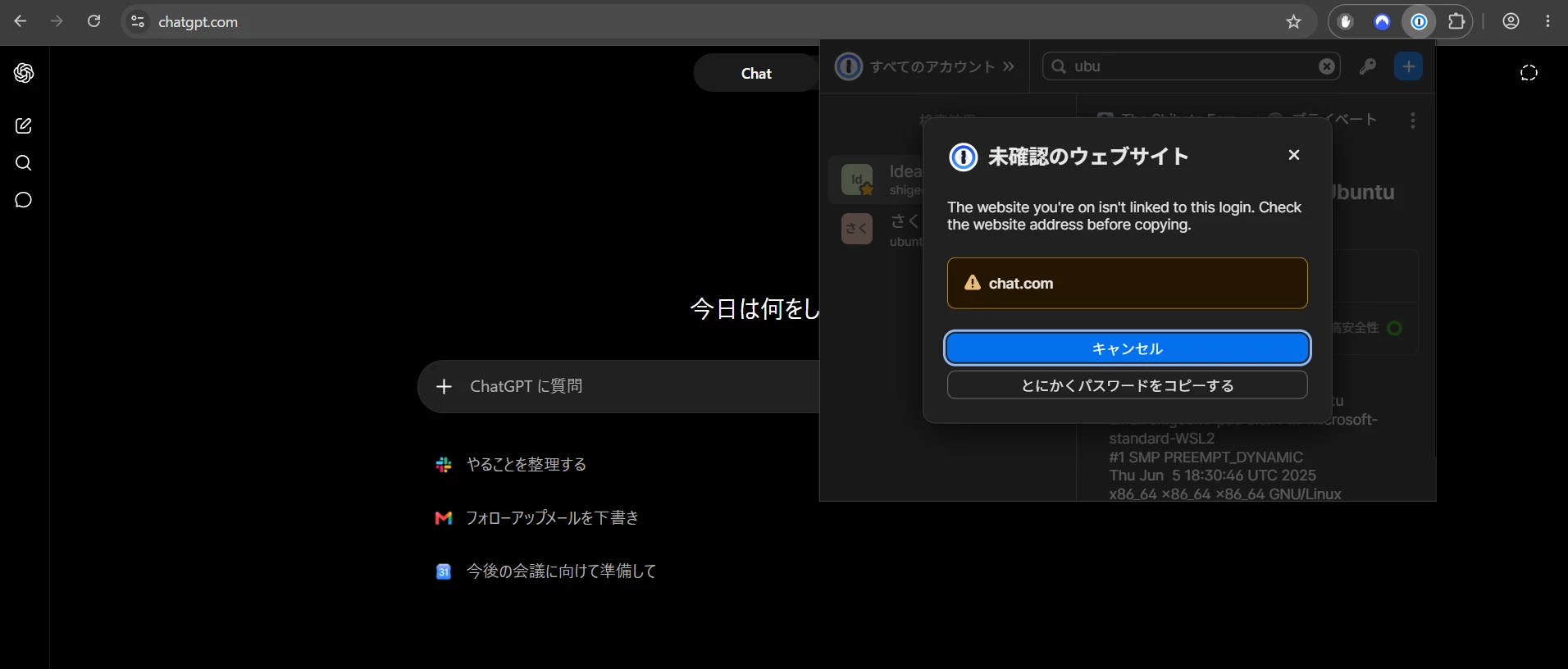
Unrecognized website warning shows chat.com while the current tab is chatgpt.com
Although the title describes the specific case in which I noticed this
behavior, my broader question is:
“How does 1Password choose the domain shown in the Unrecognized website
warning?”
When I am visiting https://chatgpt.com in Chrome and try to copy a
password from an unrelated Login item in the 1Password browser extension,
the “Unrecognized website” warning displays chat.com.
However, the browser address bar shows chatgpt.com.
At first, I thought that I might have been redirected to a phishing site
or that 1Password was detecting a different website from the one shown in
the browser. I was not previously aware that chat.com redirects to
chatgpt.com.
I therefore performed some additional tests.
OpenAI-related domains
----------------------
I opened each of the following domains and then copied a password from an
unrelated Login item:
- chat.com → the warning displays chat.com
- chatgpt.com → the warning displays chat.com
- openai.com → the warning displays chat.com
chat.com currently redirects to chatgpt.com. For example:
$ curl -I chat.com
HTTP/1.1 307 Temporary Redirect
Location: https://chatgpt.com/
I understand that chat.com, chatgpt.com, and openai.com are treated as
related domains for shared credentials.
Disney-related domains
----------------------
To determine whether this behavior was specific to ChatGPT or OpenAI, I
also tested a separate group of related domains:
- disney.com → the warning displays disney.com
- disneyplus.com → the warning displays disney.com
- espn.com → the warning displays disney.com
- hulu.com → the warning displays disney.com
The behavior therefore appears to be consistent across at least two
different related-site groups.
It seems possible that 1Password first resolves the current hostname to a
shared-credentials or related-site group, and then displays one
representative domain for that group instead of the exact hostname of the
current browser tab.
In these examples, the displayed domain is also the first domain in the
corresponding shared-credentials group. However, this is only an
observation, and I do not know whether the first entry is intentionally
used as a canonical domain or whether 1Password applies some other rule.
Questions
---------
Could you clarify the following?
1. Is the domain shown in the “Unrecognized website” warning intended to
be the exact hostname of the current browser tab?
2. If not, is it a representative or canonical domain for a
shared-credentials or related-site group?
3. How is that representative domain selected?
4. Is the first domain in the shared-credentials group used, or does
1Password maintain its own canonical-domain information?
5. Is the behavior described above expected, or is the warning displaying
an internal group identifier that was not intended to be shown to the
user?
Concern about the warning UI
----------------------------
I understand why 1Password needs to recognize that multiple domains may
belong to the same service and may legitimately share credentials. That
seems useful for autofill and credential matching.
However, I am not sure that replacing the actual current hostname with a
representative related domain is a good approach in a security warning.
In my case, the browser showed chatgpt.com while the warning showed
chat.com. Because I did not know that chat.com redirects to chatgpt.com,
I genuinely wondered whether I had been using a phishing site.
I suspect that this could be particularly confusing for
security-conscious users, including many 1Password users, who are likely
to compare the domain shown in the warning with the domain shown in the
browser address bar.
A security warning should ideally help the user verify the exact website
that will receive or is associated with the copied credential. If the
warning displays a different domain without explaining why, the user
cannot easily distinguish among several possibilities:
- the browser has been redirected;
- 1Password is referring to another tab;
- 1Password has incorrectly detected the current site;
- the site is part of a legitimate related-domain group; or
- a phishing or other security problem may be occurring.
Would it be possible for the warning to display the exact hostname of the
current tab as the primary value?
For example:
Current website:
chatgpt.com
If information about related domains is relevant, it could be displayed
separately, such as:
Related credential group:
chat.com, chatgpt.com, openai.com
This would preserve the related-site logic while allowing the user to
compare the warning directly with the browser address bar.
I am posting this not only to determine whether the current behavior is
intentional, but also because the present UI caused genuine confusion in
a security-sensitive situation. Even if the underlying domain matching is
working correctly, displaying a different hostname as though it were the
current website may reduce confidence in the warning and could eventually
cause users to disregard warnings that appear inconsistent.
Environment
-----------
- Browser: Google Chrome 150.0.7871.187
- 1Password browser extension version: 8.12.28.25
- 1Password desktop application version: 8.12.28
- Operating system: Windows 11 Home 25H2 26200.8894
I have attached a screenshot showing the browser address bar and the
different domain displayed in the warning.(Sorry I use Japanese version of Plugin)