September 22, 2026

User verification when signing in with a passkey

  • September 22, 2026
  • 7 replies
  • 45 views

Hi, something appears to have changed in the 1Password Chrome extension (macOS).

Passkeys used to be fillable without being prompted for biometrics. As I use my laptop with the lid closed, I have to enter my macOS account password now each time I want to use a Passkey, which is… really annoying.

It doesn’t matter if 1Password is locked, unlocked, there’s no cooldown on this, it prompts _every_ time and I cannot find a setting to correct this.

This seems to be a regression. I’d love it if someone has a fix.

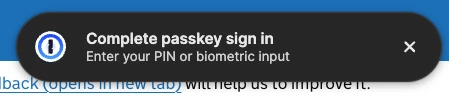
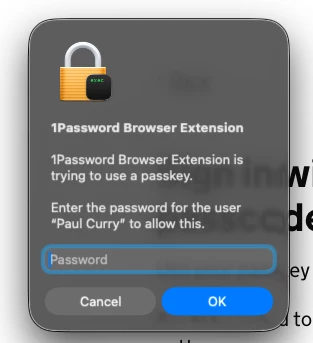
Screenshots of the problem below.

Strings for search: “1Password Browser Extension is trying to use a passkey”, “Complete passkey sign in”, “Enter your PIN or biometric input”.

This did not happen before. This is new behaviour and is detrimental.
 

Pinned Reply By 1P_Dave

Hello ​@cr3! 👋

Thanks for reaching out! Whenever you visit a protected site, 1Password now checks the authentication level requested by the site and prompts you for additional verification when needed. This helps ensure that passkeys grant the right access to the right person every time.

Whether additional user verification is required is determined by the website that you’re signing into and not 1Password. 1Password just respects the authentication level that is enforced by the website in question.

-Dave

7 replies

1P_Dave
1Password Employee
1P_DavePinned
1Password Employee
September 22, 2026

Hello ​@cr3! 👋

Thanks for reaching out! Whenever you visit a protected site, 1Password now checks the authentication level requested by the site and prompts you for additional verification when needed. This helps ensure that passkeys grant the right access to the right person every time.

Whether additional user verification is required is determined by the website that you’re signing into and not 1Password. 1Password just respects the authentication level that is enforced by the website in question.

-Dave

cr3Author
September 22, 2026

Thanks for the answer, that is at least clear. It is not a desirable behaviour; this is making sign in more difficult for websites that can now request this. But, if there is no plan to offer configuration to go back to the previous behaviour, I guess we’re gonna have to live with it.

MattSuda
September 23, 2026

Passkeys previously worked great for a long time with 1 click in the browser, please add a setting so we can go back to 1 click login with passkeys.

For some people the extra passkey security is great, but I’ve already unlocked my Mac and 1Password, so I should be able to continue logging in with passkeys with 1 click. This is a major downgrade to the ease of use. So exhausting having to lift my hand away from keyboard and mouse to use the TouchID sensor on Mac. 1Password used to be about ease of use, but lately there’s been so many extra steps just to login now. It’s so annoying having to use TouchID or Mac password to login to every website.

Respecting the website wanting to verify passkeys has little impact on the user on an iPhone with the quick FaceID, however on a Mac it downgrades the ease of use.

Because of this, I along with other users will now just downgrade back to using username and passwords for all of our logins because of the ease of use with 1 click login.

1P_Dave
1Password Employee
1Password Employee
September 23, 2026

​@MattSuda 

This is us adopting the passkey user verification standard. It allows a website to request additional authentication when a passkey is used, and we now respect the level of verification the website requires. This helps websites confirm how a passkey was authenticated and ensures they can continue to support saving passkeys in 1Password.

-Dave

cr3Author
September 23, 2026

I would argue that if the current 1Password session has been biometrically authenticated once, it should not pop every time, even if the site requests it. 1Password can happily attest “yes, that’s the user”. We have various options to lock automatically lock 1Password to our own comfort.

From the spec, depending which you are citing, the intent of Passkey User Verification is “...to distinguish individual users”, which the 1Password session is already aware of and can attest to.

In essence, I disagree with 1P’s interpretation of the spec. It is surprisingly user unfriendly.

September 23, 2026

I agree with the “user unfriendly” part. I am using a password manager, so I don’t have to type in passwords all the time. The new behavior defeats this purpose.

Even more, if I need to (re)authenticate each time I want to use a passkey, but at the same time I can still use “classic” username/password/OTP authentication without doing so, I see some hard times ahead for the wide adoption of passkeys.

As the only user on my personal Mac, I want to have at least the choice to ignore the website’s “requirements”. Make it optional, maybe give corporate admins the ability to force the setting for corporate accounts.

September 28, 2026

This needs to be changed. Every time I sign in with a passkey on my Mac, I get two boxes. First Apple's box asks me to click Continue. Then a second box says the site "requires authentication for this passkey" and makes me type my Mac password. It does this in both Edge and Safari.

The ironic thing is that I sign in to the same site with the same passkey in 1Password on Windows and it doesn't ask for anything. Same product, but you don’t follow the site’s request in Windows?  On Mac the site asks for verification and I have to type my Mac password every time, after already clicking through Apple's box.

I'm already signed in to 1Password. That should be enough. If the vault is unlocked, the site should just get the passkey. Making me type my computer password every time is annoying, and it makes passkeys worse than a regular password with autofill.