
September 7, 2026

Username Auto-Suggestion Duplicates for New Credentials
  • September 7, 2026
  • 3 replies
  • 4 views

Hi all,

I was wondering if there’s a way to turn off the auto-suggestions when creating a new login?

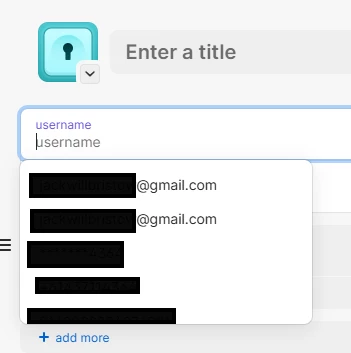
As you can see in the image this drop-down box for me often produces duplicates, like in the case of the Gmail address, which are identical.

From a security standpoint, I’m also not a fan of the app showing a plethora of username suggestions, with usernames I’ve already used in the past.

Thanks for your help.

3 replies

1P_Dave
1Password Employee
1Password Employee
September 22, 2026

Hello ​@jabri05! 👋

Thank you for reaching out! There isn’t currently an option to turn off username suggestions. These suggestions are based on usernames used in your other login items and are intended to save you from having to retype usernames you use regularly. There isn’t a security concern here because you must unlock 1Password, and the items containing those usernames, before the suggestions can be displayed.

Regarding the duplicate suggestions, is it possible that the capitalization differs between them? For example, one username may be capitalized differently in different login items which would cause both versions to be suggested. Let me know if that explains the duplicates.

-Dave

jabri05Author
September 22, 2026

Hi Dave,

No. The username suggestions I get are definitely identical in terms of capitalization. In the past week I’ve noticed three identical suggestions for the same email address. Even if turning off this feature doesn’t come to fruition I would appreciate the ability to remove username suggestions that I may not use anymore, like old email addresses or aliases.

Thanks,

Jabri


1P_Dave
1Password Employee
1Password Employee
September 23, 2026

​@jabri05 

Thank you for the reply. I recommend sending an email to support@1Password.com so that our support team can look into these duplicate suggestions further. If you can, please include a screenshot of the suggestions themselves. After emailing in, you'll receive an automated reply with a Support ID. Post that here, and I'll be able to locate your message and make sure it's gotten to the right place. 

-Dave