
Joelc
August 25, 2026
Question

What Is teh Fix When Passkey Login Asks To Scan QR Code

  • August 25, 2026
  • 3 replies
  • 6 views

I am trying to login to my Amazon account (as an example) using a Passkey which results in Amazon asking me to scan a QR code as noted below:
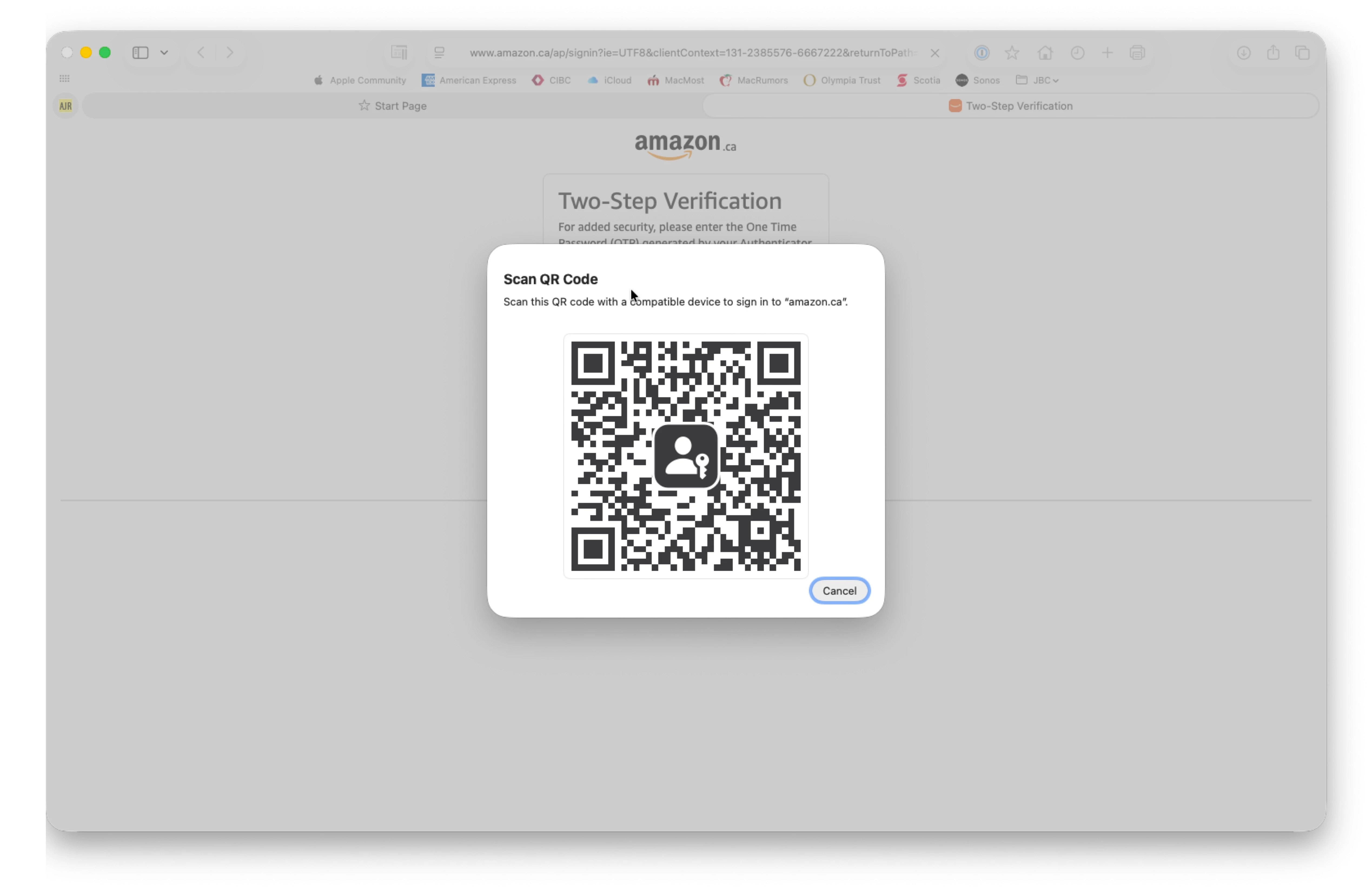


I can't scan the QR code because the browser extension is greyed out.

What is the fix and why is this happening?


Much thanks.

3 replies

1P_Dave
1Password Employee
1Password Employee
August 27, 2026

Hello ​@Joelc! 👋

I’m sorry that you’re running into issues signing into Amazon. It looks like the screen behind the QR code is prompting you for your second factor rather than for your passkey. Can you try signing in again with these steps: 

  1. Open 1Password and make sure that you see a passkey saved in your Login item for Amazon.ca.
  2. Open Safari.
  3. Go to: amazon.ca
  4. Click Hello, sign in in the top right corner of the website, then click Sign In.
  5. Fill your email address into the field and click Continue
  6. On the next screen, wait a moment and you should see a prompt asking you to sign in to amazon using your saved passkey. Follow the prompts to sign in. Don’t fill your password. 

Let me know if this works. If it doesn’t then which step doesn’t work and what do you see on your screen at that point? 

-Dave

Joelc
JoelcAuthor
August 27, 2026

Appreciate the response:


I tried your above steps and note that 1P “Sign in with passkey” appears in the top right before I enter my e-mail address.  If I click on it nothing happens.


If I enter my e-mail address then:

  1. The “Sign in with passkey” disappears and does not appear again.
  2. The “scan QR code” per the OP appears.

I will note that:

  1. I have both a Passkey and OTP set for the account. Is it possible that the are nt playing nicely together?
  2. I setup the OTP because the Passkey does not work -- hence the OP -- but the OTP.


If you need any additional information, please let me know.  Would love to get this fixed.


Joelc
JoelcAuthor
August 27, 2026

@1P_Dave 

Apologies, I used your name in the above posting rather than your username so perhaps you did not see my response.  Hence this added posting.