

September 24, 2021
Question

Where is the TOTP QR Code reader?

  • September 24, 2021
  • 4 replies
  • 145 views

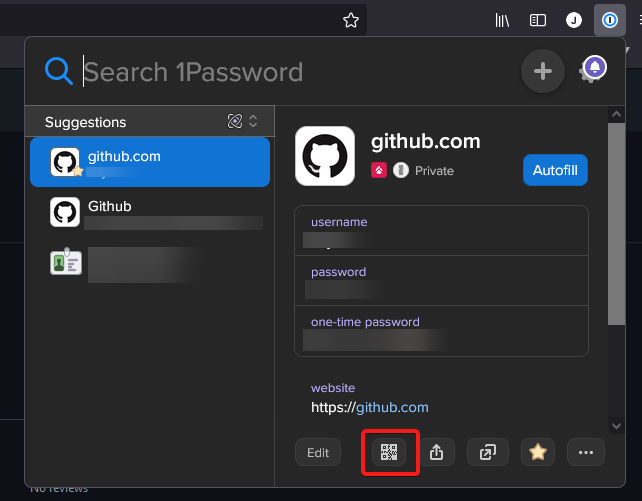
I have recently updated to the new 1Password browser extension and it seems that, in the new UI, the button to scan a TOTP QR code has been removed!

Is this button somewhere that I'm not looking or has it been completely removed?

This will likely become an issue for sites that don't give you an option to have a code instead of a QR as this option has also been removed from the app.

Old
New


1Password Version: 8.2.2
Extension Version: 2.1.0
OS Version: Windows 21H1 (19043.1237)

4 replies

September 24, 2021

It seems that the option only appears for specific websites, is this something that is only available on certain websites?

The menu for an item from this site is:

Jack_P_1P
1Password Employee
September 24, 2021

Hi @binaryoverload:

Thanks for checking in with 1Password for the browser 2.1.0! I just tested what you were seeing, and the "Scan QR Code" option will only appear when you're on that specific site. Using your example, if you are on https://github.com, then you will have the option to scan the QR code for your Login items for https://github.com. If you're on https://example.com and search for "GitHub" in 1Password in your browser, you won't have the option to scan a QR code.

I hope that clarifies any confusion about the changes you're seeing!

September 25, 2021

I just tested what you were seeing, and the "Scan QR Code" option will only appear when you're on that specific site.

Thank you for this update earlier TOTP was incorrectly captured for one of my accounts. I accidentally clicked on the wrong account for QR code capture!

1Password Employee
September 25, 2021

@prakharaug

On behalf of Jack, you are most welcome! Glad to hear they were able to steer you in the right direction. :smile: