


August 2026 at 1Password: Smarter sign ins, secure AI agents, and safer developer secrets
We’ve got a little catching up to do! Over the past two months, we’ve shipped a lot across 1Password, from smarter autofill and phishing protection to new ways to keep credentials out of the hands of AI agents. We also launched 1Password for Claude, expanded our developer security tools, and rolled out new improvements for 1Password Business admins.
Here’s what you may have missed across July and August:
Table of Contents
A summer of 1Password improvements
Over the past few months, we’ve rolled out more than a dozen improvements across saving and filling, security, migration, developer tools, and the day-to-day experience of using 1Password.
One of the biggest is a smarter approach to signing in. Universal Sign In, now in beta, can recognize the authentication method a site expects, including passwords, passkeys, social sign in, OIDC, and SAML for supported business accounts, and help get you signed in with fewer steps.

There are plenty of autofill improvements, too! 1Password can also now work as a native Credential Provider on macOS, while updates on iOS make it easier to generate and save passwords during account creation and help you spot when iOS AutoFill isn’t configured correctly.

We’ve also continued strengthening the security around those everyday interactions. Our updated phishing prevention experience checks sites against a growing list of more than 50,000 verified URLs, warning you before using credentials on an unrecognized site. And for 1Password Families, members who are removed from a family account are now guided through moving their private data to a standalone account rather than simply losing access to it.
That’s only scratching the surface. The roundup also covers improvements to importing passwords for businesses, unlock settings, MDM controls, Developer Watchtower, 1Password Environments, Safari performance, passkey verification, and more.
Read the full roundup of the latest 1Password product enhancements.
1Password for Claude
AI agents are increasingly able to do things on our behalf, but letting an agent take action shouldn’t mean handing it your passwords. That’s why we’ve launched 1Password for Claude, which lets Claude use credentials from 1Password to complete tasks in the browser without exposing the password or one-time code to Claude itself.
When Claude reaches a sign-in page, 1Password shows you which credential it’s requesting and asks for your approval. Once approved, 1Password fills the credential directly into the page. Claude knows that a sign in happened, but the underlying credential never enters the model or its memory.
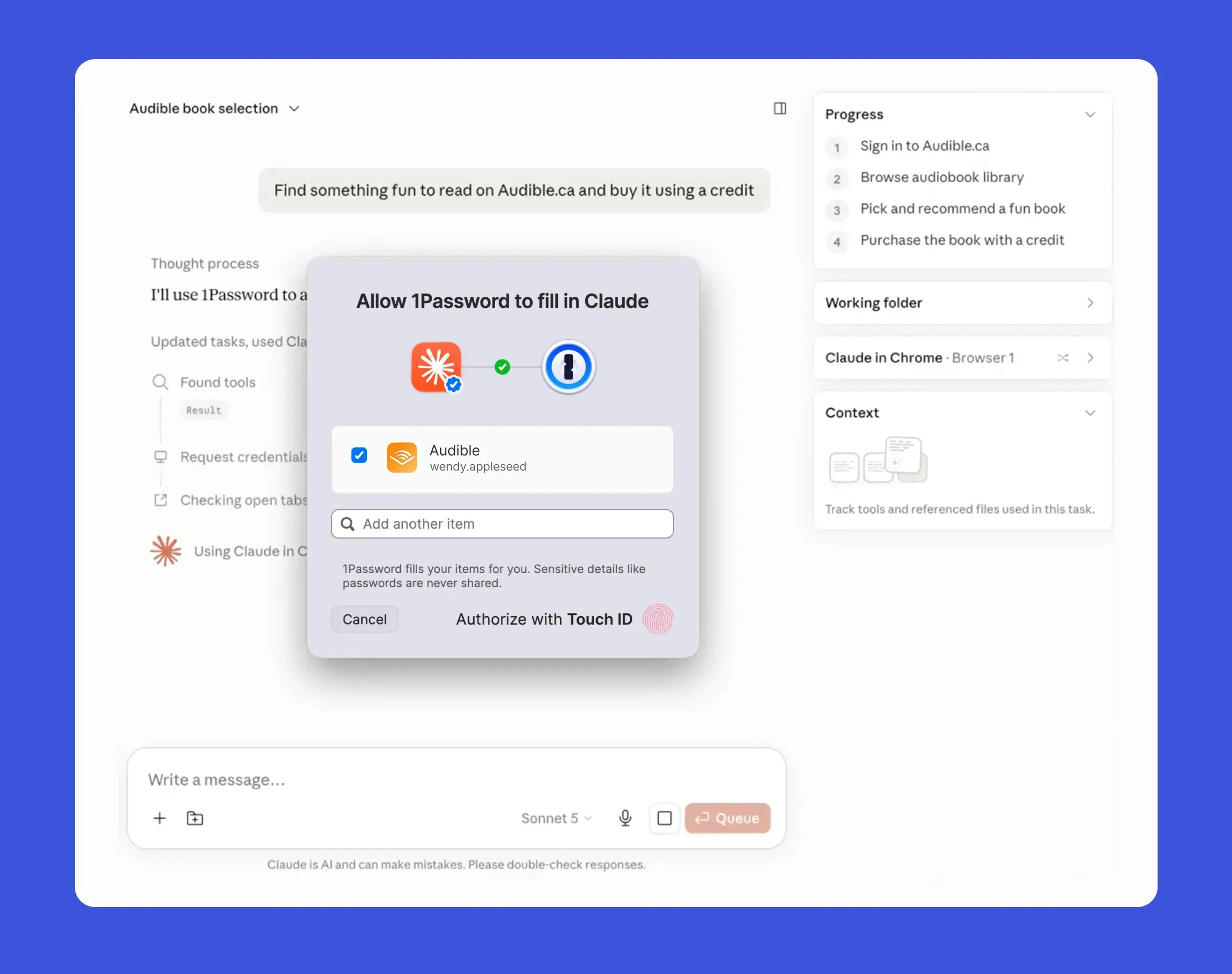
Agentic Mode in the 1Password browser extension is now available. When a compatible browser-based AI agent takes control, 1Password automatically locks down its interface and limits the agent to only the credentials explicitly approved for that task. The rest of your vault stays out of reach.
1Password for Claude is available on Mac for Individual, Families, and Business customers.
Read more about 1Password for Claude and secure agentic access.
Secure developer secrets with 1Password
Developer credentials have a habit of ending up wherever they’re easiest to use: .env files, SSH key directories, scripts, repositories, and other places that can leave secrets sitting in plaintext.
In July, we expanded 1Password Environments and Developer Watchtower to make it easier to find those credentials and move them somewhere safer without disrupting the workflows developers already use.
Developer Watchtower can now identify plaintext .env files alongside SSH keys on local devices and guide developers through moving those secrets into 1Password. For Business customers, admins also get a Local disk exposure report to help identify where unprotected developer credentials exist across their organization.
1Password Environments provides the other half of that workflow. Developers can store API keys, access tokens, database passwords, cloud credentials, and other environment variables in 1Password and make them available to applications at runtime without leaving plaintext values on disk.
We also brought the 1Password Environments MCP Server to Cursor Marketplace, making it easier for developers using Cursor to build with credentials managed by 1Password while keeping secret values outside the AI model’s context.
Learn more about securing developer secrets with 1Password.
What’s new for 1Password EPM admins
August brought several updates designed to reduce manual work for 1Password Business admins.
- Entra ID Secret Expiration helps prevent an expired SSO client secret from unexpectedly locking an organization out of 1Password. Admins can record the expiration date and receive reminders as it approaches, then use a guided flow to rotate the secret and reset the countdown.
- Multi-Tenancy and Automated Provisioning can now work together, allowing enterprises with parent and child 1Password accounts to automate provisioning across their setup.
- Vault Migrations make it easier for multi-tenant organizations to get child accounts up and running.. Instead of manually recreating shared vaults in a child account, admins can copy a vault from a parent account into one or more child accounts. Each copy is re-encrypted for its destination account, with access reset so permissions can be assigned deliberately.
- Automated Provisioning is also now available for managed service providers, allowing you to connect an identity provider to managed company instances without deploying or maintaining separate provisioning infrastructure
Read more about what’s new for 1Password EPM admins.
Building safer access for AI agents
As AI agents gain the ability to act across browsers, repositories, terminals, infrastructure, and other systems, how do we give them enough access to be useful without giving them standing access to everything?
We explored that question from several angles over the past two months.
Our agent identity series continued with a reference architecture for locally running AI agents acting on behalf of a person. The goal is scoped, short-lived, auditable authority without putting a long-lived agent credential on disk.
Nancy Wang also introduced the idea of verified loops, where agents operate under job-specific identities and have to produce trusted evidence before earning permission to take a consequential action. It creates deterministic boundaries around what an otherwise probabilistic system is allowed to do.
And in August, we joined OpenAI and other organizations in calling for collective action on cyber defense as AI capabilities continue to advance. A major part of that work is moving away from broad, standing access toward credentials and permissions tied to a specific identity, task, and period of time.
Read more about our work on agent identity, verified loops, and collective cyber defense.
Managing the growing cost of AI
Security isn’t the only challenge organizations are running into as AI adoption grows. Someone also has to pay the bill.
Consumption-based AI pricing is moving faster than many of the processes companies use to manage it, creating new challenges for Finance, IT, and the teams that actually use these tools.
Our CFO, Greg Henry, shared how an AI vendor bill arrived at five times the value of the original contract and exposed a visibility gap between Finance, IT, and the people actually using AI tools. Jason Meller ,VP Product, took a slightly different approach to the same problem with the “AI spend hangover”: organizations can’t measure the value of AI simply by looking at how many tokens people consume.
Our IT team offered another perspective from what we’ve learned from trying to govern AI use internally. With AI Spend and Consumption Management in 1Password SaaS Manager, teams can get a shared view of usage and spend across vendors, users, teams, and models rather than piecing together information from separate dashboards after the money has already been spent.
The common thread is visibility. Before organizations can govern AI effectively, they need to understand what’s being used, who’s using it, and what they’re getting in return.
Read more about managing AI costs, the AI spend hangover, and building visibility into AI usage.
How we’re building with AI at 1Password
Some of that learning is happening inside 1Password, too. Over the past couple of months our teams have published a couple of deep dives into how teams inside 1Password are using AI and building the infrastructure and context needed to make AI useful.
Our data team rebuilt 1Password’s internal data platform around a shared, open foundation using Apache Iceberg, Snowflake, and Databricks with the goal of making trusted data available across engineering, analytics, business workflows, and AI systems without every new use case requiring another bespoke pipeline or copy of the data.
Meanwhile, the team behind SAGE (our Security Analysis Guidance Engine) explained how they’re giving AI-assisted code reviews more context about the codebase while accounting for the inherent nondeterminism of language models.
And our detection engineering team shared something surprisingly similar: good AI output starts with good context. Their advice for getting started is less about finding the perfect model and more about documenting the environment well enough that both humans and agents understand the systems, logs, tools, and security boundaries they’re working with.
Read more about how we built the data platform 1Password needed, how SAGE is evolving, and what we’ve learned from AI-assisted detection engineering.
Random but Memorable
This time around, the team puts some common cybersecurity assumptions to the test, digs into the risks of standing access, and explores what businesses need to know as prompt injection becomes a very real security problem for AI agents.
- Fact or Fiction: Cybersecurity Edition | Bonus Episode
- Why “always-on” access is a hidden security risk with Rom Carmel
- What every business needs to know about prompt injection attacks with Johann Rehberger
Listen to Random but Memorable wherever you get your podcasts.
Chasing Entropy
Dave Lewis sat down with Keith Hoodlet, Director of Security Research at 1Password and leader of Off-by-1 Labs, to talk about building a career in security, critical thinking in the age of AI, and why there should be “no robots in the gym” for the skills you actually want to develop.
Keith’s advice is pretty simple: if there’s a skill you genuinely want to develop, don’t outsource the practice to AI. The conversation gets into his unconventional path into security, the value of reading and writing in an AI-heavy world, and why actually doing things still matters when you’re trying to build a career.
Listen to Chasing Entropy on Apple Podcasts.
Zero Shot Learning
Zero Shot Learning continued with four conversations about what it actually takes to build, deploy, and trust increasingly capable AI agents:
- Episode 5: Mercor co-founder and co-CEO Adarsh Hiremath addresses the AI onboarding problem
- Episode 6: Temporal co-founder and CTO Maxim Fateev uncovers the distributed systems hiding behind AI agents
- Episode 7: Cognition President of New Enterprise Jeff Wang envisions a future where AI agents prove their own work
- Episode 8: OpenAI Codex product leader Rohan Varma is redefining what it means to be a developer
Across the latest four episodes, Nancy Wang and her guests get into the infrastructure behind reliable agents, why evals and company-specific context matter, how agents can prove they actually completed a task, and what happens to software development when agents increasingly own the implementation work.
Catch up on Zero Shot Learning podcast.
Release note highlights
Browser extension
- You can now use 1Password for Claude to let Claude sign in to websites on your behalf without sharing your login or one-time code with Claude.
- 1Password for Claude can now sign in with logins set up to use supported sign-in providers.
- If you try to paste your Secret Key into a website, 1Password now blocks the paste and opens the extension to help protect your account.
- Phishing warning settings have moved to Settings > Security & privacy > Phishing prevention, with a separate setting for the popup phishing warning.
- On verified low-risk sites, the phishing prevention prompt now highlights Add website and autofill as the primary action.
- You can now put double quotes around a search query to look up an exact phrase, including special characters like dots and dashes.
- We’ve fixed a number of autofill and automatic sign-in issues across websites, including one-time password filling and sites with multiple sign-in methods.
Mac, Windows, and Linux
- [Mac] You can now use 1Password as a macOS AutoFill provider to natively fill and save credentials in Safari and other apps.
- [Mac] You can now use 1Password for Claude to let Claude sign in to websites on your behalf without sharing your credentials with Claude.
- [Mac] You can now run a local MCP server from the Developer tab, allowing AI assistants to access 1Password Developer tools.
- [Mac] Developer Watchtower now highlights scanning for plaintext secrets, including .env files and SSH keys.
- [Mac] 1Password now suggests and fills logins through Universal Autofill for native HTTP authentication prompts in your browser.
- [Linux] Auto-lock now works in KDE Plasma on Wayland and other Wayland environments that support the ext_idle_notifier_v1 protocol.
- [Mac, Windows, and Linux] You can now use 1Password.com to add your account to the 1Password app without re-entering your password, Secret Key, or an SSO verification code.
iOS and Android
- [iOS] You can now generate a password through AutoFill without unlocking 1Password first.
- [Android] 1Password now offers to save your login when a site asks for your username and password on separate screens.
- [iOS] We’ve updated several buttons throughout the app to use the iOS 26 Liquid Glass style.
- [iOS] We’ve fixed an issue where AutoFill could fill an outdated password.
- [Android] We’ve fixed an issue where autofilling an item could fail if 1Password locked just before filling.
- [iOS and Android] We’ve made a number of improvements to account switching, imports, biometric unlock, and overall app performance.
1Password CLI
- Debug output now includes per-request timing and more information when a vault can’t be read.
- Reporting item usage for cached items no longer delays reading secrets. Usage data is now sent in the background.
- Vault lookups that fail on the server are now correctly reported as errors.
- Connection error messages no longer include the full request URL, which could contain the account’s email address