

1Password Employee
Aug 11, 2026 7:24 PM UTC

macOS AutoFill is now available to everyone!

Hey everyone!

Native macOS AutoFill is now generally available in 1Password for Mac. This has been one of the most requested features for years, and it's now ready for everyone on the stable channel.
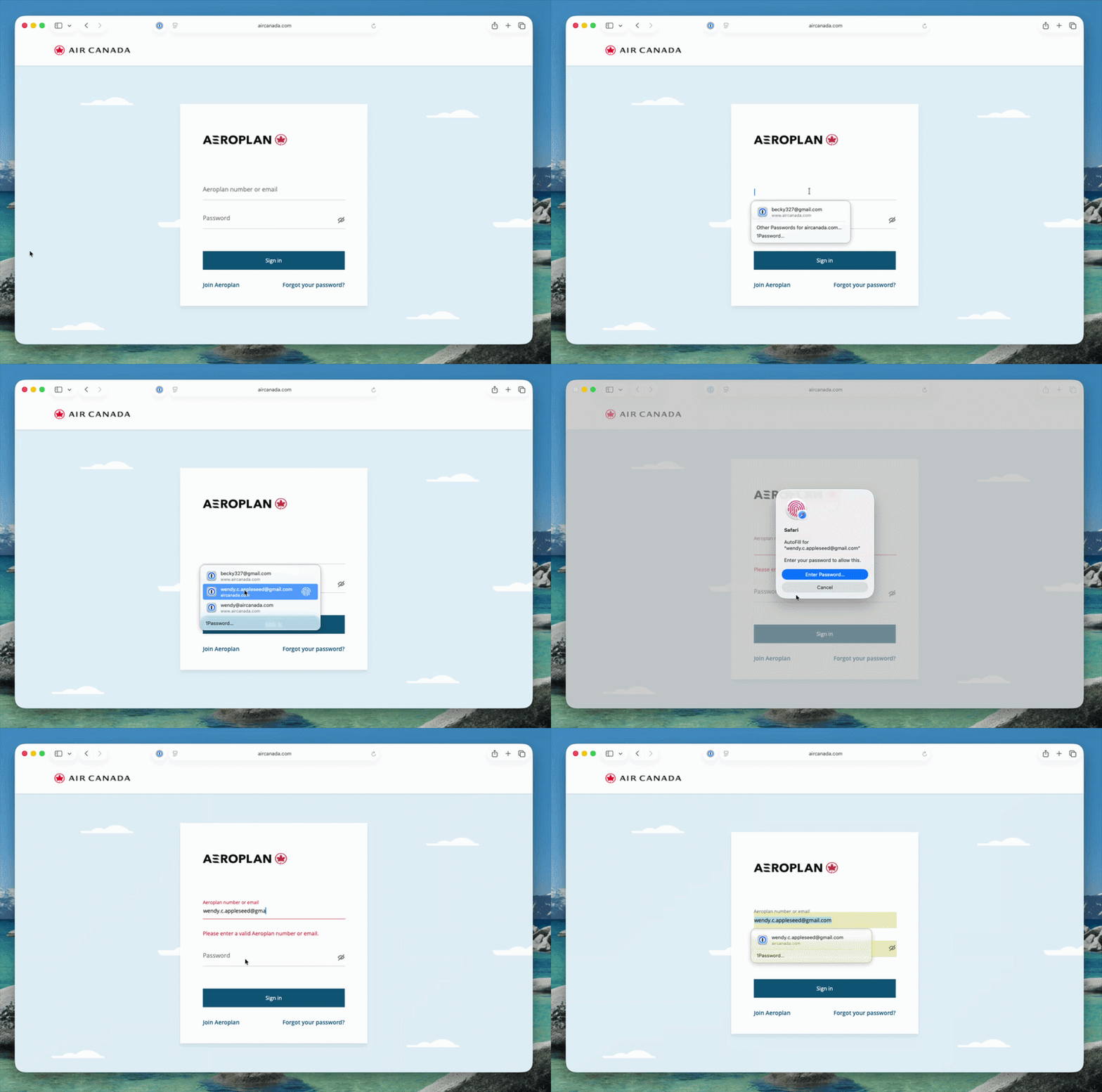


Here's what macOS AutoFill gives you:

  • By adopting Apple's Passwords API, 1Password functions as a native Credential Provider on macOS for logins. You can view autofill suggestions directly within Safari and other supported desktop apps.
  • Passkey support is built in. Fill, create, and update passkeys easily through macOS AutoFill.
  • The 1Password Safari extension works alongside macOS AutoFill. Login suggestions appear in Safari's native menu, and the extension continues to fill credit cards, addresses, and other items the Passwords API doesn't support yet.
  • One-time code support through the same integration is on the way and will land in an upcoming release.

How to turn it on:

  • Update to 1Password for macOS 8.12.32 or later.
  • Go to 1Password for Mac Settings > Autofill > Set up macOS AutoFill, then select "Turn On" from the macOS permission prompt. You'll see "Active" status once it's enabled.

Full setup and troubleshooting details are in our support article.

To everyone who tried the beta over the past few months: thank you! Your feedback directly shaped this release. Try filling logins and passkeys and let us know how it goes in the comments!

147 replies

Oct 3, 2026 3:23 PM UTC

Can anyone definitely confirm that Autofill is working correctly for macOS Golden Gate 27.0.1?

Also, is there a guide somewhere that explains in simple terms how it’s supposed to work ideally? I’ve not gotten it to work yet in any way that makes sense to me. I’m for anything that simplifies my online experience but, so far, for me anyway Autofill seems problematic in comparison to just using the Safari Extension.

I’m a longtime 1Password client, but so far I’m having trouble with Autofill for some reason. 

1P_Dave
1Password Employee
1Password Employee
Oct 5, 2026 2:31 PM UTC

Hello! I’ve replied to your email. Please continue the conversation there so we can keep everything in one place.

-Dave

Oct 6, 2026 1:46 PM UTC

No problem. FYI, I’ve given up on Autofill, and I just don’t have any more time to explore it. I’m sticking with the Safari Extension. I do, however, appreciate your efforts to help me. 

Oct 16, 2026 6:15 PM UTC

So I have Universal Sign In feature turned off in the Safari extension because I’m trying to really kick the tires on the macOS Autofill functionality. This is what I get when attempting to login to MS Dynamics 365 using a passkey stored in 1PW:


  1. Click my Microsoft SSO account.
  2. Microsoft SSO recognizes I have a passkey setup. Click Next.
  3. macOS Autofill prompts me to use my passkey stored in 1PW. Great! Click Continue.
  4. Now I’m sent back to the same screen as step 2. WTH! Click Next.
  5. The 1PW Passkey login appears. It looks like the new Universal Sign In feature but I’m told it’s different. Ok fine. Click Use passkey.
  6. Finally I get the Touch ID prompt. After which I’m successfully logged into D365 using my passkey. 

This entire process is … “sub-optimal”. Why did I not get the Touch ID prompt after step 3? It’s like I was sent through the process with the old UI flow … then after step 3 I was sent through the process again with the new UI flow. This is the kind of friction with trying to use passkeys in 1PW that makes end users want to turn it off altogether.  Screenshots attached for the steps I referenced above.


1P_Dave
1Password Employee
1Password Employee
Oct 28, 2026 7:50 PM UTC

​@OAW 

I’m sorry for the delay in replying, that definitely doesn’t look like the correct flow. If you temporarily disable the 1Password for Safari browser extension entirely, then are you able to sign in using your passkey when only using native AutoFill? 

-Dave

1P_Dave
1Password Employee
1Password Employee
Nov 9, 2026 8:45 PM UTC

@OAW 

It’s possible that an improvement in the nightly version helped with the issue that you were seeing. If you see the issue again then please send in a diagnostics report and the team can investigate further. 

-Dave