Protect what matters – even after you're gone. Make a plan for your digital legacy today.
Forum Discussion

btrombley
5 months agoNew Contributor
After login, first item isn't selected
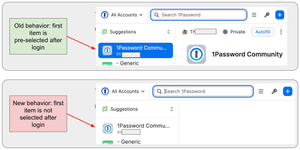
In the past, after using my fingerprint to login, the first item in 1Password's list of available options would be pre-selected. This was great: I could hit <Return> and it would fill the form. That ...

btrombley
4 months agoNew Contributor
I'm seeing this behavior on two separate Macs: my personal one using v8 and my corporate-provided work one running v7.
Here's a video from my personal Mac (running v8) showing this when using the browser extension as well as trying from within the form field. Note that I relocked 1Password after using the browser extension to then show this in the form field. https://imgur.com/a/MWDeQUw

1P_Dave Moderator
3 months agoModeratorThanks for the reply. 1Password 7 is no longer supported or being updated, I recommend that you upgrade all devices to 1Password 8.
Thank you for sharing the video recording, I'm still seeing the first item in the list be selected when I open the pop-up in Chrome from the toolbar. Can you tell me which specific version of the 1Password browser extension you're using and which version of Chrome you're using: Check version information
And, once the pop-up from the toolbar is open, does the first item get selected if you press the down arrow on your keyboard?
-Dave
- btrombley3 months agoNew Contributor
It seems to inconsistenlty select the first item, I haven't figured out why it sometimes does or doesn't do this. In any case, you're right that I can use the keyboard arrow key to select it. That solves this well enough, thanks for the help!
- 1P_Dave3 months ago
I'm glad that the arrow key provides a usable workaround for now. I'll keep an eye out for further reports and continue to try to reproduce the issue on my end.
-Dave


