Protect what matters – even after you're gone. Make a plan for your digital legacy today.
Forum Discussion

Former Member
5 years agoHide on this page / disable for certain input fields
The password selection popup using the browser plugin (Chrome, Edge) is shown on many fields which in my opinion do not have to do with what is stored in the password manager. For example it shows wh...
Former Member
5 years agoHi @mathiasw!
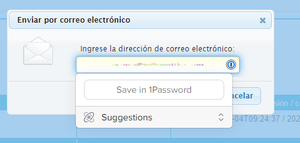
For example it shows when only an e-mail address input is required (see screenshot), or on address input fields like directions which are not stored in the password manager.
Are you able to share a URL to this page so we can test it?
Additionally when selecting "Suggestions -> Hide on this page" this seems to affect the current session, but when opening the page the next time, the popup shows again.
Indeed, this is currently the behavior :+1: But I will let the developers know that you would also like to have a more permanent setting for this.
ref: dev/projects/customer-feature-requests#832
Or it would be helpful to have the modal in a closed state and only when clicking on the round 1Password icon in the input field it opens.
You can go to the extension settings and unselect the option Show autofill menu on field focus if you prefer ;)


