Protect what matters – even after you're gone. Make a plan for your digital legacy today.
Forum Discussion

Anonymous
5 years agoHide on this page / disable for certain input fields
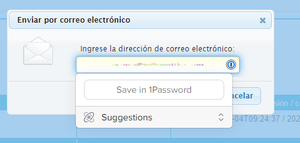
The password selection popup using the browser plugin (Chrome, Edge) is shown on many fields which in my opinion do not have to do with what is stored in the password manager. For example it shows wh...
Anonymous
5 years ago@mathiasw:
But you can have a look at this page, which is a generic registration form example. 1Password shows in all address fields.
I see what you mean now: this is the expected behavior at the moment. Even if you don't have Identity items in 1Password, the 1Password extension still lets you know that it is able to fill address items on those forms. I don't believe there is a way to tell 1Password not to show up at all for a specific category of items at the moment.
Regarding the settings: where do I find this setting? On my settings page (Edge and Chrome) I do not see the setting you mentioned.
Directly inside the 1Password extension's settings. If you open the browser extension, you can see the gear icon on the right:
And if you click on that and then on Settings, you can see the settings page with that option too:


