
Oct 19, 2026 9:34 AM UTC
Question

Browser autofill Issue: Azure VM page bastion

Hi,


Since a few weeks Microsoft has updated the page for connecting to VMs via the Bastion option. I now defaults to Authentication Type: "Microsoft Entra ID” but after selecting "VM Password” the 1password extension doesn't fill in the username + password. Even when clicking the extension in the username or password field. 


URL: No url unfortunately as it's not publicly available. 
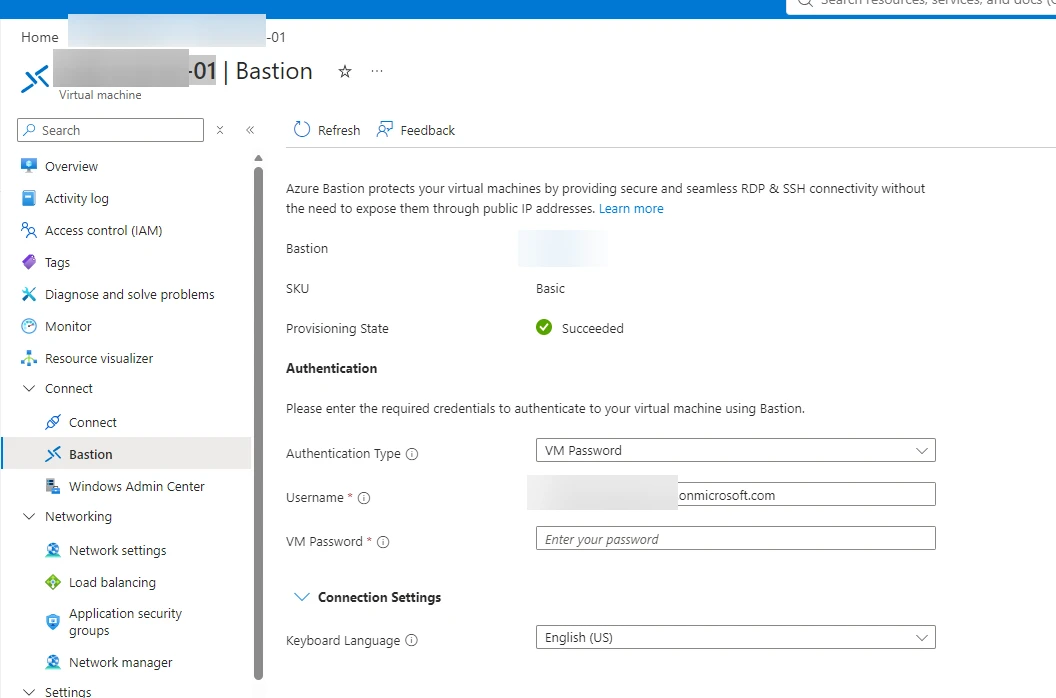
Azure page for connecting via Azure Bastion


Browser: MS Edge
Extension Version: 8.12.41.1
Desktop App version: 1Password for Windows 8.12.40 (81240031)

If needed I can provide screen recordings privately.  
Please let me know if you need more information


Thanks,

Rik


7 replies

Trevor_1P
1Password Employee
1Password Employee
Oct 20, 2026 4:09 PM UTC

Hi ​@Rik,

It certainly would be helpful to see the recordings. Could you send them over email to support@1Password.com?

Additionally, it would be helpful to grab the page structure as well:

  1. Right click the 1Password icon in your browser’s toolbar while on the page.
  2. Select Help > Collect Page Structure.

You can attach the JSON file to your email as well. With your email please include:

- A link to this thread: https://www.1password.community/1password-at-home-31/browser-autofill-issue-azure-vm-page-bastion-25853

- Your forum username: Rik

You should receive an automated reply from our BitBot assistant with a Support ID number.  Please post that number here.  Thank you!

Oct 20, 2026 5:13 PM UTC

We are having the same issue.  Microsoft changed their portal and now things are funky.

RikAuthor
Oct 21, 2026 3:45 PM UTC

Hi ​@Trevor_1P,

I sent the screencap and page structure to support@1Password.com ticket id: 848025

I now also tested with Firefox; same issue

I heard from colleagues that Keeper has a similar issue since the page changed. 


Trevor_1P
1Password Employee
1Password Employee
Oct 29, 2026 8:53 PM UTC

Hi ​@Rik,

Thank you for confirming that, and for sharing the workaround as well 😊.

RikAuthor
Oct 27, 2026 1:46 PM UTC

Hi ​@mscirri, 

I received a workaround for this from support:

  1. Edit the item
  2. Add this website address: https://sandbox-2.reactblade.portal.azure.net
  3. Save the item.
  4. Reload the page in your browser.

That worked for me 🙂

Oct 27, 2026 2:55 PM UTC

Did they tell you why that works?

RikAuthor
Oct 27, 2026 3:01 PM UTC

 Yes the page uses cross-origin iFrames. 


Hi Rik, 
 
I hope you're well.
 
I wanted to share a potential workaround. It looks like the page is using cross-origin iFrames. Could you try the following on your Azure log-in item in your 1Password vault: 

  1. Edit the item
  2. Add this website address: https://sandbox-2.reactblade.portal.azure.net
  3. Save the item.
  4. Reload the page in your browser.

 
Please let us know if the autofill still continues to fail.


Hi Rik,
 
Thank you for confirming the workaround works.
 
I've looked into this further and found that we have an existing feature request with our development team to improve how 1Password recognises and fills login forms embedded within websites, particularly when those forms are hosted on a different domain from the main website.
 
I've added your experience to the existing request to help our team better understand how this affects customers in practice.
 
While I don't have a timeframe for when we might see improvements, keeping both website addresses saved in your Login item remains the recommended workaround for now.
 
Please note we still have the defect open my colleague Ana created so we can address this for the Azure Bastion page.
 
Thanks,