September 3, 2026
Question

Disable Auto-Login-Popup

  • September 3, 2026
  • 5 replies
  • 10 views

Hi,

I have recently been getting the following pop-up in my browser (Chrome). It appears to be some kind of "auto-login". How can I disable it?
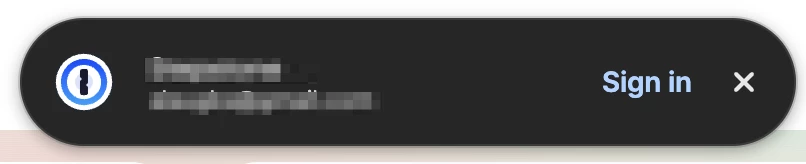



This topic has been closed for replies.

5 replies

September 3, 2026

I just came here trying to figure out how to turn this annoying thing off and found another article with the answer: https://www.1password.community/1password-at-work-58/feedback-universal-sign-in-a-new-autofill-experience-25394

September 5, 2026

I was able to turn this off as noted in the article above (it’s in the plugin settings area in the browser). Not sure why they put this annoying popup smack dab in the center of my screen - really misguided and abusive user interface. Shame on you, 1Password - I don’t need more popups obscuring my screen.

1P_Gem
1Password Employee
1Password Employee
September 4, 2026

Hi ​@HansWurst, thanks for posting!

To confirm, have you been able to disable this new autofill experience using the steps pinned in the post linked by ​@andyn3? (Thanks for the assist here!) 

If not, could you give this a try, and let me know whether it helps?

lysander
September 10, 2026

I have Universal Login set to OFF in Safari but it continues to pop-up when logging into Amazon.com when using a PASSKEY. Also shows up on other sites asking me to login when already logged in.

Using version 8.12.36

1P_Dave
1Password Employee
1Password Employee
September 10, 2026

Closing this thread as a duplicate of the existing thread: Feedback: Universal sign-in, a new Autofill Experience

-Dave