
dfibuch
August 27, 2026

Feedback: Universal sign-in, a new Autofill Experience

  • August 27, 2026
  • 166 replies
  • 423 views

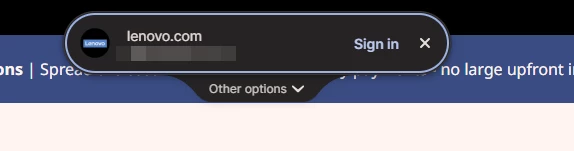
Noticed this morning this Sign in prompt when I go on a site that is stored in my 1P. Can’t find any info about it. Anyone got any ideas when it was released and do we have any control over it?



Pinned Reply By 1P_Dave

Hello folks! 

Thanks for all the feedback everyone has shared about 1Password’s new universal sign-in experience. 1Password now brings password, passkey, and other sign-in options into a single and convenient prompt for all of your logins. 

As we continue refining the new experience, based on feedback and reports from customers, the new experience has been temporarily turned off for 1Password Business users. If you use 1Password through your employer, you’ll see the classic experience for now. We plan to re-enable the new experience for business customers soon and will share updates as they become available.

If you use a personal 1Password account, and you’d like to use the classic experience too, you can follow these steps: 

  1. Right click the 1Password icon in your browser’s toolbar and select Settings.
  2. Choose Autofill & save from the side menu.
  3. Toggle off Use universal sign-in for logins.

-Dave

166 replies

August 27, 2026

Same here.

I can’t find a way to disable it. It guesses differently than the old one and I don’t want it.

ChrisC1P
1Password Employee
1Password Employee
August 27, 2026

Hi ​@dfibuch and ​@kurtzenter thanks for reaching out.

The prompt you’re seeing is 1Password’s new Universal sign-in experience. It brings password, passkey, and other sign-in options into a single prompt when 1Password detects a sign-in opportunity. You can learn more about it in our blog article: https://1password.com/blog/1password-product-enhancements-smarter-autofill-phishing-prevention

If you would rather not use the Universal sign-in, you can turn it off with the following steps:

  1. Right click the 1Password icon in your browser’s toolbar and select Settings.
  2. Choose Autofill & save from the side menu.
  3. Toggle off Use the new autofill experience for sign in.

Let me know if those steps don’t work for you or if you have any questions.

dfibuch
dfibuchAuthor
August 28, 2026

Thank you Chris. I actually like it, was just confused because there was nothing in the release notes about it (unless I missed it) and no screenshots showing it so got kind of worried if it was legitimate.

1P_Dave
1Password Employee
1Password Employee
August 28, 2026

@dfibuch 

I’m sorry that the new feature came as a surprise! We’re currently rolling it out to everyone over the next week and we plan to publish more documentation soon. You can find it mentioned in our new blog article, published yesterday: 1Password product enhancements: Smarter autofill, phishing prevention, and more

-Dave

August 27, 2026

I actually like this new feature but it's popped up on only one of my computers and not the other one. They are different types of Mac, but they're both running the same operating system (Tahoe 26.6.2) and they are both running the exact same software version of 1Password. Both the app. (1Password for Mac 8.12.34) and the same Safari extension. (8.12.34.34)

I'm just wondering why one computer has the option to choose this and one computer does not. 

August 29, 2026

Same for me - and a real shady step what 1PW is doing here… It does not give trust into it’s product if you’re doing it this way...

August 27, 2026

The new login experience seems like a step back.


1- on websites where the username is entered on the first page before you enter the password on a new page, it asks for the password/ touch ID fingerprint twice.  very annoying.  How can I go back to not having to enter the password within a certain window?  My desktop app is set for “balanced” for security. unlock for 8 hours.


2- when it does enter both username and password on a page, instead of logging in, it pops up to suggest more login/password suggestions!   this happens on https://www.bhphotovideo.com  even though sign in automatically is enabled.


One answer in another thread suggested you cna turn off the new user experience.  that option does not exist in Safari Version 26.5.2 (21624.2.5.11.8) on Tahoe 26.5.2 (25F84)


1P_Dave
1Password Employee
1Password Employee
September 1, 2026

@ekf 

I’m sorry that you’re running into issues with autofill in Safari. So that I can take a look, can you reply to this comment with a screenshot of the prompts that you’re seeing? 

-Dave

August 27, 2026

Anyone else having this issue? This new autofill experience is breaking the new passkey for Salesforce security requirements and I can’t disable this or disable the forward to login page redirect…Disabling the setting does nothing in Edge.

All my 1Passwords users are getting super frustrated with this latest extension release!

August 28, 2026

Yes same here. People at my company are losing it.

August 28, 2026

My issue is that the new “Sign in” popup (with the rounded corners) also keeps showing up on sites to which I am already successfully logged in. Like on Weebly. Annoying. Seems like a beta

August 28, 2026

I’ve had this issue too. setlist.fm does it for me a lot. And it’ll prompt me to “go to the login page” even if I’m already logged in.

lysander
August 28, 2026

The new Universal Single Login breaks the use of Passkeys on the Wells Fargo site. The Use Passkey option is  on the webpage but 1Password seems to makes it non-functional. If I turn OFF the new feature the webpage works as usual. 

Please look into this.

1P_Dave
1Password Employee
1Password Employee
September 2, 2026

@lysander 

I’m sorry that passkeys aren’t working with Universal sign in on Wells Fargo. So that we can investigate this further, I'd like to ask you to reproduce the issue again and then create and share a 1Password diagnostics report from 1Password in your browser:

Send a diagnostics report (browser extension)

Attach the diagnostics to an email message addressed to support@1password.com

With your email please include:

You should receive an automated reply with a Support ID number.  Please post that number here.  Thanks very much!

-Dave

August 28, 2026

I’m on the iOS 27 beta, and while the beta had significantly improved or eliminated the problem of iOS prompting to resave credentials that 1password just entered, this new login flow usually triggers that behavior again.

1P_Dave
1Password Employee
1Password Employee
September 1, 2026

@bkrodgers 

Thanks again for helping us to test the iOS 27 beta, I’ve passed your report along to our development team. 

-Dave

August 28, 2026

After updating, 1Password now shows a large floating prompt at the very top of my Chrome window when it detects a sign-in field.

It is so far away from the field I’m using that interacting with it feels extremely unintuitive. The old field-level prompt made sense because it appeared where I was already working. This new placement feels disconnected from the login form, and I want to remove it. I compared this to a colleague who has the same version of 1Pass Ext + Google Chrome and on both we’re sharing versions but they did not have this so I’m not 100% sure where this is coming from but it is not a good design.

Is there a setting to disable this floating prompt or restore the previous field-level behavior?

Environment:

  • 1Password extension: 8.12.34.34

  • Chrome: 152.0.7977.65, Official Build, arm64

  • macOS

I’ve attached a screenshot showing the placement on an Okta sign-in page.


lysander
August 29, 2026

Yes, turn it off in the browser extension settings:


September 8, 2026

Does not work on macOS 26.7 and Vivaldi Browser. Despite disabling the new autofill the overlay is interfering on every website I’ve an login for but don’t want to login.

August 29, 2026

I wish I could disable. For some reason only some people see that checkbox despite being on the same version. Makes no sense.

1P_Dave
1Password Employee
1Password Employee
September 2, 2026

@dexmot74 

I’m sorry that you’re running into issues. If the steps in the pinned post didn’t help them please send an email to support@1Password.com along with your community username and a link to this thread and our support team can look into your situation further and help get things working. 

After emailing in, you'll receive an automated reply with a Support ID. Post that here, and I'll be able to locate your message and make sure it's gotten to the right place. 

-Dave