

July 22, 2026
Solved

Long browser address hides the Remove button in "Connect to additional browsers"

  • July 22, 2026
  • 1 reply
  • 7 views

Adding a browser with a very long address in Settings - Connect to additional browsers causes the address to overlap the Remove button, making it hard to Remove

Steps to reproduce 
1. Open Settings. 
2. Go to Connect to additional browsers. 
3. Add a browser using an long address. 
4. Try remove that browser.
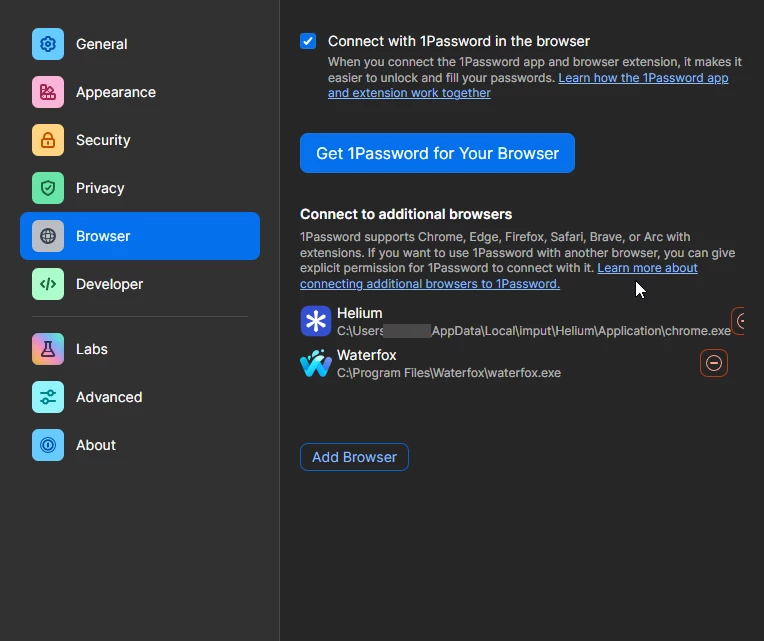
Environment
- Windows 10
- 1920 × 1080
- Display scaling: 100%

Screenshot attached.

Best answer by 1P_Gem

Hi ​@xuxian, thanks for taking the time to report this!

I’ve done some testing on my end and I can confirm that I’m seeing the same thing.

I’ve filed a bug report with our developers, including all of the details you’ve provided here and all of the details from my own testing. In the meantime, you can use Ctrl + - to zoom out enough to reveal the button.

If you have any further questions or concerns, let me know!

Just a quick edit to add that it looks as if you had posted this twice, so I’ve gone ahead and removed your other post to avoid duplication of efforts by the team - thanks!

1 reply

1P_Gem
1P_GemAnswer
1Password Employee
July 22, 2026

Hi ​@xuxian, thanks for taking the time to report this!

I’ve done some testing on my end and I can confirm that I’m seeing the same thing.

I’ve filed a bug report with our developers, including all of the details you’ve provided here and all of the details from my own testing. In the meantime, you can use Ctrl + - to zoom out enough to reveal the button.

If you have any further questions or concerns, let me know!

Just a quick edit to add that it looks as if you had posted this twice, so I’ve gone ahead and removed your other post to avoid duplication of efforts by the team - thanks!