July 5, 2026
Question

Unecessary (annoying) prompt to save/update login - selected web pages only

  • July 5, 2026
  • 5 replies
  • 22 views

In the past few weeks, I have been observing a strange behavior of 1Password in Safari (macOS Tahoe), namely a prompt to save/update a login after I already logged in. This occurs, for example, after I logged into my Synology NAS web interface (local IP address), every time I touch the right-hand menu (any item) - see below.

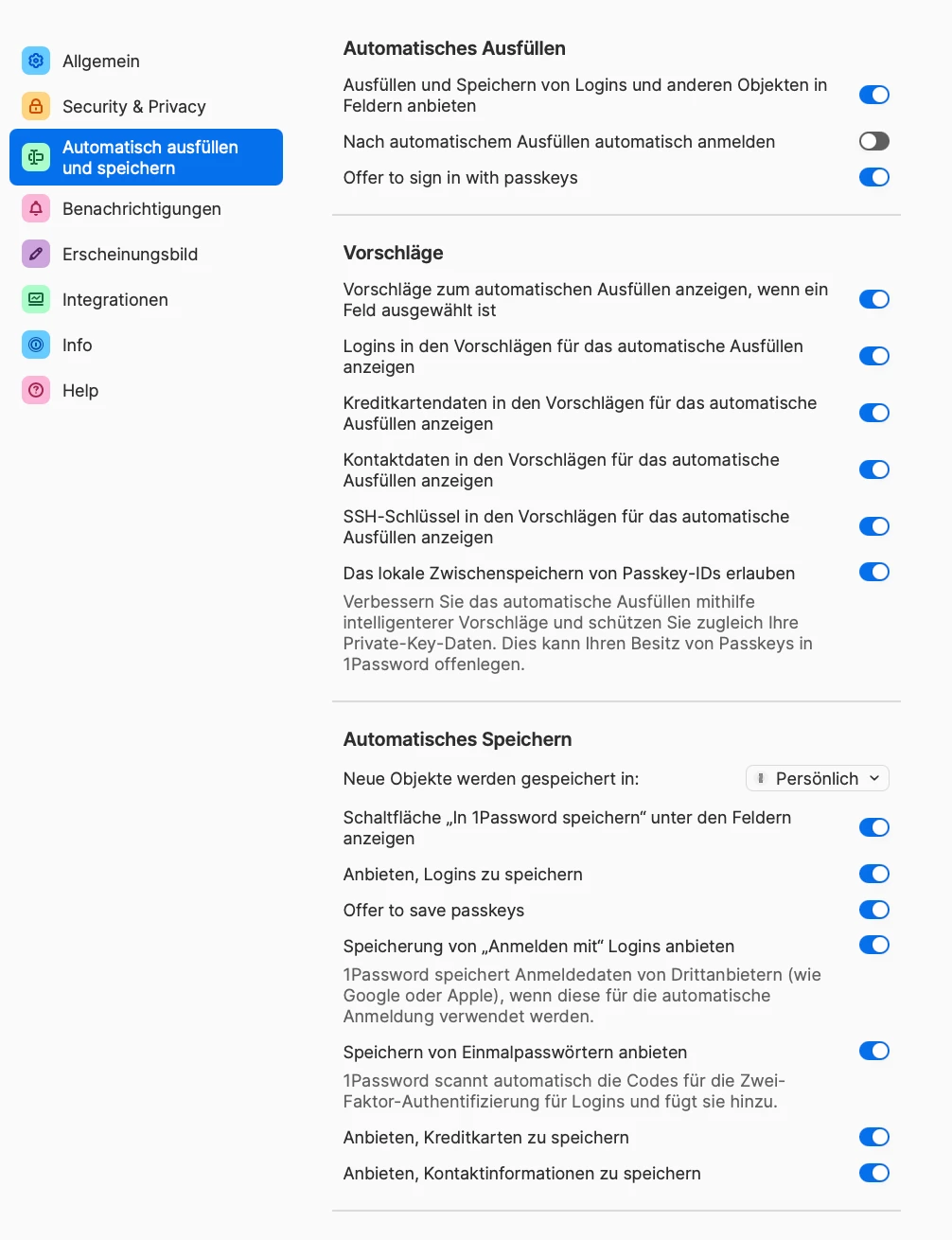
I haven't really found a solution in the community - which items exactly would I have to disable in the auto save/fill section of the Safari extension? - see below (I assume the English version will match the German one in terms of location of switches).

Thanks for any help and regards,

Jan

erroneous prompt for saving/updating log-in
1Password browser extension - autofill settings

5 replies

July 5, 2026

Update: When I actually save/update the login, the password is 3 or 4 lines of characters (100+)

1P_Dave
1Password Employee
July 6, 2026

Hello ​@Horatio2000! 👋

I’m sorry that you’re seeing an unexpected save prompt after you fill your password into a website, that’s definitely not the right behaviour. Would you be able to share the following: 

  1. How are you filling your login credentials when the issue occurs? Using the login credential suggestion that appears below the username/password field? Using the Command-Backslash keyboard shortcut? Or some other method? 
  2. Can you post a screenshot of the unexpected save prompt that you see? 

I look forward to hearing from you. 

-Dave

July 6, 2026

Thank you for responding. 

  1. I click on the 1PW icon next to the username field, then login suggestions pop up and I select the appropriate one. See annexed screenshot. In the next window popping up, 1PW autofills the password. Upon clicking “next” (arrow), I need to confirm the login via 2FA (iPhone app). 
  2. I posted a screenshot of the unexpected save prompt with my initial inquiry. But just in case, another copy below. This pops up when clicking on any of the five icons in the top right corner of the NAS web interface (shown in the screenshot). 
  3. When I *accept* the prompt and save the login in a new object, the name given to it by 1PW is 178, which happens to be the third number of the internal IP address (coincidence?). The new object contains the (correct) username that I used for the initial login and a new password of roughly 180 characters in length (gibberish). 

Does this help any further? 

Best regards,

Jan


1P_Gem
1Password Employee
July 13, 2026

Hi ​@Horatio2000, thanks for this additional information!


I'd like to pass this to our support team for further investigation. They may need to ask you to collect some details from an affected sign in page so we can file a bug report with our developers. Could you email in to: support@1password.com


With your email, please include:


You’ll receive a reply with a Support ID number. Please post that back here so we can link things together. Thanks!

July 13, 2026

Hi Gem,

I am happy to ask for a ticket from your support team. However, before I do that, I would like to add that, at present, I am not seeing the issue right now. The website with the problem was http://192.168.178.45:5000 (address to my Synology NAS). Insofar, I am afraid that I presently cannot add any further info. Should I open a ticket nevertheless?

Best,
Jan

DenalB
July 13, 2026

I also have this “issue” on some websites. I can’t tell exactly which websites they are, but I’m seeing this since months. I had this issue in Firefox and now in Brave Origin as well. I didn’t change anything to the login credentials. Just login with the help of the 1PW icon at the end of the username and / or password fields. After login was successfull, a popup occurs asking to update an existing entry or create a new one in 1PW. Strange thing.

I’m using Linux (Arch Linux / Fedora) if that matters.

1P_Gem
1Password Employee
July 13, 2026

Hi ​@DenalB, I’m sorry to hear you’re running into this as well.


Would you be willing to share some examples of websites where you’ve encountered this issue, so we can do some testing on our end? If this is something you’d prefer not to share on a public forum, you can email the details in to support@1password.com instead. Make sure to include a link to this thread, and your forum username.

DenalB
July 13, 2026

As soon as it appears again, I’ll ping you. 😉