
August 24, 2026

Browser extension icon badge: show login count per site

  • August 24, 2026
  • 3 replies
  • 1 view

I’m requesting a badge count on the 1Password browser extension toolbar icon showing how many saved logins match the current site, similar to the way Bitwarden and LastPass already do it.

Right now, clicking the icon just shows a list with no count. On sites where I have multiple logins (shared/departmental accounts, multiple environments, etc.), I have to click in and scroll to figure out how many exist. A badge number gives that at a glance, and also makes it obvious when a new login gets created for a site I already have saved.

This has been requested since at least 2016 (https://1password.community/discussion/70569) and again in 2023 (https://1password.community/discussion/136397), both acknowledged by support as passed to the product team, neither implemented. Re-raising because this is still a real workflow gap and I'd like to see it prioritized.

So the ask is to have a badge count on the extension icon reflecting number of matching logins for the active tab's domain.
Pinned Reply By 1P_Dave

Hello ​@MrPlumber! 👋

Thank you for the feature request! While I’m not aware of any current plans to add an item count to the toolbar icon, I’ve filed your request with our product team as well for future consideration. 

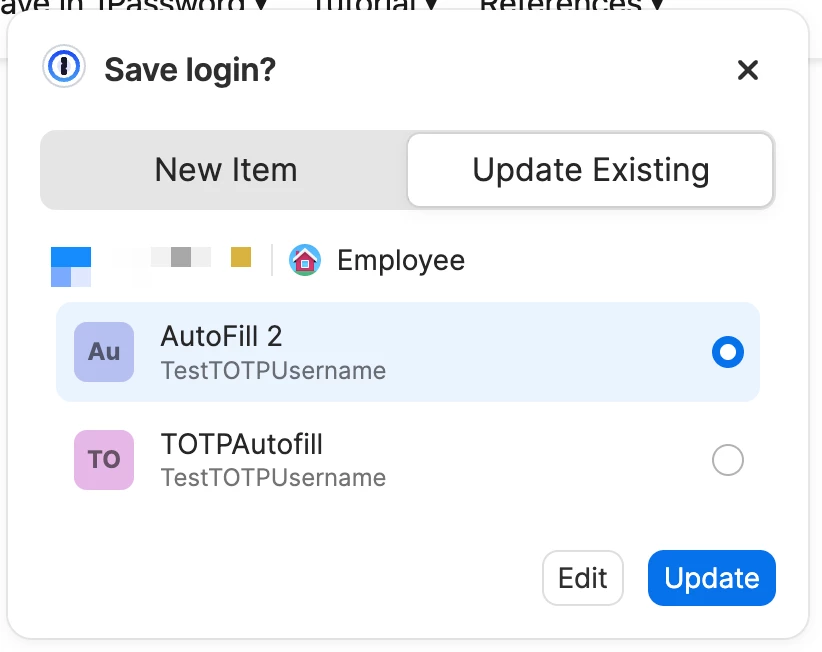
When you’re on a website, you can click on the 1Password icon and you’ll see all of the logins associated with that page (as you mentioned). And when you save a new password, to help you avoid creating duplicate logins, 1Password will show an auto-save prompt that allows you to update an existing login or save a new one:

We’ll continue to iterate on the 1Password experience in the browser based on everyone’s feedback! 

-Dave

3 replies

1P_Dave
1Password Employee
1Password Employee
August 25, 2026

Hello ​@MrPlumber! 👋

Thank you for the feature request! While I’m not aware of any current plans to add an item count to the toolbar icon, I’ve filed your request with our product team as well for future consideration. 

When you’re on a website, you can click on the 1Password icon and you’ll see all of the logins associated with that page (as you mentioned). And when you save a new password, to help you avoid creating duplicate logins, 1Password will show an auto-save prompt that allows you to update an existing login or save a new one:

We’ll continue to iterate on the 1Password experience in the browser based on everyone’s feedback! 

-Dave

MrPlumberAuthor
August 26, 2026

Hey Dave,

Appreciate the reply. That said, "filed for future consideration" is essentially the same response the 2016 and 2023 threads got, so I'll admit I'm not overly optimistic this time around.

The autosave prompt is helpful when creating a new login, but it doesn't address what is needed here - knowing at a glance how many logins already exist for a site before clicking in, especially for shared/departmental accounts I didn't personally save. Right now that means clicking in and scrolling every time, which is exactly the friction Bitwarden and LastPass solved with a simple badge count.

Would genuinely love to see this get real traction this time instead of another "noted." Happy to test it out if it ever makes it to beta.

1P_Dave
1Password Employee
1Password Employee
August 26, 2026

@MrPlumber 

I’m sorry that I don’t have any further news to share. While this hasn’t been one of our more frequently requested features, the team will continue to consider adding a feature like this about when planning future improvements. 

Thanks again for letting us know how we can improve 1Password for your needs! 

-Dave