July 28, 2026
Question

How do I disable SharePoint creds saving for my work account?

  • July 28, 2026
  • 1 reply
  • 0 views
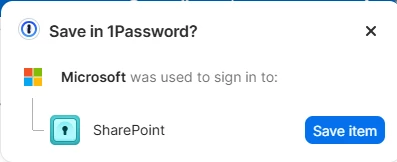
Every time I sign into work SharePoint I’m getting this popup, but I don’t want to save this item into 1Password


1 reply

1P_Dave
1Password Employee
1Password Employee
July 28, 2026

Hello ​@Ocker3! 👋

Thanks for the question! 1Password can be used to sign in to sites with supported providers, such as signing into SharePoint using your Microsoft account. If you’d like to avoid seeing the prompts on that webpage then you can hide 1Password on the page: 

  1. Right-click on the page in question. 
  2. Click 1Password - Password Manager > Hide on this page. 

Alternatively you can turn the “sign in with” feature off entirely with these steps: 

  1. Open your browser.
  2. Right-click on the 1Password icon in your browser's toolbar and click Settings
  3. Click Autofill & save
  4. Scroll down and turn off Offer to save "sign-in with" logins.

I hope that helps! 

-Dave