
September 30, 2026
Question

How to hell am I supposed to use my personal account if I can't remove my work SSO account
  • September 30, 2026
  • 3 replies
  • 2 views

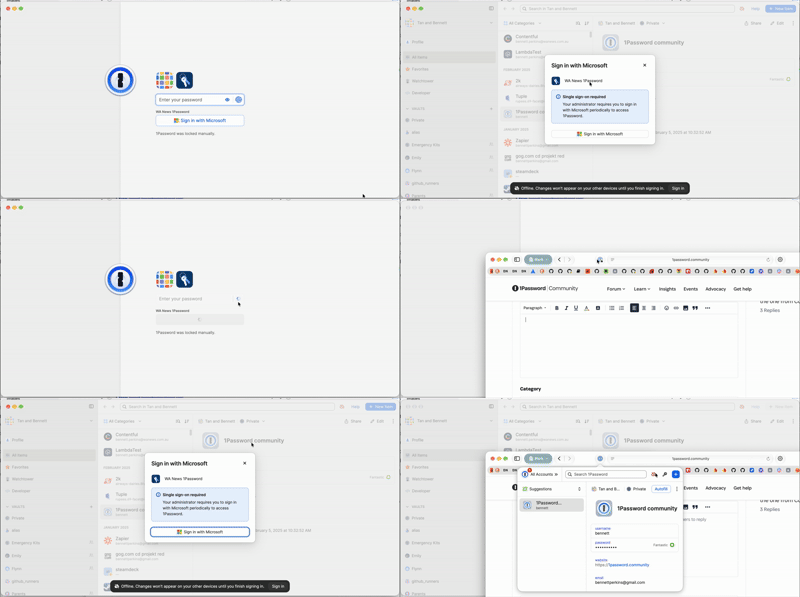
Personal account is signed in and working fine, but work SSO is not available, so apparently I can’t use either of my accounts any more?

The worst part is it won’t even let me save generated passwords any more, so I’ll need to reset my forum password next time I log in.

How can I remove this account from the app?

3 replies

bennettAuthor
September 30, 2026

Answer:

To sign out of the work SSO account:

1Password → Settings… → Advanced → Reset 1Password (but make sure you have a recovery key first)

Restart 1Password. When it prompts you to sign in, don’t sign in to the work SSO account.

There’s probably an easier way to sign out of an account, but I couldn’t find it. 🤷🏻

1P_Gem
1Password Employee
1Password Employee
September 30, 2026

Hi ​@bennett, I’m sorry for the trouble you ran into, and that you had to fully reset the app to remove the work account. For future reference, you can find our support article on signing out of 1Password here:

It should also be possible to unlock and use your personal account while leaving the work account signed in but locked. For example, you should be able to enter your personal account password on the unlock screen, then fill and save passwords to your personal account. Since that didn’t work as expected in this case, I’m not sure what went wrong.

If you add the work account again and run into similar issues, please email support@1password.com with a diagnostics report and a description of what happened. Our team can then take a closer look.

bennettAuthor
September 30, 2026

For future reference, you can find our support article on signing out of 1Password here:

The first step is to “sign in and unlock the app”, but if you examine the GIF above, after unlocking the app, the “Sign in with Microsoft” modal blocks all access to the app, including the sidebar, so it’s not possible to navigate to “Manage Accounts”.

It should also be possible to unlock and use your personal account while leaving the work account signed in but locked. For example, you should be able to enter your personal account password on the unlock screen, then fill and save passwords to your personal account.

Yep, that’s how I typically use it, and it’s how I’ve used it until today. 

After signing back in to the work account, the issue is 100% reproducible. Diagnostics report sent.