
July 6, 2026

Secure Input blocking other apps event taps

  • July 6, 2026
  • 22 replies
  • 58 views

Hello,


I know this bug has been reported a gazillion times, but I have exact reproduction steps that hopefully will help you solve the issue
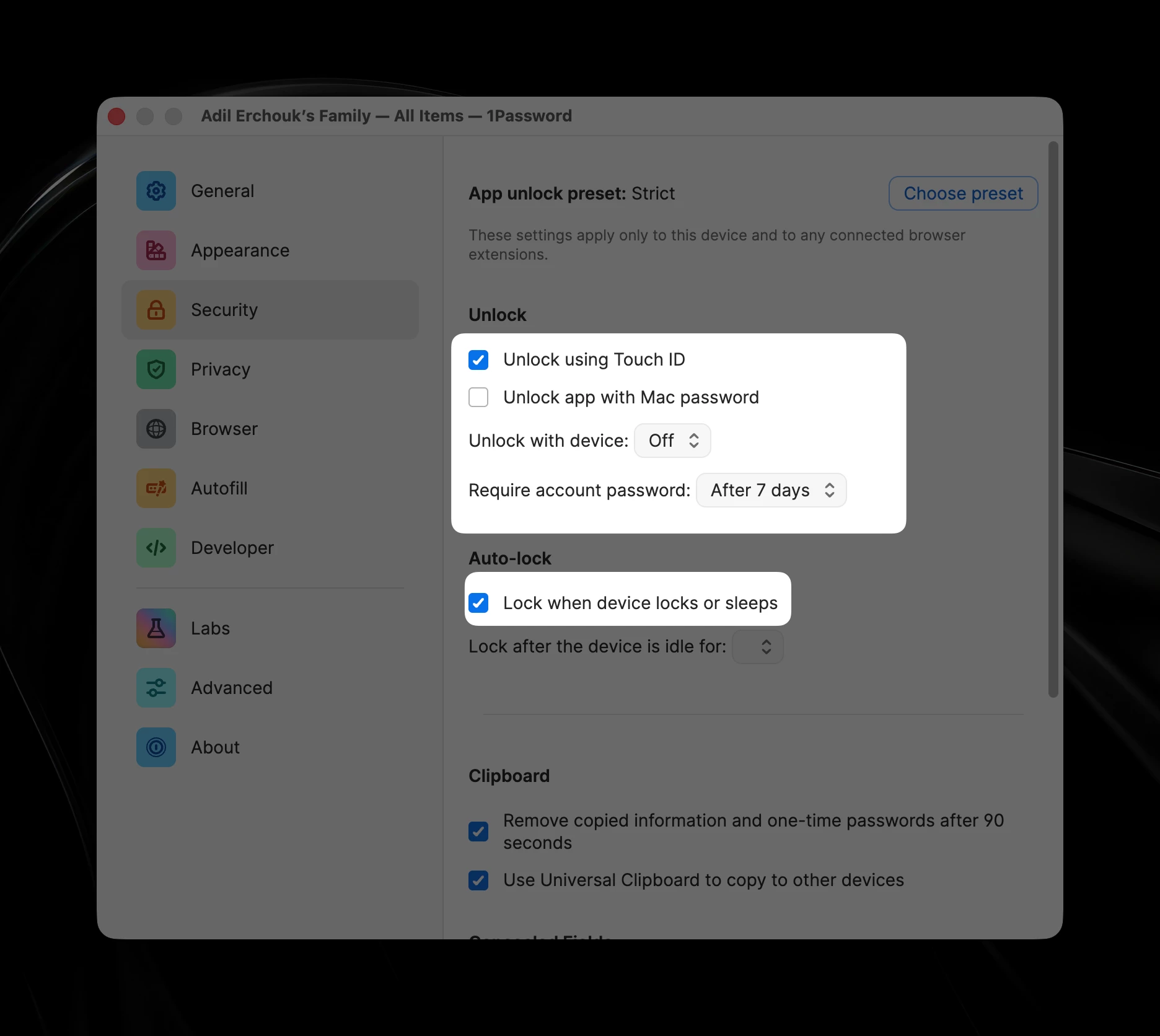
Settings to reproduce the issue
  1. Make sure to have these few Security options 
    1. Unlock app with Mac password: off
    2. Unlock with device: off
    3. Lock when device locks or sleeps
  2. Keep two windows on screen, 1Password and another focusable app
  3. Focus 1Password, lock it (⇧⌘L)
  4. Focus the other application
  5. Lock the screen (⌃⌘Q) - at this stage you might notice 1Password focus flashing
  6. Unlock the screen
  7. Your second application is still focused but you can notice the account password field of  1Password highlighted with the accent color border

From step 7, 1Password is blocking Secure Input and the only way to get out of it is terminating the app or focus then unfocus.

Also at this stage, the system falsely reports other apps as holding Secure Input (using `ioreg -l -w 0 | grep SecureInput`). It often reports `loginwindow` as the holder of Secure Input.


Hopefully, this will help you fix the issue or report it to Apple if it’s an OS issue.


Best regards,

Adil


Pinned Reply By 1P_Dave

Hello folks,

Our development team is currently tracking an issue where 1Password for Mac may enable Secure Input incorrectly in certain situations.

Until the issue is resolved, one of the following options should allow Secure Input to be released after the issue occurs on your Mac: 

  • Focus the 1Password app and then switch focus to another app. Wait a moment.
  • Right-click on the 1Password icon in the menu bar at the top of your screen and then click Quit. Then, re-open 1Password.

I’m sorry for the inconvenience caused and hopefully this will be fixed in a future update soon.

-Dave

22 replies

July 23, 2026

Hi,

1Password 8.12.26-31 mentions in it’s Release Notes

We’ve fixed an issue where 1Password could keep Secure Input enabled longer than intended.

I’m on 1Password for Mac 8.12.32 (81232018) and I can still reproduce the issue both with the repro steps pitnikola and I mentioned.

It’s quite blocking in my workflow so I will try out Keeper app if the migration is easy. But feel free to reach out for me to test again if you fix it.

1P_Gem
1Password Employee
1Password Employee
July 23, 2026

Hi ​@adilerchouk, I’m sorry for any confusion caused here, and for the continued disruption to your workflow. The fix you’ve highlighted in our release notes was for a different issue with 1Password and Secure Input. The issue you’ve reported is still being worked on at the moment.

Thanks for checking back in about this, and for your kind offer to test a fix once one is released!

July 24, 2026

For weeks I’ve been seeing a recurring issue on an M2 MacBook Pro running macOS 26.5.2 (25F80). When it occurs:

  • Fn-E won’t open the emoji picker
  • Fn-Fn won’t start Dictation
  • Alfred snippets stop expanding
  • Keyboard Maestro typed-string triggers stop working
  • Sometimes the emoji picker opens, but clicking an emoji doesn’t insert it

Running:
ioreg -l -w0 | grep SecureInput

shows that Secure Input is active. Different processes have appeared as the owner, including Proton Mail, Capture One, and loginwindow. In one case, Proton Mail’s PID remained listed even after Proton Mail had quit.

The reliable workaround so far is to unlock 1Password. Immediately afterward, Secure Input clears, ioreg returns no result, and Fn-E, Dictation, Alfred snippets, and Keyboard Maestro all begin working again.

Restarting CharacterPalette, TextInputMenuAgent, TextInputSwitcher, SystemUIServer, Dock, and pboard did not fix it. Logging out and back in does.

Has anyone else seen Secure Input become stuck like this, particularly after sleep/wake? Any idea what might be causing it, or how to clear it properly without relying on 1Password or logging out?

Updated:
Moments ago when I returned to my computer, Apple Music had supposedly captured Secure Input! I think this is an issue with MacOS.

1P_Gem
1Password Employee
1Password Employee
July 24, 2026

Hi ​@kappabear, I’m sorry to hear you’ve been running into issues with 1Password and Secure Input as well.

To confirm, does the behaviour you’re seeing match the behaviour others have mentioned in this thread - that is, it happens when your device locks/sleeps while 1Password is running, and locked but not focused on your screen, and once you wake your device, that’s when Secure Input is reported as being held by various other processes?

July 24, 2026

@1P_Gem :

Yes, that matches what I’m seeing.

The issue occurs after I return to the Mac following sleep/lock. In those cases, 1Password is running in the background, locked, and not focused on screen.

When I wake the Mac:

  • Fn-E does not open the Character Viewer
  • Fn-Fn does not start Dictation
  • Alfred snippets do not expand
  • Keyboard Maestro typed-string triggers do not work

Unlocking 1Password immediately clears the condition and restores all of those functions.

This morning, before unlocking 1Password, I confirmed Secure Input was active:

kCGSSessionSecureInputPID = 77074

That PID belongs to:

/Applications/Proton Mail.app/Contents/MacOS/Proton Mail

So yes, the behavior matches the pattern you described: after sleep/lock, with 1Password locked and running in the background, Secure Input is reported as being held by another process. Unlocking 1Password clears it.

I have also previously seen Secure Input attributed to Capture One, Apple Music, and loginwindow under the same conditions.

`KappaBear@JP-M2-MacBook-Pro ~ % ioreg -l -w0 | grep SecureInput
| "IOConsoleUsers" = ({"kCGSSessionOnConsoleKey"=Yes,"kSCSecuritySessionID"=100016,"kCGSSessionSystemSafeBoot"=No,"kCGSessionLoginDoneKey"=Yes,"kCGSSessionIDKey"=257,"kCGSSessionUserNameKey"="KappaBear","kCGSSessionGroupIDKey"=20,"CGSSessionUniqueSessionUUID"="F [removed by moderator] -4A1D-B131-7B05D8345D1D","kCGSSessionSecureInputPID"=77074,"kCGSessionLongUserNameKey"="KappaBear","kCGSSessionAuditIDKey"=100016,"kCGSSessionLoginwindowSafeLogin"=No,"kCGSSessionUserIDKey"=501})
| | "IOConsoleUsers" = ({"kCGSSessionOnConsoleKey"=Yes,"kSCSecuritySessionID"=100016,"kCGSSessionSystemSafeBoot"=No,"kCGSessionLoginDoneKey"=Yes,"kCGSSessionIDKey"=257,"kCGSSessionUserNameKey"="KappaBear","kCGS`

After unlocking 1P:
`KappaBear@JP-M2-MacBook-Pro ~ % ioreg -l -w0 | grep SecureInput

KappaBear@JP-M2-MacBook-Pro ~ % `

1P_Dave
1Password Employee
1Password Employee
July 28, 2026

@kappabear 

Thank you for providing those details, we’ve shared your report and post with our development team. 

-Dave

1P_Dave
1Password Employee
1Password Employee
July 28, 2026

Hello folks,

Our development team is currently tracking an issue where 1Password for Mac may enable Secure Input incorrectly in certain situations.

Until the issue is resolved, one of the following options should allow Secure Input to be released after the issue occurs on your Mac: 

  • Focus the 1Password app and then switch focus to another app. Wait a moment.
  • Right-click on the 1Password icon in the menu bar at the top of your screen and then click Quit. Then, re-open 1Password.

I’m sorry for the inconvenience caused and hopefully this will be fixed in a future update soon.

-Dave

August 6, 2026

This secure input bug is really annoying, and I don't think even the usually awesome 1Password team has been able to fix it. Instead of closing and reopening the 1Password app, I found a much quicker way to get back to work. Just enter the following commands in the Terminal app, and you can continue working immediately:

killall "1Password Helper"

killall "1Password Helper (Renderer)"

killall "1Password-BrowserSupport"

On my MacBook, Terminal runs in the background all day.

—Carsten

1P_Gem
1Password Employee
1Password Employee
August 6, 2026

Hi ​@Carsten, I’m sorry to hear that you’re running into this as well, and thank you for sharing the faster workaround you’ve found. I’ve added your report to the internal tracker for this issue.

August 17, 2026

This is extremely frustrating. I rely on several accessibility and efficiency tools—including Superkey and Keyboard Cowboy—to navigate my Mac. When 1Password leaves Secure Input enabled, those applications stop receiving global keyboard shortcuts.

I’ve upgraded to the latest 1Password release, but the problem persists. Focusing 1Password and then switching to another application—or quitting and reopening 1Password—releases Secure Input, but this is only a temporary workaround. Please prioritise a permanent fix. Thank you.

System information

  • macOS 26.5.2 (25F84), Apple Silicon/arm64
  • MacBook Air (Mac17,3), Apple M5, 24 GB RAM
  • 1Password for Mac 8.12.33
  • 1Password for Brave extension 8.12.32.33
  • Brave 151.1.93.134
  • Superkey 1.66
  • Keyboard Cowboy 3.28.4
  • Karabiner-Elements 16.0.0

Relevant 1Password configuration

  • Touch ID and device-based unlocking enabled
  • Idle auto-lock: 60 minutes
  • “Lock when device locks or sleeps” currently disabled as a workaround
  • SSH Agent enabled
  • Developer features enabled
  • CLI and SDK shared lock state enabled
  • Local MCP integration enabled

Symptoms

  • The failure usually appears after the Mac sleeps or is locked and subsequently wakes.
  • Superkey and Keyboard Cowboy stop detecting global shortcuts.
  • Secure Input remains active even though 1Password is in the background and no password field is visibly focused.
  • ioreg may report loginwindow or whichever application is currently focused rather than 1Password.
  • Bringing 1Password to the foreground and switching away often immediately clears the condition.
  • If that fails, quitting and reopening 1Password clears it.
  • Logging out also clears it, presumably because the process holding Secure Input is terminated.

This behaviour closely matches the reproduction already reported in this thread: 1Password auto-locks during a lock/sleep transition and its unlock field appears to retain Secure Input after wake.