

macOS AutoFill is now available to everyone!
Hey everyone!
Native macOS AutoFill is now generally available in 1Password for Mac. This has been one of the most requested features for years, and it's now ready for everyone on the stable channel.
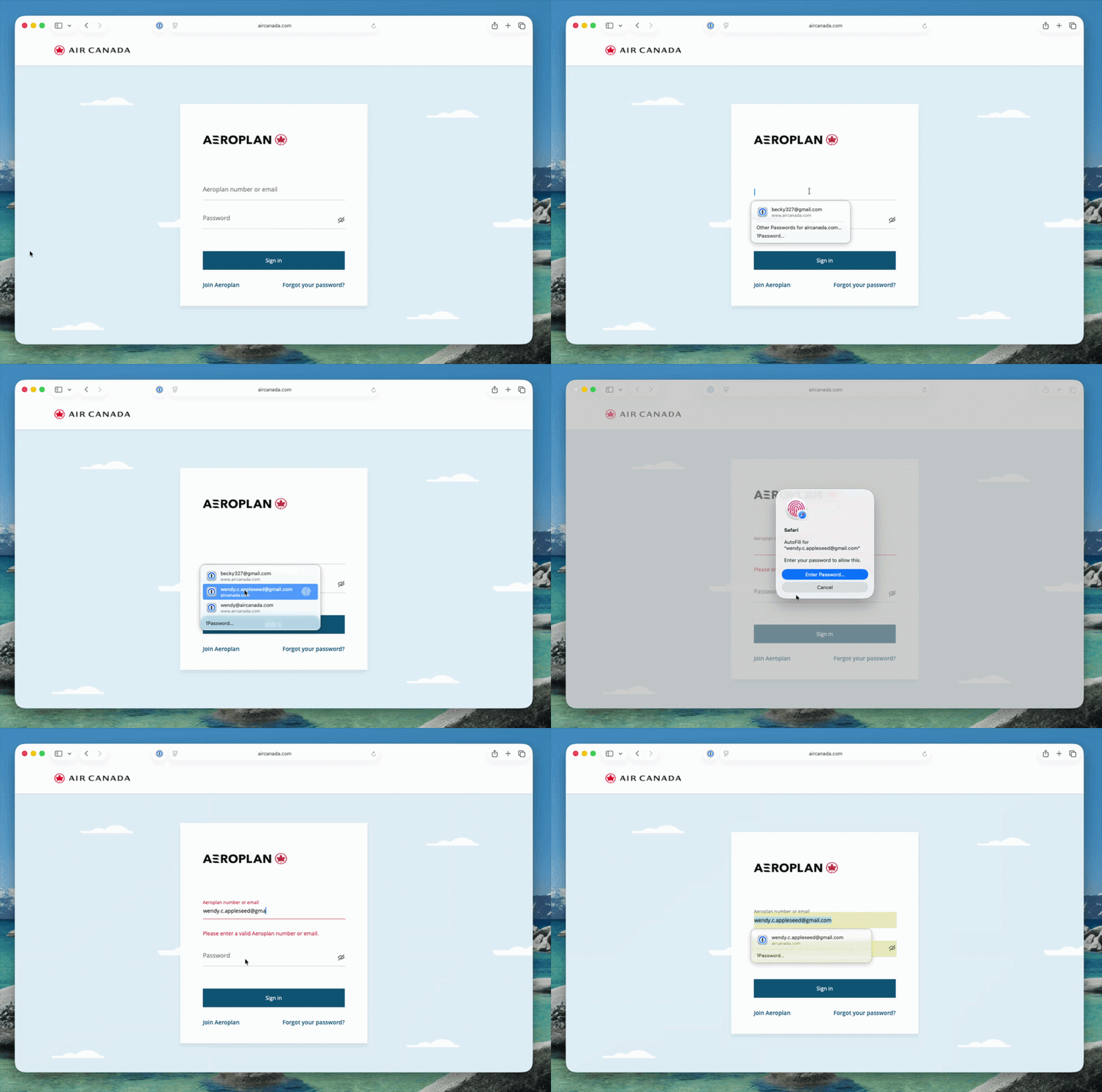
Here's what macOS AutoFill gives you:
- By adopting Apple's Passwords API, 1Password functions as a native Credential Provider on macOS for logins. You can view autofill suggestions directly within Safari and other supported desktop apps.
- Passkey support is built in. Fill, create, and update passkeys easily through macOS AutoFill.
- The 1Password Safari extension works alongside macOS AutoFill. Login suggestions appear in Safari's native menu, and the extension continues to fill credit cards, addresses, and other items the Passwords API doesn't support yet.
- One-time code support through the same integration is on the way and will land in an upcoming release.
How to turn it on:
- Update to 1Password for macOS 8.12.32 or later.
- Go to 1Password for Mac Settings > Autofill > Set up macOS AutoFill, then select "Turn On" from the macOS permission prompt. You'll see "Active" status once it's enabled.
Full setup and troubleshooting details are in our support article.
To everyone who tried the beta over the past few months: thank you! Your feedback directly shaped this release. Try filling logins and passkeys and let us know how it goes in the comments!