

1Password Employee
August 11, 2026

macOS AutoFill is now available to everyone!

  • August 11, 2026
  • 100 replies
  • 559 views

Hey everyone!

Native macOS AutoFill is now generally available in 1Password for Mac. This has been one of the most requested features for years, and it's now ready for everyone on the stable channel.
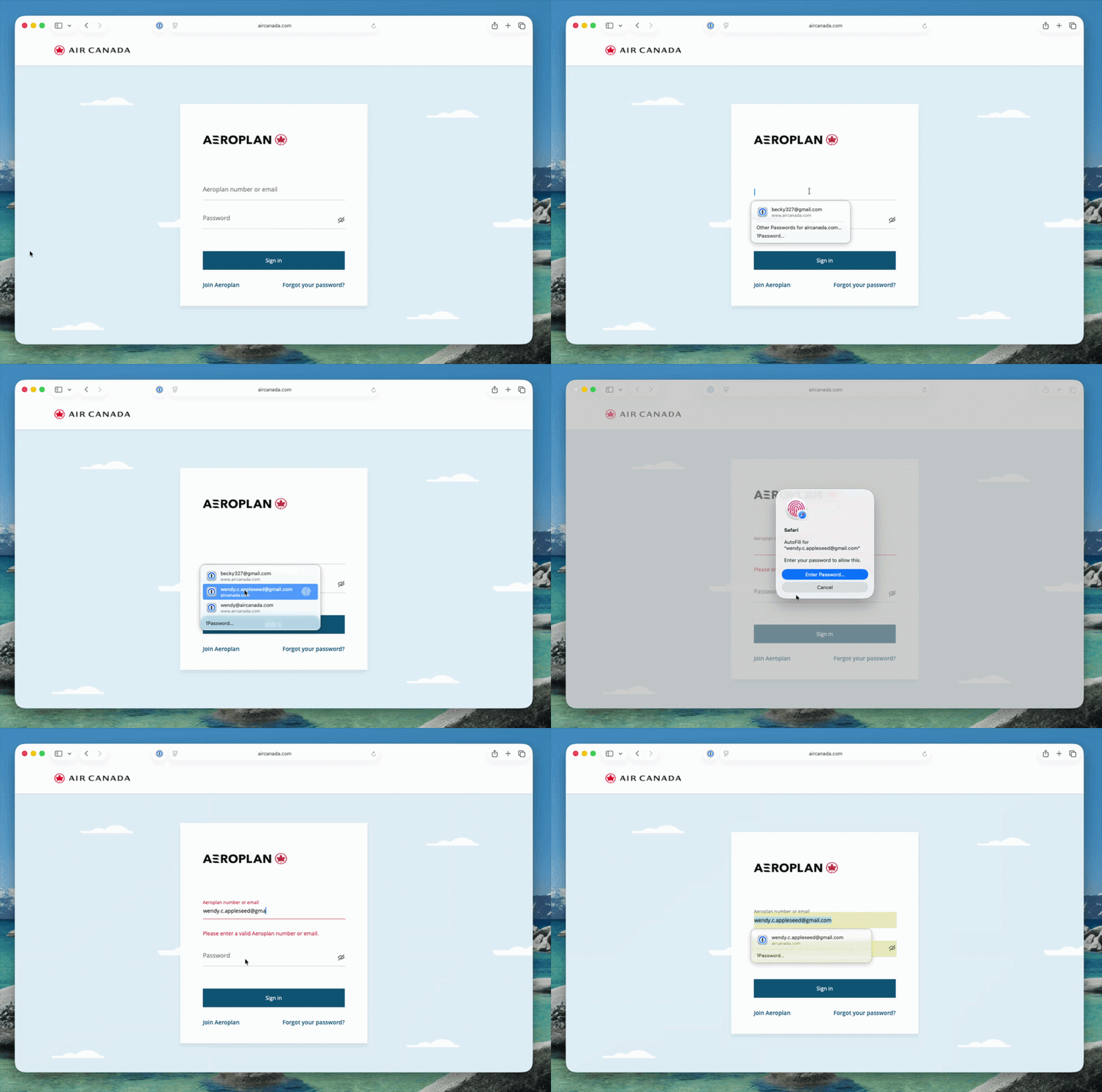


Here's what macOS AutoFill gives you:

  • By adopting Apple's Passwords API, 1Password functions as a native Credential Provider on macOS for logins. You can view autofill suggestions directly within Safari and other supported desktop apps.
  • Passkey support is built in. Fill, create, and update passkeys easily through macOS AutoFill.
  • The 1Password Safari extension works alongside macOS AutoFill. Login suggestions appear in Safari's native menu, and the extension continues to fill credit cards, addresses, and other items the Passwords API doesn't support yet.
  • One-time code support through the same integration is on the way and will land in an upcoming release.

How to turn it on:

  • Update to 1Password for macOS 8.12.32 or later.
  • Go to 1Password for Mac Settings > Autofill > Set up macOS AutoFill, then select "Turn On" from the macOS permission prompt. You'll see "Active" status once it's enabled.

Full setup and troubleshooting details are in our support article.

To everyone who tried the beta over the past few months: thank you! Your feedback directly shaped this release. Try filling logins and passkeys and let us know how it goes in the comments!

100 replies

August 21, 2026

I have this set up and it shows the wrong credentials for the website I’m on - it seems to show the first entry that matches the domain. If I click on the 1Password… in the suggestion popup, it shows just the correct one that should be used.

I have the password entries to show only if the website matches the exact host.

1P_Dave
1Password Employee
1Password Employee
August 24, 2026

@scotte_zinn 

Thanks for trying macOS AutoFill! Currently, autofill behaviours that you’ve set for certain items are not recognised by macOS AutoFill. I’ve added your comment to our internal tracking item for the issue. 

-Dave

August 25, 2026

It does work for some public sites, but for my own domain (homelab) I’m seeing the above behavior. That is, no matter what subdomain is specified, the autofill entry is the first one for the main domain until I select 1Password…


August 25, 2026

It seems like with macOS Tahoe 26.6.2, safari now uses the AutoFill Passwords and Passkeys settings at the macOS level. The password field in Safari is now overtaken by macOS and not the 1Password extension anymore. I’m on 1Password for Mac 8.12.33 (81233001)

That’s ok. BUT that means 1Password needs to be better integrated with this. As you can see, the `Ser Up Codes In` settings don’t list 1Password as an app I can set up the verification codes.

August 25, 2026

My comment is only about ordering. I will not use this if 1Password entries are ordered before Passwords entries, which they are.

August 25, 2026

Hey guys. The only issue I have with it is that I have multiple AWS accounts and I’m unable to differentiate the 2FA entries because only the username is displayed and I use the same username across several accounts. Is there anything you can do to improve it or it’s just macOS limitation?


1P_Dave
1Password Employee
1Password Employee
August 25, 2026

@wpisdu 

Thanks for the feedback! When you fill your login credentials into AWS, 1Password should automatically copy the right one-time password to your clipboard. When you’re prompted for your MFA code, try pasting that one-time password using CMD-V on your keyboard. Let me know how that goes. 

-Dave

August 25, 2026

Pasting is working!

August 25, 2026

1Password is not respecting the Exact Site matching on vault items. For example:


  1. I have a vault item for truenas login that only fills on exactly truenas.acorn.city
  2. I have another vault item for pve-node-01 that only fills on exactly pve-node-01.acorn.city:8006
  3. I open Safari at truenas.acorn.city and I see 1Password offer to fill from pve-node-01 instead.


Why?


1P_Dave
1Password Employee
1Password Employee
August 25, 2026

@Scottrus71 

It looks like you’ve enabled our new support for macOS native AutoFill. Currently, autofill behaviours that you’ve set for certain items are not recognised by macOS AutoFill. 

If you’d like to return to the previous experience, which does support autofill behaviours, you can follow the steps in this guide

-Dave

August 25, 2026

It appears to be misbehaving: it shows all my matching 1Password entries before my Passwords entries. I use 1Password for a lot of things, but Passwords for most personal things, and this is extremely annoying. Is it not configurable? If not, I will have to abandon using it.

August 25, 2026

Disabled 1Password autofill in macOS until this is addressed.

I realize the 1Password devs might have no control over it, but it is still intolerable.

August 26, 2026

Since I enabled the Autofill feature in MacOS, 1Password autofill has become really a hassle. In the past, 1Password suggested autofill from the same (sub)domain (exact match). With the new autofill, 1Passwords now suggests all passwords from all sites with the same root domain. We have many different systems sharing the same root domain, each system has its own subdomain and uses different credentials. With the new autofill, we now have to scroll across the whole suggestion list to find the correct password entry.


It’s even worse with 2FA. After autofilling the password, 1Password now lists all OTP codes from all subdomains instead of autofilling the OTP from the just selected entry.


Is there a way to show the exact match on top of the list?

1P_Dave
1Password Employee
1Password Employee
August 28, 2026

@sonny.kieu 

Thank you for the feedback! Currently, autofill behaviours that you’ve set for certain items are not recognised by macOS AutoFill. 

It’s even worse with 2FA. After autofilling the password, 1Password now lists all OTP codes from all subdomains instead of autofilling the OTP from the just selected entry.

When you fill your login credentials into a website, 1Password should automatically copy the right one-time password to your clipboard. When you’re prompted for your one-time password, try pasting that one-time password using CMD-V on your keyboard. 

-Dave

August 28, 2026

Honestly, this implementation is not good

The 1Password  MacOS browser autofill inplementation is a net feature loss vs the native 1Password implementation

It is slow and isn't worth a damn if you manage a lot of passwords

The 1Password solution was so easy and fast, it would fly through user/pass/2FA without any input on most sites

Not anymore

I’ve turned it off

1P_Dave
1Password Employee
1Password Employee
August 28, 2026

@CCRF4 

I’m sorry that native AutoFill didn’t fit your needs, we’ll continue to make the experience smoother along with our friends at Apple. And if 1Password for Safari works better for you then you can definitely go back to using it exclusively.

-Dave

August 28, 2026

Thank you, I did go back

..and while I far prefer Safari, it’s helpful that 1Password also works on Edge

No interest in Chrome

August 29, 2026

Generally try not to get too fussed with 1Password but right now I am. It is one of those things that just needs to work. Lately it hasn't. Full uninstall/reinstall doesn't resolve issues (including trashing everything related in the ~/Library) .

Seems like there has been integration into macOS and iOS systems. Developers and 1Password need to understand users don't necessarily care about every detail, setting, etc. Don't have time to read everything.

Problems:
1. On macOS I'm counting 3-4 Touch IDs to log into certain accounts (one press for user, one for password, and then again?). This never happened. If 1Password was unlocked then CMD+\ was all I needed. Now it has become a serious headache to log on to anything. Enough to end the 9 year subscription. It used to be so much better and smoother.
2. To resolve issues with family and multiple logins to same sites I used favourites. Now I don't even see the login I want. I'm presented with logins I rarely, if ever, use. I have to click through menus to get to the actual login to use.

With integration why is:
A) Quick Access in the menu bar needed? I never used it before anyhow and Touch ID worked, app suggests it should not.
B) the need to carry on with 1Password for Safari. It seems, without knowing better, there are multiple paths pushing passwords into Safari, and from a user perspective - confusing (default suggestions, little key icon on the right, etc.).

I see blogs / newsbits / emails of how great 1Password is doing in the Apple Ecosystem. From this user who prefers not to hear about that, not to follow it, etc. I get frustrated when it stops working and right now 1Password and Apple are working terribly together IMO - both in macOS and iOS.

If there are solutions to my 2 problems I'm all ears but quick troubleshooting searches provide no answers. It seems these problems arose after system integration but I don't know that for a fact.

1P_Dave
1Password Employee
1Password Employee
September 3, 2026

Hello! I’ve replied to your other post here.

-Dave

August 31, 2026

More issues with the recent changes in macOS Tahoe 1Password. In Canada Janeapp is often used with healthcare providers. Prior to the change 1Password seamlessly worked with all providers. Now:

1. the wrong default username is chosen for all sites buts one
2. one manually chooses the correct username but this does not populate the correct password
3. one manually chooses the correct password

What use to work, take a second with CMD+\, now is a manual, slow, three step process that is completely un-automated. Big step backwards. 9 years. Rarely complain. This is awful...coupled with all this authentication. I have turned off "Use Touch ID for autofilling passwords" but I shouldn't be digging for this. 1Password needs to inform the user, or actively suggest/make the change with this system integration. 

1P_Dave
1Password Employee
1Password Employee
September 3, 2026

@Jack229 

Thank you for sharing your feedback for our support for macOS AutoFill! If you’d like to revert back to the previous experience then you can certainly do so: If you want to turn off Autofill

Our team is working on adding a prompt to let folks know that they can turn off “Use Touch ID for autofilling passwords”, a macOS default, if you don’t want to use Touch ID each time you fill a login. We hope to release this in a future version of 1Password. 

Can you tell me a little more about what you mean by “the wrong default username is chosen”? How did you set a default username? 

-Dave

September 2, 2026

Three feature requests for the new 1Password Native Safari fill, which is awkward when a site has more than one Login item:


1. Show the item's Display Name in the fill dropdown. For bank accounts the username is just a number, so there's no way to tell two or more accounts apart.

2. Show up to 3 items for a single website in the initial dropdown, instead of having to go ferreting around.

3. Remember which username was picked on the last fill and offer it again. Some banks put the username on one page and the password on the next.


Background for some key accounts my wife and I have separate userids and passwords for the same site. I have access to her accounts, and she has access to mine. So when I try to log in I face the mess described above.

1P_Dave
1Password Employee
1Password Employee
September 3, 2026

Hello ​@mlevison! 👋

Thank you for the feedback, and I’m sorry for the confusion. We’ve shared feedback with Apple requesting that suggestions display item titles, support multiple items at once, and use improved sorting. We hope these enhancements will be included in a future macOS update.

If you’d like to revert back to the previous experience then you can certainly do so: If you want to turn off Autofill

-Dave

September 3, 2026

Understood. Can you share the Apple Feedback URL? I will be happy to comment on it there. Often if Apple gets more feedback on a feature like this, they will prioritize it.