Level up your business security with free, on-demand training and certification. Explore 1Password Academy today →
Forum Discussion

Former Member
2 years agoAnnoying Popups
Please fix this..
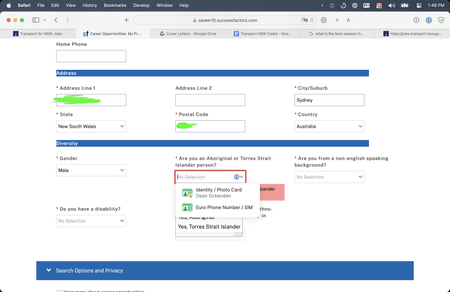
If I click the 1 password icon to remove the suggestions then the other forms options disappear so the solution was to inactivate the browser extension which I would prefer not t...

steph_giles 1Password Team
2 years ago1Password TeamHey @deanocko,
I'm sorry for the delay in getting back to you.
You're right 1Password is incorrectly appearing on that field in your screenshot. I'd like to file an issue with our development team to see if we can improve the behaviour on this page in a future update however I am unable to access the page you are on. Could you possibly send over some page details for me?
Here's how:
- Navigate to the page with the filling issue.
- Right click the 1Password icon in your browser toolbar.
- Click Help and choose Collect Page Structure.
- 1Password will save a .json file to your "Downloads" folder.
- Attach the downloaded .json file to your next reply.
Once I collect all the details, I will report the issue to our developers. I hope to hear from you again soon.




