Level up your business security with free, on-demand training and certification. Explore 1Password Academy today →
Forum Discussion

Anonymous
2 years agoCan I turn Autofill off for a specific website?
Autofill is useful, but there is one work website in which I will never use it and I never want to accidentally use it there either -- is it possible to disable the auto fill for a specific website/d...
Anonymous
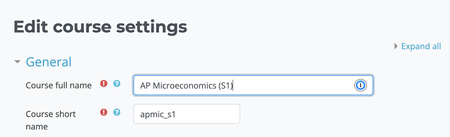
2 years agoIt shows up as an Icon, which I understand is not invasive. But... ideally, I'd like it off for the entire website -- I manage our school's LMS and with a staff of about 80 teachers who will be introduced to 1Password next year, everyone who edits a lesson or course page will begin to see this icon in the Name fields on any page they are editing. While testing it out, I do see that you have to click the icon and then click something from the little popup box, so that helps make it more "intentional", but I also noticed there is no "undo" option when you select something to autofill -- it overwrites what was there so my worry is someone will not notice or will not know what text was there to begin with.
Basically, there will never be an instance where anyone will need to autofill anything into our LMS (and we SSO to log into it). Some staff use browser tools like Grammrly and I am concerned that if they click the wrong icon/popup, that they'll begin to overwrite lesson and course titles. So I was hoping there was a way to disallow an entire domain from the autofill feature.


