Level up your business security with free, on-demand training and certification. Explore 1Password Academy today →
Forum Discussion

Anonymous
2 years agoChange AutoFill Behavior for specific websites
Hi guys,
I hope this is not an reguarly asked question... because I wasn't able to find anything on the forum....
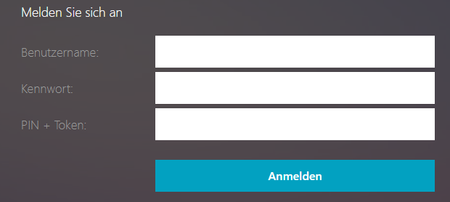
I have a webseite, where I want to edit/change the autofill behavior:
...

1P_Evon 1Password Team
2 years ago1Password TeamHey @Jaxx0n, thanks for writing in!
There isn't a way to use the 1Password extension to autofill two different fields into one on a website. However, I have a workaround that might be helpful for you.
Have the 1Password extension autofill the username, password and PIN into the fields then drag and drop or paste the one-time password.
Just to confirm, does the "Pin + Token" field require them to be autofilled in that particular order? Or, can you autofill the one-time password first and then drag and drop the PIN afterwards?
Additionally, is this a private website? If not, can you share the website URL so I can test things out?
That being said, I understand that some websites require two different passwords to be filled into one and because of that, I've shared the feedback with our product team who review these feature requests.
I look forward to hearing back from you @Jaxx0n, so we can assist you further.
-Evon
ref:37709015


