Level up your business security with free, on-demand training and certification. Explore 1Password Academy today →
Forum Discussion

Anonymous
2 years agoChange AutoFill Behavior for specific websites
Hi guys,
I hope this is not an reguarly asked question... because I wasn't able to find anything on the forum....
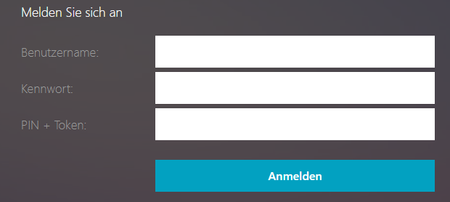
I have a webseite, where I want to edit/change the autofill behavior:
...

1P_Evon 1Password Team
2 years ago1Password TeamHey @Jaxx0n, thanks for your reply.
How do I make 1Password fill the Pin into this field?
I'd like to take a closer look at this page structure to confirm. I recommend sending an email to mailto:support+forum@1Password.com so that our support team can help you.
With your email please include:
- A link to this thread: https://1password.community/discussion/143936
- Your forum username: Jaxx0n
- If possible, a sample website.
- Collected page structure:
- Navigate to the page exhibiting the behaviour.
- Right-click the problematic field and select 1Password > Help > Collect Page Structure.
- 1Password will save a .json file to your "Downloads" folder.
- Attach the file to your next reply.
After emailing in, you'll receive a reply from BitBot, our friendly robot assistant with a Support ID that looks something like [#ABC-12345-678]. Post that here, and I’ll be able to locate your message and make sure it’s gotten to the right place.
We look forward to assisting you further,
-Evon


