Level up your business security with free, on-demand training and certification. Explore 1Password Academy today →
Forum Discussion

ajahn
4 years agoSuper Contributor
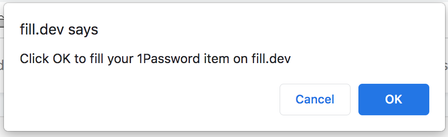
"Click OK to fill your 1Password item on ..."
Not sure if this is specific to your test area (https://fill.dev/), but I think I've seen this in other places. When I go to: https://fill.dev/form/registration-email and click the 1password icon in ...

Anonymous
4 years agoHey ajahn ,
This is a confirmation prompt that makes sure you've intentionally clicked on autofilling your personal details or credit card info into a page, and that the page did not clickjack you or performed any other sort of malicious action to get 1Password to autofill anything without your permission.
There's no way to disable this security measure. If you'd like to autofill more than one field on a page, I'd recommend doing so from the 1Password extension icon in your browser's toolbar, which will autofill all possible fields on the page in one go and will not display this warning because websites have no access to the extension's window.


