Protect what matters – even after you're gone. Make a plan for your digital legacy today.
Forum Discussion

jonand
1 year agoOccasional Contributor
Feature request: Restructured items list
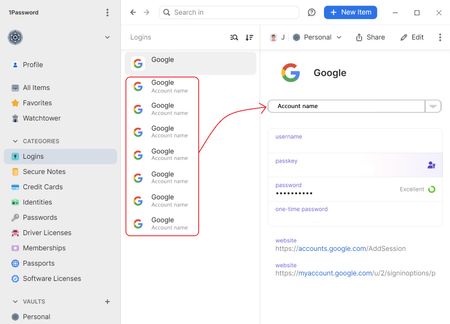
There is a thing I for a long time wish could be changed with the password manager, despite that I already like it very much as it is. It is the list of items that I wish could be restructured with t...

jonand
1 year agoOccasional Contributor
No, I don't see it as nested items. It is at least not meant to be seen as nested items with a tight coupling to, in the example, the "Google item". I see it more as a second level of categorisation, a way to organise the entities (accounts), and it should be possible to implement some way to move a single entity (account) to a corresponding "Google"-item in another vault. Maybe would such an operation have to duplicate the "Google"-item if there is no one existing already, that afterwards could be edited.
I see one thing that is wrong in the image I attached to my post. The URL:s should not go with the entity (account), but with the "Google"-item as they are common for all the entities. If they were added for each account, as they are currently, are they duplicated as redundant information for each account. If the URL is changed, which is often is, would I have to change the URL for every entity (account).
Your suggested solution with more accounts in their own sections does not work well. It is because only the first account, in the username and password field, is entered automatically in the login field in the browser. For the other accounts would I have to copy that information manually. The sections are still very useful. I often use them for other related passwords that not has to be entered automatically in an login field.
Different accounts and different collections is not as a good way to separate the accounts as my suggestion because they change the whole list of items shown. It is useful to have that level also for a higher level of organisation of all the items, like to separate "work" from "home".
My inspiration to this change actually came from how Kaspersky's password manager is organised. They organise the items and entities in a way just like I suggest here. I used their password manager until some years ago, as part of their Total-package, until Russia freaked out against Ukraine. I am glad that I found 1Passord as an even better password manager after that, except their way to organise the items ;)
I understand that this is not a small change as it would affect the overall structure of the items and entities, but I am sure it would add a useful level of order for the information stored in the password manager. I use it for everything of my important information, and I actually count it as one of my most important and critical apps, so I have a lot of information in it :)

1P_Dave Moderator
8 months agoModeratorThank you for the feedback. While I can't make any promises that something like this will be implemented, I've passed your comments along internally to our product team.
-Dave
PB-49631465




