Level up your business security with free, on-demand training and certification. Explore 1Password Academy today →
Forum Discussion

jimmyjayp
1 year agoOccasional Contributor
How can I stop 1password from asking me to save passwords in the browser?
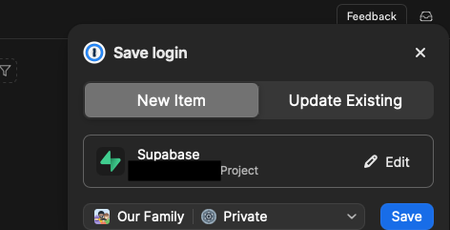
Does anyone know how to stop 1password from putting pop-ups in front of me to save passwords? I'm finding it very annoying. And in at least 1 case, it's confused and asking me to save a password for...

DKGee
28 days agoNew Contributor
1Password Devs - You NEED to FIX this !
Exactly as the others have said here - - provide a switch to TURN OFF the intrusive slide-over dialog that repeatedly asks to save an entered password - while still allowing the user to ASK for 1Password info when needed in the password fields

1P_Dave Moderator
28 days agoModeratorThanks for following up and I'm sorry for the frustration. You can turn off the prompt in the original poster's screenshot by following these steps:
- Open your browser.
- Right-click on the 1Password icon in your browser's toolbar and click Settings.
- Click Autofill & save.
- Turn off "Offer to save logins".
Does turning off this option not work for you? Turning off "Offer to save logins" will still allow 1Password to suggest existing logins.
-Dave


