Level up your business security with free, on-demand training and certification. Explore 1Password Academy today →
Forum Discussion

Anonymous
3 years agoHow do I unhide the password popup window?
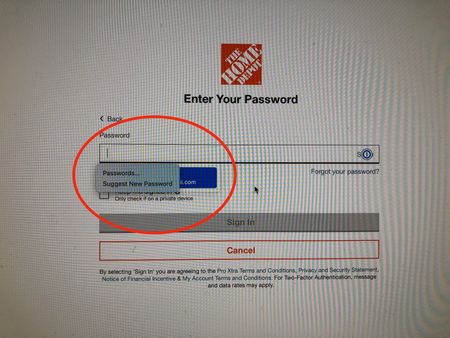
Starting a few weeks ago when I select the 1Password icon in a password box to fill in the password, the popup box hides the actual password. That's mildly annoying when I only have one account, but ...

Jack_P_1P 1Password Team
3 years ago1Password TeamHi @Drieka:
That second box you're seeing appears to be coming from Safari's password manager, not 1Password. To disable Safari's password manager:
- Click the Safari menu and choose Preferences.
- Click the AutoFill icon.
- Turn off all the AutoFill web forms settings: “Using info from my contacts”, “User names and passwords”, “Credit cards”, and “Other forms”.
Let me know how you get on with that!
Jack


