Level up your business security with free, on-demand training and certification. Explore 1Password Academy today →
Forum Discussion

fultonm
3 years agoOccasional Contributor
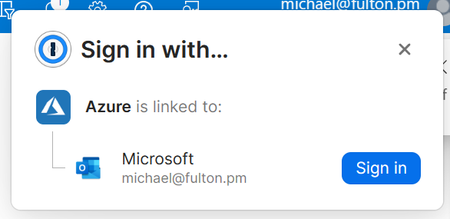
How to turn off Sign in with Link Account
I always get this message every time I load Azure Portal.
I am already signed in and I don't need to Link any account or do this.
Choosing "Sign In" doesn't do anything and if I refresh the pag...

1P_David 1Password Team
3 years ago1Password TeamHi fultonm , thanks for reaching out!
The issue you're experiencing where with Azure where the sign in with prompt will consistently appear is one that we're aware of. Our development team is currently looking into the issue in order to make improvements. I apologize for any impact on your workflow and I've made the team aware of your experience.
If this behaviour is getting in your way too much, you can disable the "Sign in with" prompts altogether using the following steps:
- Open your browser.
- Right-click the 1Password icon in the toolbar and select "Settings".
- In the Autofill section, toggle off "Offer to save new provider sign ins".
I hope this helps in the meantime. Let us know if you have any questions.
ref: dev/core/core#18917