Protect what matters – even after you're gone. Make a plan for your digital legacy today.
Forum Discussion

Damnatus
4 years agoDedicated Contributor
Inconsistent lock state display in 8.4.0 on W11 between App & Extension (Restart 1PW app fixed it)
Hi,
I just had the experience that when clicking on the 1Password Extension for Chromium Browser (I'm using Edge 95), the pop up didn't show up (including closing and opening the browser). So I us...
Damnatus
4 years agoDedicated Contributor
1P_PeterG: Had it again.
I think it has to do with Microsoft Edge and hibernate more than with the 1Password app as such. Maybe something about an issue in the communication between the 1Password Extension and the 1Password app after waking from sleep while the browser was open.
My PC went to hibernate over night (I'm using the Windows Settings "When plugged in, putmy device to sleep after {time}" in System -> Power -> Screen and sleep). I had Edge as well as the YouTube PWA open. Coming back today morning, I pressed the power button (because wake from peripherals doesn't work, that's why I said deep hibernate in the OP) and everything's back up.
But when I tried to use the 1Password Extension (Beta from Chrome Store), the "Oopen 1Password" button didn't do anything. So I went into the integrated Browser Taks Manager and terminated the 1Password Extension Process.
After that, the 1Password Extension icon was gone from the toolbar. A "balloon" notification from Edge said that the 1Password Extension stopped working and I should click on the notification to restaart the process. But while reading, the notification disappeared.
I went into the Extensions Menu and trying to deactivate and re-activate the 1Password Beta. The switch didn't respond, so I quit Edge.
As I currently test "Startup Boost" I made sure to quit Edge also in the icon tray. (It was not enabled when I first reported the issue on 2nd Nov). Then I reopened Edge and the 1Password Extension was deactivated in the Extensions menu. I activated it, the icon in the toolbar reappeared and when clicking on the "Oopen 1Password" to unlock the Extension, it worked.
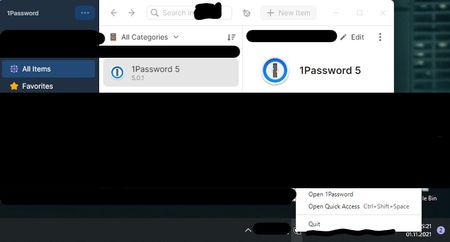
But the state is still inconsistent with the tray icon (that shows the lock while the 1Paassword app is unlocked, and the App itself, where the Lock Menu item is greyed out. (And CTRL+Shift+L does not work as well)
I have saved the 1Password app logs from when I first reported the issue up to now. It seems that Edge has not such a log file location, otherwise I would have offered it.
Sorry for the long and boring detailed description of the replication.



