Level up your business security with free, on-demand training and certification. Explore 1Password Academy today →
Forum Discussion

Andrew42
2 years agoSuper Contributor
Logging into a site issue
Frequently I come across a problem when using 1P to enter a site. . You will notice that details about the site appear in a small box in the centre of the screen. Why does this happen and, worse, ...
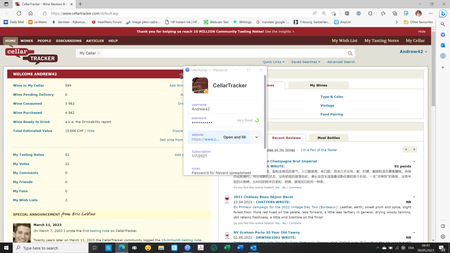

Andrew42
2 years agoSuper Contributor
I am using a Windows 10 PC with Edge. Both are the latest versions. The problem does not occur if I use the icon on my browser, (which I rarely do). The reason I don't use the icon in the browser is because it does not remember my set-up and defaults to "Suggestions" the next time I unlock 1P. This is not the case when I reopen the main app. I have the 1P icon on my task bar and find it easier to operate either that way or using a keyboard short cut to open 1P because it retains my last view.
The problem does not always occur and maybe happens when I click of the record in the side bar. But when it happens it doesn't matter whether I click on Open and Fill in the pop-up or in the main record, the pop-up does not go away unless and until I manually delete it.





