Level up your business security with free, on-demand training and certification. Explore 1Password Academy today →
Forum Discussion

Anonymous
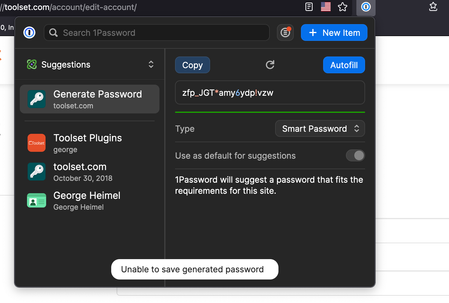
3 years agoMac Desktop app not syncing and all browsers say "unable to save generated password"
I have the following versions:
* MacOS (8.10.3)
* IOS version (8.10.2)
I am connected to both a Teams account and a Families account. Recently I have started experiencing that changes made in ...
Anonymous
3 years agoHi @GeorgeS360 - thanks for contacting us 🙂
I'm truly sorry for any interruption in your workflow caused by the issue you're seeing. We do have an open issue internally regarding the 'unable to save' message, and our development team is actively investigating the situations in which this can occur. I've added your case as an affected user.
At this point, I'd like to ask for a diagnostic from the 1Password for Mac desktop app. This will help us get the full picture, and ensure there is no data loss for any items that might not be synced properly yet:
Here is a link on how to generate the diagnostic: https://support.1password.com/diagnostics/?mac
Attach the diagnostics to an email message addressed to support+forum@1password.com.
With your email please include:
- A link to this thread:
https://1password.community/discussion/139328/mac-desktop-app-not-syncing-and-all-browsers-say-unable-to-save-generated-password#latest - Your forum username:
GeorgeS360
You should receive an automated reply from our BitBot assistant with a Support ID number. Please post that number here. Thanks very much!
Additionally, I have a few questions on your specific situation - could you include the answers along with the above diagnostics?:
- Do you have (or have you ever had) two-factor authentication enabled for your 1Password account(s)?
- Does the 1Password for Mac desktop app lock/unlock along with the browser extension? Or do you have to unlock each of them separately?
- If you disable the app integration in the browser extension, and manually lock/unlock the extension, does the 'Unable to save' message persist? Here's how to do that:
- Right click the 1Password icon in the browser's toolbar > Settings > Under General turn off 'Integrate with 1Password app'.
- This should lock the extension, if it doesn't, right click the 1Password icon and select 'Lock'.
- Then left click the locked icon to enter your password and unlock it.
We look forward to hearing and assisting further!


