Level up your business security with free, on-demand training and certification. Explore 1Password Academy today →
Forum Discussion

snozdop
4 years agoSuper Contributor
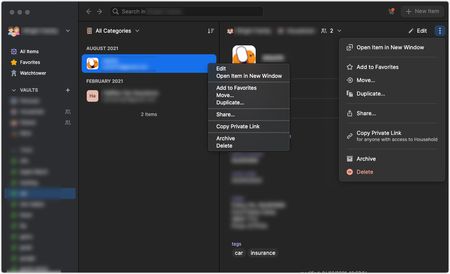
[MAC] Inconsistent menu styles
In the main 1Password 8 window you get two different menu styles containing almost exactly the same items (just one difference) depending on where and how you access the menu:
If you right...

Former Member
4 years agoThey can't easily change this, it is a fact of Electron, you'll see the same in Slack, Teams, etc. You can't skin (right click) context menus because they are an OS feature.
You could disable them entirely by implementing a click handler at the lowest level of the electron app and calling evt.preventDefault() in it, and then implement your own context menu component I guess, but I bet that's a lot more work to get it to render consistently, fill it with contextually useful information, and at the end of the day it loses out on behaviour we expect from context menus such as automatically closing when focus is lost, or being able to render outside of the window (if they fit, they should always render to the bottom right of the cursor, regardless of the current apps window size).
You can make such a context menu disappear when focus is lost quite easily I bet, but rendering outside the window as we expect context menus to do is a hard no. 1Password will now have to spend UX designer time figuring out how to make good context menus, and if there are subtle differences between OS:es then they will likely miss those, making the app feel out of place.