Level up your business security with free, on-demand training and certification. Explore 1Password Academy today →
Forum Discussion

1P_Blake Community Manager
6 months agoCommunity ManagerIntroducing a simpler, faster way to unlock 1Password
Hey 1Password Community! We’ve been working on a simpler faster way to unlock 1Password without compromising the security you trust.
Unlock with your device
With the new Unlock with Device settin...
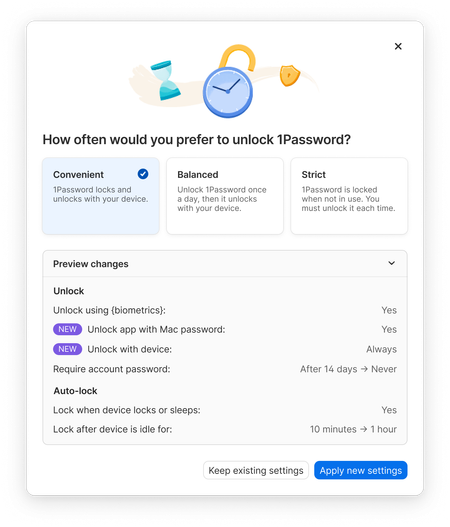
- 6 months ago
Thanks everyone for jumping in here and sharing what you’re seeing!
If you’re already running the latest version of 1Password (currently 8.11.18) you’re on the right version for these new unlock presets. Nothing extra needs to be installed. This rollout is happening through a feature flag, which is why some people are seeing the new options immediately and others aren’t.
When the new unlock presets don’t show up right away, it’s usually one of two things. The app hasn’t picked up the feature flag has changed yet, or there’s a 1Password Business account added in the app alongside your personal account. Business accounts don’t support these new presets right now, so the app hides them when one is present.
Locking and unlocking 1Password will usually trigger the new unlock presets showing up for you. A quick quit and restart of the app can help too, and the new presets should appear in Settings > Security once everything updates.
If you’ve tried the steps above and the presets still aren’t appearing, or something just isn’t working the way it should, feel free to reach out to us at support@1password.com and we can take a closer look.


Solos
6 months agoOccasional Contributor
I'm using the latest production versions of 1Password on my Mac, iPad and iPhone (8.11.18). All devices are using the latest official OS. I can see Convenient preset only on Mac, on iPad and iPhone I can see only two options in Settings: Balanced and Strict. Do you know why Convenient is not available on iPhone/iPad?
I have Balanced preset set on all devices and am confused how it works. On iPhone and iPad I have "Unlock with device" option turned on and "Ask to unlock again" set to "After 10 minutes".
When I unlock iPhone, 1Password is unlocked. But then I lock the phone and when I pick it up again after over 10min, unlocking iPhone does not unlock 1Password. I need to unlock 1Password with FaceID to open it. I think it should not work like that, because in this case, "Unlock with device" works only once. I would expect that unlocking iPhone with FaceID always unlocks 1Password for 10min. And then, when I actively use phone (e.g. watching YouTube), 1Password locks after 10min even though iPhone is unlocked all that time. In a nutshell, unlocking iPhone with FaceID shall always reset 10min timer for locking 1Password.

1P_Dave Moderator
5 months agoModeratorBy default, 1Password on mobile will only unlock using your device if you've accessed 1Password within 10 minutes of your last unlock. You can adjust this by following these steps:
- Open and unlock 1Password.
- Tap the icon for your account or collection at the top left and choose Settings. (If you’re using an iPad, tap your account or collection at the top of the sidebar.)
- Choose Security.
- Change "Ask to unlock again" to your desired duration.
Security presets vary across platforms based on the nature of those platforms and the unique threats that they face. Since mobile devices are shared and handled publicly more frequently, 1Password on those devices avoids being unlocked for extended periods of time.
-Dave
 aguther5 months agoOccasional Contributor
Hello Dave, that's what I did already, but it doesn't work.
Maybe it's intensional that it doesn't work as I understand it with certain settings, but then the documentation and explanation should be improved.- 1P_Dave5 months ago
Thank you for the reply. So that our team can collect some additional information from your end, and advise further, I'd like to ask you to create and share a 1Password diagnostics report from your Windows PC (which you mentioned in your other post as a device where device unlock isn't working, once we investigate Windows the team will also help with your iOS device):
Send a diagnostics report (Windows)
Attach the diagnostics to an email message addressed to support@1password.com
With your email please include:- A link to this thread: https://www.1password.community/discussions/announcements/introducing-a-simpler-faster-way-to-unlock-1password/164357/replies/165121
- Your forum username: aguther
You should receive an automated reply from our BitBot assistant with a Support ID number. Please post that number here. Thanks very much!-Dave

