Level up your business security with free, on-demand training and certification. Explore 1Password Academy today →
Forum Discussion

joeRinehart
5 months agoNew Contributor
1Password Chrome extension is incorrectly manipulating <code> blocks
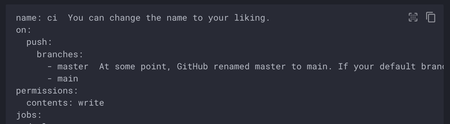
The latest 1Password Chrome extension is incorrectly manipulating the DOM within <code> blocks on static pages. It looks it's using prism.js to try to add syntax highlighting to <code> blocks on the ...
- 4 months ago
Hey everyone! I want to thank everyone who called our attention to this and explain what happened and what we’re doing about it.
What happened: Prism.js is a syntax-highlighting library we use for our Labs Snippets feature. While optimizing our build to reduce bundle size, we unintentionally bundled Prism.js into the extension in a way that caused it to run on pages where it shouldn’t, which interfered with code formatting on certain sites. We apologize for the inconvenience this caused.What we’re doing about it: We’ve completed the fix and submitted it to the Chrome Web Store, along with Firefox, Edge, and our other supported extension storefronts. Rollout timing depends on each store’s review process, but we expect it to land over the next few days.
We want to emphasize that vault security was not impacted. At 1Password, protecting our customers’ privacy, passwords, and credentials is our highest priority.
Check out our postmortem covering what went wrong, the timeline, and the concrete changes we’re making to how we build and release future browser extension updates: Incident Postmortem - 1Password Browser Extension Code Syntax Rendering Issue


ponaj39356
5 months agoNew Contributor
We’ve run into the same issue described in this thread on our production website.
We use Shiki as a server-side code highlighter for code blocks (static HTML generated on the server and sent fully rendered to the browser). The code blocks are initially rendered correctly, but shortly after page load the Chrome extension mutates the DOM inside <code> elements. As a result, the internal structure generated by Shiki (for example, line wrappers and nested spans) is rewritten, and the code formatting breaks.
We’ve verified that:
The HTML is already fully highlighted on the server (no client-side highlighting).
The issue does not reproduce in Incognito mode with extensions disabled.
The DOM structure inside <code> differs between normal mode (with 1Password enabled) and Incognito mode.
data-1p-ignore / data-1password-ignore do not prevent this behavior in our case.
Because our site receives a large volume of traffic, this issue affects a significant number of users, and we need to ship a fix as soon as possible, even if it must be handled entirely from our side as a workaround.
With that in mind, we have two key questions:
Is there any supported or recommended way, from the website’s codebase, to prevent the 1Password Chrome extension from mutating the contents of <code> blocks?
For example, specific attributes, markup patterns, or configuration that the extension explicitly respects.
What is the rationale for the Chrome extension mutating the DOM inside <code> elements at all?
From a website’s perspective, <code> represents static, non-interactive content, and DOM mutation here can break widely used syntax highlighters that rely on a stable internal structure.
We understand that browser extensions operate with elevated privileges and that this may be a bug rather than intended behavior.
Thanks in advance for your time, and happy to provide a minimal reproduction if that’s helpful.

sukka
5 months agoNew Contributor
In fact, 1Password Extension should not inject Prism.js into the other webpages in the very first place!


