Protect what matters – even after you're gone. Make a plan for your digital legacy today.
cli
873 Topics
1Password CLI Bug Report: Service Account Cannot Read Environments
Summary op environment read and op run --environment return "Environment was not found" when authenticated with a Service Account that has Read access to the Environment. Desktop app authentication works correctly with the same Environment ID. Environment op CLI version: 2.33.0-beta.02 OS: macOS 15.3 (arm64) 1Password Desktop App: 8.12.2 Account type: Individual (my.1password.com) Steps to Reproduce Create a 1Password Environment "AI Agent" with variables (e.g., BRAVE_API_KEY) Create a Service Account "Ghossty" with: Vaults: Dev (Read) Environments: AI Agent (Read) Export the Service Account token: export OP_SERVICE_ACCOUNT_TOKEN="<token>" Run: /usr/local/bin/op environment read <environment-id> Expected Result BRAVE_API_KEY=<value> GITHUB_PAT=<value> Actual Result [ERROR] 2026/02/18 18:41:55 bad input passed by the user: Environment was not found Workaround Confirmation Desktop app authentication works correctly with the same Environment ID: OP_SERVICE_ACCOUNT_TOKEN= /usr/local/bin/op environment read <environment-id> # Output: # GITHUB_PAT=[REDACTED:github-fine-grained-pat] # BRAVE_API_KEY=[REDACTED:api-key] Additional Context op whoami confirms the Service Account is authenticated: URL: https://my.1password.com User Type: SERVICE_ACCOUNT The Service Account was created on 2026-02-18 (after Environments beta was available) The SA has confirmed Read access to the Environment in the 1Password app UI op run --environment <id> -- printenv also fails with the same error Vault access works fine with the same SA (op item list --vault Dev succeeds) Impact Cannot use the official headless/automated approach for loading Environment variables in shell startup scripts. Forced to use desktop app authentication which requires biometric confirmation on every invocation.77Views1like3CommentsCritical: op item move caused loss of OTP field (irrecoverable 2FA data)
Hi, I need clarification on what appears to be a serious data integrity issue with op item move. I moved several items between vaults using: op item move <ITEM_ID> –vault <TARGET_VAULT> The command completed successfully. However, after the move, I discovered that the OTP (TOTP) field was missing from the items in the destination vault. Details: The original items contained functioning TOTP fields. After the move, the OTP fields are no longer present. The original items are not in “Recently Deleted”. There was no warning, no error, and no indication that any field types would be excluded. There was no documentation warning that OTP fields might not be preserved. This has resulted in effective data loss. The TOTP secrets cannot be reconstructed. As a result, I now have to go through account recovery procedures with the affected services in order to regain 2FA access. That is time-consuming and in some cases involves manual identity verification. From a user perspective, this is extremely concerning: A “move” operation implies a lossless transfer. OTP secrets are security-critical data. A password manager must guarantee preservation of all credential components, especially second factors. If the move operation internally recreates items (rather than truly moving encrypted blobs), that behavior needs to guarantee full field fidelity — or explicitly block or warn when certain field types cannot be safely transferred. Questions: Is this expected behavior or a bug? Are OTP fields officially supported in op item move? Is there any possible recovery path for the lost TOTP secrets? Are there plans to ensure field-type completeness during move operations? At the moment, this behavior represents irreversible loss of authentication data without warning, which is a serious integrity issue for a password manager. I would appreciate clarification and guidance.84Views0likes2CommentsMeet the 1Password team at KubeCon Europe
KubeCon + CloudNativeCon Europe is coming up on March 23–26 in Amsterdam. A few folks from the 1Password team will be there and we'd love to meet you! If you rely on 1Password for your development work – the CLI in your terminal, Service Accounts in CI/CD, or 1Password Connect in a Kubernetes cluster – we’d love to know if you’re attending and if you’d like to meet the team. We want to hear more about how you’re using 1Password Developer tools, what’s working (and what’s not), and what you’d like to see next. Tell us about the awkward edge cases, security tradeoffs, and the problems you’re solving for today. If you’re a 1Password customer attending KubeCon Europe and you’re up for a short chat with the 1Password team, please let us know using this form: Let us know if you'll be at KubeCon. Not traveling this time? Reply here with what you’re building and how you’re managing human and machine credentials.36Views0likes0Comments
1Password Environments Beta is awesome
Just wanted to drop some feedback after playing around with the new Environments Beta in 1Password. Honestly, I’m loving it so far. The local .env file mounting is just brilliant. Secrets are easy to access without having to run extra commands, but still secure – exactly what I want. Makes switching between machines seamless, too. A couple of things I’d really like to see next: 1. CLI Integration - being able to create/edit/list environments and variables from the terminal would make this so much more useful, right now, having to click around in the desktop app is a bit of a pain for dev workflows. 2. More integrations: AWS Secrets Manager is a great start, but would love to see GCP and other major providers such as GitHub, etc. A plugin system for integrations would be awesome also to help cover more niche players like Modal.com Overall, this is a huge step in the right direction for 1Password. Can’t wait to see where this goes next!427Views4likes3CommentsFeature Request: GeneratorRecipe for Memorable Passwords
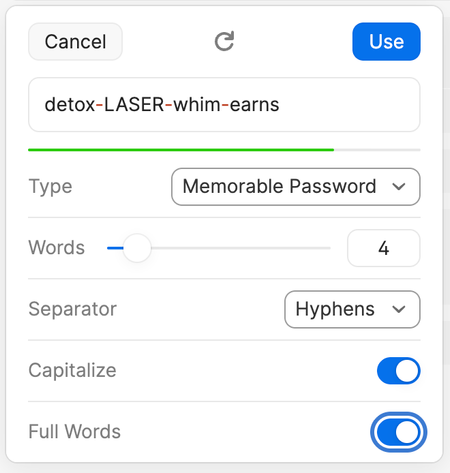
Currently in the API options for 1P Connect there is an ability to specify a "GeneratorRecipe" when creating a password for a record: https://developer.1password.com/docs/connect/api-reference/#item-generatorrecipe-object This is great for super-high-entropy random passwords but in some instances we would like to have the ability to specify that the generator create a "Memorable Password", as can be done in the 1P apps: Ideally this would then allow for specifying criteria similar to: "generate": true, "memorableRecipe": { "memorableRequirements": [ "HYPHENS", "CAPITALIZE", "FULLWORDS" ], "words": 4 } While this isn't needed all the time as the default 'generate' option is suitable in most scenarios, this would provide some extra flexibility. PS - In the same vein, it would nice to have this capability for the CLI's '--generate-password' option as well!! https://developer.1password.com/docs/cli/item-create/#create-an-item38Views0likes1CommentWhat is an Agent Chassis?
Jeff Malnick’s post is confident. It’s also detached from how developers actually ship code today and made me furious.“Agent chassis” boils down to: the script that runs your agent. Fine. But the security layer argument collapses when the tooling underneath is fragmented.Right now you pick between CLI, shell plugins, service accounts, connectors, environments — each with different auth models, rate limits, edge cases, and silent failures. None cleanly support a headless agent workflow. I’ve built workarounds for my workarounds.Agentic coding made this obvious. Agents need real credentials at runtime. Not desktop popups. Not biometric prompts in a terminal.The community built unofficial MCP servers. Anthropic shipped 50+ connectors. 1Password isn’t there.The spec is public. It’s buildable. So—who’s shipping it?54Views0likes1CommentAutomated bi-directional sync between 1Password and AWS Secrets Manager — is this actually possible?
Hey everyone, SRE at a small startup here. We've been using 1Password for a while and overall love it, but we're running into a friction point with our AWS setup that I'm hoping someone has solved. What we're trying to achieve: We want a proper bidirectional sync between 1Password vaults and AWS Secrets Manager. Specifically: 1Password → AWS SM: When someone on the team updates a credential in 1Password, it should automatically propagate to AWS Secrets Manager so our workloads pick it up without anyone having to manually copy-paste things. AWS SM → 1Password: We use AWS Secrets Manager's native auto-rotation for some credentials (RDS passwords, API keys, etc.). When AWS rotates a secret automatically, we'd want that updated value to flow back into 1Password so our employees can always go to 1Password as the single source of truth and get the current credential. On the new "Environments" feature (beta): We noticed the new Environments feature and got excited — it looked like exactly what we needed. But after digging in, it seems pretty limited right now. From what we can tell: There's no SDK support for managing environments programmatically There's no CLI support either (`op` doesn't seem to have environment management commands yet) Everything has to be done through the UI wizard This makes it really hard to automate. We provision new environments dynamically as part of our infrastructure-as-code workflows (Terraform), so we need to be able to create and configure environments programmatically. Is this on the roadmap? Are there any workarounds people are using? The SAML IdP requirement in Environments: Related to the above — the Environments setup wizard seems to require a SAML Identity Provider to be configured for each environment. We use Azure Entra ID as our IdP (federated through AWS Cognito), and we have a single IdP setup that covers all our environments. Is it actually required to have a separate SAML IdP per environment, or is there a way to reuse a single IdP across multiple environments? The wizard flow makes it seem like each environment needs its own IdP configuration, which would be a significant blocker for us — we can't dynamically spin up new IdP configurations every time someone creates a new environment in our platform. If this is a hard requirement, it basically rules out Environments for our use case entirely, since we'd need to automate IdP provisioning as part of environment creation, which is a whole other can of worms. Summary of questions: Has anyone built a reliable bidirectional 1Password ↔ AWS Secrets Manager sync? Especially the AWS SM → 1Password direction for auto-rotated secrets? Is there any programmatic/API access for Environments (SDK, CLI, REST API) that isn't documented yet, or is it genuinely UI-only right now? Is a separate SAML IdP per environment actually required, or can you reuse one IdP across environments? Thanks!59Views0likes2Comments
Error initializing client
Hi. My colleague is having issues with 1Password CLI. He is using macOS on a MacBook Pro M1. See the commands and errors below: ~ » echo "op://my-vault/my-secret-entry/username" | op inject --account mycompany.1password.com [ERROR] 2024/03/22 15:29:40 error initializing client: read: context deadline exceeded ~ » echo "op://my-vault/my-secret-entry/username" | op inject --account mycompany.1password.com [ERROR] 2024/03/22 15:29:59 error initializing client: connecting to desktop app: connecting to desktop app timed out, make sure it is installed, running and CLI integration is enabled Could you please help us fix this issue? 1Password Version: Not Provided Extension Version: Not Provided OS Version: macOS Browser: Not Provided1.2KViews0likes6Comments
[ZSH] Plugin aliases break completion for the command run by the plugin
I have ZSH set up to introspect aliases and run plugin functions based on what the alias is calling. This means that an alias set up for gh : alias gh='op plugin run -- gh' will actually trigger the _op_plugin_run completion function, not that for gh itself. I have worked around this with this in my .zshrc (I don't really want to edit the completion file as I'll definitely forget to keep it updated): ``` function __my_op_plugin_run() { _op_plugin_run for ((i = 2; i < CURRENT; i++)); do if [[ ${words} == -- ]]; then shift $i words ((CURRENT -= i)) _normal return fi done } function load_op_completion() { completion_function="$(op completion zsh)" sed -E 's/^( +)_op_plugin_run/\1my_op_plugin_run/' <<<"${completion_function}" } eval "$(__load_op_completion)" compdef _op op ``` In lay-terms, this: 1. Checks if the previous word is -- 2. Takes -- and everything prior to it out of the scope of the completion 3. completes as normal from the first argument after -- . This is the pattern used by https://github.com/99designs/aws-vault/blob/master/contrib/completions/zsh/aws-vault.zsh This is also possible in https://github.com/99designs/aws-vault/blob/master/contrib/completions/bash/aws-vault.bash and https://github.com/99designs/aws-vault/blob/master/contrib/completions/fish/aws-vault.fish It would be really helpful if the CLI team could update the completion function generated by op completion $SHELL to trigger this reset, so we don't lose shell functionality by using op plugin s! 1Password Version: Not Provided Extension Version: Not Provided OS Version: Not Provided Browser:_ Not Provided844Views3likes6Comments1Password shell plugins not working when configuration is stored in git
Scenario: Multiple developers work on the same git project. When working within the project, it is common to invoke shell commands, such as `hcloud` that need authentication. There are different git projects all using the `hcloud` CLI, that require different permissions (project-scoped API tokens). The idea is to share the `.op/plugins/hcloud.json` file across the team using git. The filte itself does not contain any sensitive information, as it only references the credential by account id, vault id and item id. Because the item is in a shared vault, the ids are the same for all developers. Setup: - project-a/.op/plugins/hcloud.json -> reference project-a hcloud token - project-b/.op/plugins/hcloud.json -> reference project-b hcloud token Expected outcome: ``` cd project-a hcloud server list # should only show servers from project-a, because project-a API token is used cd ../project-b hcloud server list # should only show servers form project-b ``` This works fine on the machine that sets this up using `hcloud plugin init`. However, as soon as the file gets pulled through git, the credentials are no longer detected. The reason seems to be that the `op` CLI ignores files that are group- or world-readable. When I manually run `chmod 600 .op/plugins/hcloud.json` the shell plugin starts to work again. The problem is that git creates files using 0644 permission. What is the reason for this limitation? I can imagine that this limitation is in place, so that other system users cant create shell plugins to force certain credentials to be used. What do you think about the setup? Is this something that op could support?45Views0likes2Comments