Protect what matters – even after you're gone. Make a plan for your digital legacy today.
ssh
549 Topics
Using 1password on a server in a script?
Hi, I've been a recent 1password convert, and I'm loving it. One thing I can't figure out if this is possible: I have a server on which I have scripts running (through cron) that need some credentials. Both SSH keys are required as well as actual API credentials. Right now those are stored in a file on the filesystem, which works, but I'd love it if I can somehow get these out of OP instead of having to have the files there. These scripts run at night, thus it needs to be 100% "hands-off". For the SSH keys I fear there is no solution using OP that's truly non-interactive. The API credentials I think are possible, but I'm not seeing it. Anyone can point me in the right direction? 1Password Version: 8.10.0 Extension Version: 2.6.1 OS Version: Fedora 37 Browser:_ FirefoxSolved201Views0likes2Comments
[Linux] Use $XDG_RUNTIME_DIR instead of $HOME/.1password?
I like to try (although not very successfully) to keep my home directory clean of unnecessary dotfiles. While this is a very cool feature, I think it makes more sense to keep the socket in $XDG_RUNTIME_DIR . This seems to be what the directory is made for, and would prevent another folder under the home directory. From the https://specifications.freedesktop.org/basedir-spec/basedir-spec-latest.html: $XDG_RUNTIME_DIR defines the base directory relative to which user-specific non-essential runtime files and other file objects (such as sockets, named pipes, ...) should be stored. The directory MUST be owned by the user, and he MUST be the only one having read and write access to it. Its Unix access mode MUST be 0700. 1Password Version: 8.6.0~26.BETA Extension Version: 2.3.0 OS Version: Fedora Linux 35 (Workstation Edition)596Views0likes8Comments
Support for SSH Certificates (2024)
This question came up a couple of times in 2022, but it didn't look like anything was resolved. Since it's been two years... For those unfamiliar with the concept, SSH certificates are host and user public keys, signed by your own internal SSH CA, that ease key approval and distribution, especially in large-scale environments. Once a user has created a public-private key-pair, the public key is signed by an (internal) SSH CA. The user then uses ssh-add to add the public key and, if present, the certificate file to the user's ssh agent. https://smallstep.com/blog/use-ssh-certificates/ of how SSH certificates work. Using stock ssh-add and ssh-agent on Mac OS 14, we can see the public key and certificate both being added to the agent: $ /usr/bin/ssh-add .ssh/id_ed25519 Enter passphrase for .ssh/id_ed25519: Identity added: .ssh/id_ed25519 (<REDACTED>) Certificate added: .ssh/id_ed25519-cert.pub (chris) A remote host, when properly configured, will verify that my user certificate has not expired (expiration and inception times) and was issued by a trusted CA, whose key would have already been added to the server. This eliminates the need for me to maintain an authorized_keys file on the remote end. I was hoping to be able to store these keys in 1Password. That certainly works; however, 1Password does not support certificates in neither the user interface nor the ssh agent. 1Password derives public keys from private keys but does not provide a way for the user to upload the certificate file, above and beyond attaching an arbitrary file. The ssh agent behind the scenes presumably also does not support certificates. For the moment, I have configured my ssh client to use the stock ssh-agent for the host that uses certificates, while everything else can go through 1Password. Are there any plans to add support to the 1Password user interface and to the underlying ssh agent for certificates? Thanks! 1Password Version: 8.10 Extension Version: Not Provided OS Version: macOS 14.2.1 Browser: Not Provided1.1KViews15likes11CommentsHow to stop a running 1password ssh agent?
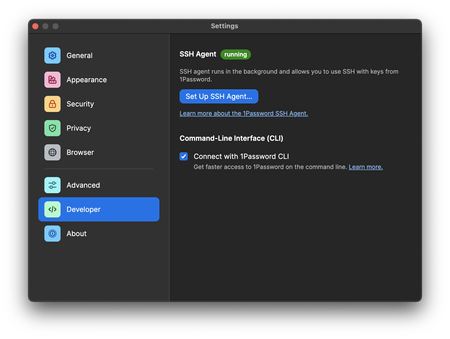
I was experimenting with the 1Password SSH agent and clicked on the "Set Up SSH Agent..." button. However, I couldn't find a way to undo my selection. In my opinion, there should be an option to easily cancel, reverse, or reset the settings back to their defaults in case I make changes that I'm unsure about, especially when dealing with unfamiliar settings. I attempted to uninstall 1Password and reinstall it, hoping that it would revert the changes, but unfortunately, that didn't work. 1Password Version: 8.10.8 Extension Version: Not Provided OS Version: macOS 13.4.1 Browser: Not Provided828Views1like1CommentFeature idea: when creating ssh keys, consider option to auto add comment to end of public key
When copying and pasting public keys to remote servers it is helpful if they include a comment to easily identify keys when reviewing authorized_keys Under Developer options consider having a flag to auto-add comment to key so if generating a key for "web apps server bronze 2022" it might add a comment at end: == 1password-web-apps-server-bronze-2022 Alternatively you could have a ssh comment field in 1password and whatever user defines is automatically added to end of public key. 1Password Version: 8 Extension Version: Not Provided OS Version: Not ProvidedSolved834Views4likes6Commentsssh agent does not list my keys despite $SSH_AUTH_SOCK set
I've seen previous discussions on this topic, https://1password.community/discussion/139077/ssh-agent-wont-list-my-keys, however my current configuration has all the bits in that discussion. So, here's my current setup and configurations: I have the 1password ssh agent running per the Settings -> Developer options in 1Password. The configuration ( ~/.ssh/config ) has a Host * IdentityAgent pointing to "~/Library/Group Containers/2BUA8C4S2C.com.1password/t/agent.sock" , which I added automatically from the settings page I added the global plist per https://developer.1password.com/docs/ssh/agent/compatibility/#configure-ssh_auth_sock-globally-for-every-client and loaded it. It did not complain about errors, so I assume it's working I restarted the computer since then I made sure my zshrc does not redeclare the SSH_AUTH_SOCKET environment variable fetching private repositores from the command line works, as 1password pops up and asks me to authorize the keys in the vault, and then succeeds in using them there are no keys as files in the ~/.ssh/ directory I have an ssh agent configuration toml file which changes the order of the keys, but nothing else $ echo $SSH_AUTH_SOCK tells me it's set to /private/tmp/com.apple.launchd.IC5jFZHBxD/Listeners (unsure whether this is due to the plist file?) ps aux | grep ssh-agent tells me there's an ssh-agent process running at /usr/bin/ssh-agent -l , I don't think this is 1passwords, and I don't know what starts this one With the above, ssh-add -l tells me the agent has no identities. Ideally I would like the command to list the keys that the 1password ssh agent has 1Password Version: 8.10.18 Extension Version: 2.16.0 OS Version: macOS 14.1 Browser: Arc (chrome)2.4KViews0likes7CommentsOpenSSH Agent like putty
I see putty now allows you to configure pageant to let openSSH access keys via named pipes, and it can coexist with the built in Open SSH agent in Windows. It basically works like how you configure 1password on Linux and Mac, so taking over the named pipe shouldn't be neccessary. Any plans to change how it works on windows in the future? I fear that Windows or defender will suddently realize that this is not the correct process, and block it at some point. Here's how Putty does it, section 9.3.3: https://tartarus.org/%7Esimon/putty-prerel-snapshots/htmldoc/Chapter9.html#pageant-cmdline (yes, this is actually where putty stores it's documentation😪) Also, any plans to include native support for putty/pageant? Alot of windows tools like WinSCP and Devolutions RDM uses Putty as it's backend, so it would be useful to have support built in. I got it working with Nathan Beals' WinSSH-Pageant, but would be super nice to have it built in😊 1Password Version: Not Provided Extension Version: Not Provided OS Version: Not Provided Browser: Not Provided730Views1like2Comments