Level up your business security with free, on-demand training and certification. Explore 1Password Academy today →
cli
893 TopicsSecurity concern with allowing Terminal complete access to my 1P account via op CLI
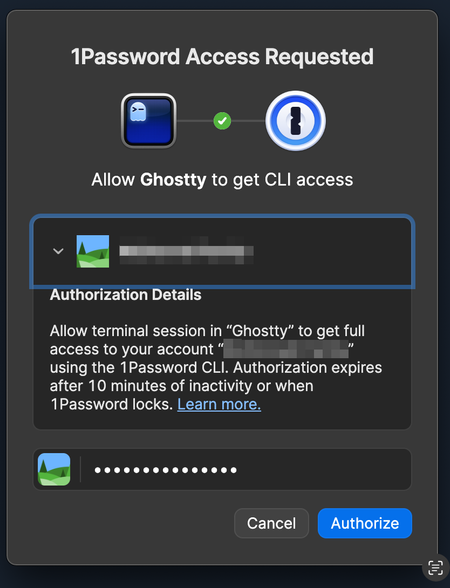
I have a shell script that uses 1Password secret reference: export EXAMPLE_API_KEY=$(op read "op://Vault-Name/Example API Token/Specific-Token/Token") But when it's loaded, I have to authorise the terminal/shell to have access to it (see screenshot) My concern is that it's giving the terminal/shell access to my entire account and all vaults within it when I only want to provide it with access to one entry within a single vault. What happens if I had a malicious script installed that scans for 1Password secret references across multiple files? The script might not be able to identify the "account" but it just needs the vault names. Then it can start to build up common names for identifying secrets stored within 1Password and try requesting them, and if I've already authorised the terminal/shell I won't see a popup notification and so the script would be free to access the secrets. Initially, I moved any secrets I use for development work into a separate vault, which I thought would help when it came to the terminal/shell requiring access via a 1Password secret reference because it would only have access to that specific vault (reducing the blast radius) but that's when I noticed it wasn't getting access to just the vault but the entire account. I'm not sure how much of an issue people think this is but it worries me. 1Password Version: 8.10.40 Extension Version: Not Provided OS Version: macOS 15.1 Browser: ChromeSolved877Views0likes12Comments
We need a way to disable password prompts for a period of time
It would be better if we could disable the password prompt on a particular item for a period of time, rather than unlocking the whole thing. For when automated agents access op:// passwords, it's currently dangerous because then they can access any other credentials for a period of time. Instead, it would be more ideal to say: "Do not ask again for X hours for this password".32Views0likes0Comments
Loading 1Password credentials inside a Docker Container from an Environment.
I have a Docker container that runs a server application, and I’m using 1Password Environments to store all of the credentials for this service. What I’d like to do is load all secrets from a specific 1Password Environment into the container’s runtime environment only when I start the server, not at build time and not as long‑lived plain env vars on the host. In other words, I want something like: Start command (or entrypoint) pulls secrets from a given 1Password Environment Those secrets are exposed as environment variables inside the container The server process then reads them as normal env vars Once the server stops, the secrets are no longer present I’ve seen references to using op run to inject env vars for a command, and also to using 1Password Environments / Connect for runtime secret delivery, but I’m not sure what the recommended pattern is for a simple Docker container scenario.65Views0likes1CommentSSH Agent should support host-to-key mapping to avoid MaxAuthTries exhaustion
The 1Password SSH agent currently offers all keys in the vault sequentially for every SSH connection, regardless of which key is relevant to the target host. This triggers an error for a number of hosts: Too many authentication failures Servers configured with MaxAuthTries below the number of SSH certs on in 1Password run the risk of being unreachable thanks to the way that the agent presents the keys. Best practice (https://linuxize.com/post/ssh-hardening-best-practices/) suggests 3-4 for the setting, and according to the man page for sshd indicates that the default is 6 (https://unix.stackexchange.com/questions/418582/in-sshd-config-maxauthtries-limits-the-number-of-auth-failures-per-connection) To reproduce: Have 6+ SSH keys in your 1Password vault Connect to a server with MaxAuthTries 3 (or default) configured The correct key in vault order is greater in count to the setting on the host Result: Received disconnect from [host]: Too many authentication failures Evidence from verbose SSH output: debug1: Offering public key: GitHub ED25519 ... agent debug1: Offering public key: GitLab ED25519 ... agent debug1: Offering public key: K8sFrontEnd ED25519 ... agent Received disconnect: Too many authentication failures The correct key (4th in vault) was never reached since the MaxAuthRetry was set to 3. Workaround: Save the relevant public key to disk and use IdentitiesOnly yes + IdentityFile in ~/.ssh/config to pin a specific key to a host. This works but defeats much of the convenience of the agent. Feature request(if the devs are looking here): Allow users to associate a key with one or more hostnames directly in the 1Password vault item or SSH Agent UI. The Bookmarks tab suggests this infrastructure may already be in progress. If bookmarked hosts could drive key selection, that would solve this entirely. This is a natural extension of what 1Password already does well: matching credentials to their intended destination.20Views0likes0CommentsNew getting-started guides, AI search, and LLM-ready docs for 1Password dev tools at 1password.dev
Hi everyone! We've been investing in making 1Password's developer documentation genuinely useful from the first click, and we wanted to share what's now live over at 1password.dev. 📖 New getting-started guides We've published workflow-based getting-started guides across every major tool area: SSH & Git, 1Password CLI, SDKs (Go, JavaScript, Python), Environments, integrations, and more. Instead of jumping between reference pages, you can follow a clear path from setup to working integration, organized around how you actually build. 🔍 AI-powered search across the docs You can hit Ctrl+K on any page and ask a question in plain language. The built-in AI assistant searches the full documentation set and gives you a direct answer with links to the relevant pages. It’s a much faster way to find what you need, especially if you’re not sure which tool or section to look in. Try it: open 1password.dev, hit ⌘+K, and type “How do I set up git commit signing with multiple GitHub accounts?” 🤖 Docs built for AI dev workflows If you use AI coding assistants like Cursor, Copilot, Windsurf, or Claude, our docs are now natively consumable. Every page is available as Markdown (append .md to any URL), and we serve llms.txt and llms-full.txt at the site root so your tools can reference 1Password docs directly. Details here: Build with LLMs 🏗️ Refreshed docs structure The documentation is now organized around the way developers work, with clearer navigation across SSH & Git, CLI, SDKs, Environments, secrets management, and integrations. If you've found our docs hard to navigate in the past, it's worth another look. 📌 One practical note: our developer docs now live at 1password.dev. All your existing developer.1password.com links and bookmarks redirect automatically, so nothing breaks. We'd love your feedback If you run into any issues or have suggestions, let us know in this thread. You can also reach us in the 1Password Developers Slack. Happy building! 🔐69Views1like0Comments
Generate passwords from op 1P CLI?
Is it possible to add command to generate random passwords from the 1P CLI? Add the https://1password.com/password-generator/ web version also to the "op" command. Like: ~/home>op --genpass aB! 12 Generates a Password with a length of 12 character with lowercase UPPERCASE and symbols. 1Password Version: Not Provided Extension Version: Not Provided OS Version: Not Provided1.1KViews0likes8Comments
How to get/set url/webiste autofill behaviour through CLI
Hello, I'd like to kindly ask if 1password CLI allows to get or set "autofill behaviour" attribute assigned to a specific website/url. I didn't find such information in documentation, only a brief entry concerning attributes of fields other than website: https://developer.1password.com/docs/cli/secret-reference-syntax/#field-and-file-metadata-attributes I've tried `op read` and `op item get` with no success: $ op read op://my-vault/my-entry/website?attribute=behaviour [ERROR] 2025/10/22 14:23:23 could not read secret 'op://my-vault/my-entry/website?attribute=behaviour': unknown query parameter value 'behaviour' for key 'attribute'. Supported values for this key are: value, type, title, id, designation, otp $ op item get my-entry --format json | jq .urls [ { "label": "website", "primary": true, "href": "https://www.example.com/" } ]107Views1like2CommentsMac OS OP CPU Usage + Processes Out of Control!
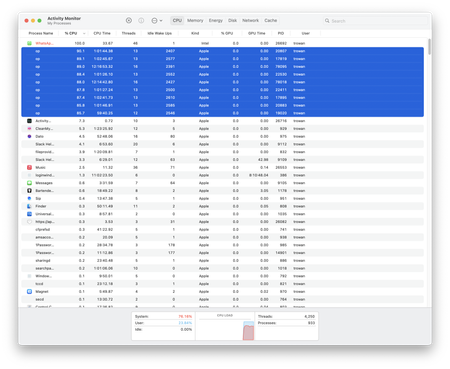
Been having this issue for some time but finally have the time to document it properly. Noticed my M1 Mac slowing down to a crawl, upon inspecting Activity Monitor, I can see that the "op" processes are eating up CPU like crazy. More and more spawn and the CPU usage increases drastically. I need to force quit all the "op" processes to be able to use my machine. I have the SSH Agent and the CLI enabled. Using it with Hyper (terminal), Forklift (sftp), and TablesPlus (mysql), Tinkerwell. 1Password for Mac 8.10.23 (81023003) Apple M1 Pro 32 GB Mac OS 14.2.1 (23C71) OP version 2.24.0 OP plugins installed/configured: brew, doctl, gh. Can't figure out how to attach the generated diagnostics or if they contain personal info. Please help, I love the functionality of it, just cannot use it. 1Password Version: 8.10.23 Extension Version: 2.19.0 OS Version: Mac OS 14.2.1 (23C71) Browser: Not Provided129Views0likes3Commentsssh agent popup does not appear
Hello, I've been using 1p ssh agent on multiple platforms, but on windows in particular it's been giving me trouble. For whatever reason, in powershell, the ssh agent appears to be running, I can run a ssh-add -l and it gives me the keys I expect including my github key: but if I run a git clone or git pull, the request fails with a permission denied error: The 1 password prompt for key authorization never shows up and so no valid key is presented to the server. Any suggestions on how to debug this properly? This key is valid and I use it on osx and Linux without issue.47Views0likes1Comment