Level up your business security with free, on-demand training and certification. Explore 1Password Academy today →
feature request
717 Topics
How to disable auto popup to enter/update passwords
Although it’s a great option to be able to automatically fill in passwords to smoothen the login, it often also is a pain when 1Password thinks it detects login fields on a page and constantly shows the update/enter popup. Isn’t there a way to disable the popup for certain pages and/or addresses? It happens when I’m working in a certain page the popup appears after almost any entry/action I perform on these pages. And that way it annoys, and therefore makes you ‘hate’ the option (which it shouldn’t).16Views0likes1Comment
Polish language support
Hello, I have been using 1password for a long time, both at work and privately, I must admit that I like this application very much. I would like to introduce my family with this password manager, but the problem here is the language barrier. Why, despite the passage of so many years, there is still no Polish language support?Solved616Views4likes15CommentsCopying and Pasting Icons
I first commented on the subject of loosing the ability to copy and past icons in version 8, some four years ago. Since then I have mislaid my community login and password and so have reenrolled as a new user. I administer a family account. We have collectively, 7 x MAC desktops, 2 x Windows desktops, 7 x iPhones, 8 x iPads. The ability to create entries in 1Password with identical icons is important to all users. For those, less technically confident, the icon provides a secure and confident way to recognise entries - many within a shared vault. Individuals, when automatically offered the upgrade in their 1password app, thought, as instructed by me over many years, to keep their apps up to date for security reasons. Having upgrade their iPhones, iPads etc to version 8, the very first calls and emails to me, concerned the loss of the ability to copy and paste icons. Many thought it was a misunderstanding of the new version 8 - it wasn't. We still appear, not to have addressed this issue? As a consequence I had to uninstall everyones version 8 and reinstall versions 7. As I type this on a MAC desktop, I am the only user running version 8 on any device!! On my iPhone, I am running both versions, just so that I can utilise the 'copy and paste icon' facility. Although you have provide in version 8 a 'dropdown' below the icon (in edit mode) providing 'choose a photo' and 'choose a file' - neither of these provide a suitable resolution to version 7 'copy paste'. We use 1password in our family for everything, having spent years drumming into everyone the need to be secure and adhere to good password practices. I feel everyone is missing out on he update of version 8 JUST because of a 'copy and paste' issue. Please can you address this ASAP ? I'm sure that many have similar views even though the numbers may not reveal themselves in your community forum - Out of our family, I am the only community user, but they all have the same issue - their may well represent many other users who do not visit the community forum. Thank you77Views0likes3Comments
Backup Enhancements
I recommend that 1Password add functionality (a) to automatically remind the customer to perform a local backup of the password data, if one has not been done recently; and, (b) to automatically encrypt the 1PUX and CSV export files so that the information is always in a protected state. 1Password does a serious disservice to its customers by failing to emphasize the importance of backing up the password data – and, by failing to make that process as smooth as possible. The argument that a local backup is not needed because the data is backed up on the 1Password servers is disingenuous and potentially dangerous to the digital well-being of the customer. When a 1Password account becomes inaccessible (as has been reported in this forum by customers under different scenarios), having a means to restore the password data to 1Password or an alternative password manager becomes invaluable.8Views0likes0Comments
Automated bi-directional sync between 1Password and AWS Secrets Manager — is this actually possible?
Hey everyone, SRE at a small startup here. We've been using 1Password for a while and overall love it, but we're running into a friction point with our AWS setup that I'm hoping someone has solved. What we're trying to achieve: We want a proper bidirectional sync between 1Password vaults and AWS Secrets Manager. Specifically: 1Password → AWS SM: When someone on the team updates a credential in 1Password, it should automatically propagate to AWS Secrets Manager so our workloads pick it up without anyone having to manually copy-paste things. AWS SM → 1Password: We use AWS Secrets Manager's native auto-rotation for some credentials (RDS passwords, API keys, etc.). When AWS rotates a secret automatically, we'd want that updated value to flow back into 1Password so our employees can always go to 1Password as the single source of truth and get the current credential. On the new "Environments" feature (beta): We noticed the new Environments feature and got excited — it looked like exactly what we needed. But after digging in, it seems pretty limited right now. From what we can tell: There's no SDK support for managing environments programmatically There's no CLI support either (`op` doesn't seem to have environment management commands yet) Everything has to be done through the UI wizard This makes it really hard to automate. We provision new environments dynamically as part of our infrastructure-as-code workflows (Terraform), so we need to be able to create and configure environments programmatically. Is this on the roadmap? Are there any workarounds people are using? The SAML IdP requirement in Environments: Related to the above — the Environments setup wizard seems to require a SAML Identity Provider to be configured for each environment. We use Azure Entra ID as our IdP (federated through AWS Cognito), and we have a single IdP setup that covers all our environments. Is it actually required to have a separate SAML IdP per environment, or is there a way to reuse a single IdP across multiple environments? The wizard flow makes it seem like each environment needs its own IdP configuration, which would be a significant blocker for us — we can't dynamically spin up new IdP configurations every time someone creates a new environment in our platform. If this is a hard requirement, it basically rules out Environments for our use case entirely, since we'd need to automate IdP provisioning as part of environment creation, which is a whole other can of worms. Summary of questions: Has anyone built a reliable bidirectional 1Password ↔ AWS Secrets Manager sync? Especially the AWS SM → 1Password direction for auto-rotated secrets? Is there any programmatic/API access for Environments (SDK, CLI, REST API) that isn't documented yet, or is it genuinely UI-only right now? Is a separate SAML IdP per environment actually required, or can you reuse one IdP across environments? Thanks!123Views0likes3Comments
1Password 'Environments' and monorepos/collocated deployment configuration
I'm fiddling with Environments today to see how it would work for my workflows, and immediately ran into two fairly significant blockers: ## Multi-environment orchestration The only way I can see to get an environment-ID into an `op run` command is as a flag/env-var pre-dispatch; but for something like Ansible, where an entire inventory of tasks require a complex mapping of projects/apps/secrets/teams, that would require centralizing all of the "environment IDs" into one top-level invocation, irrespective of what actual tasks the given Ansible command might run. (This isn't Ansible-specific, "ansible" here could be any complicated orchestration tool that makes intelligent decisions about what to do for multiple potential environments.) Yes, I'm sure the blessed path, or what would be ideal for 1P, is that each possible orchestration tool in existence use the 1P SDK, have a built-in, or a plugin, or something like that, so that 1P is separately queried for each target/environment - but there will always be *some* tool that doesn't (up to an ad-nauseum target of "all of our deployment is bespoke by scripting.") At the moment, this situation is still better served by the previously-extant `op://` references in static env-files: they're "discoverable" during the process, in that anything/everything present in the environment is substituted at launch-time; but that's also worse in its own way - they're less isolated, and it leaves a similar "collect all the environment for all possible targets first, before executing the orchestrator." I don't necessarily have a specific feature-request or a way I imagine this working, right now; I just wanted to surface the annoyance for you to consider as you're working on the feature. (Related issue, similar vein, but not exactly the same architectural problem - there's only one `OP_ENVIRONMENT_ID` env-var; and while the `op run` can take multiple environment-flags, that's again a single-point-of-invocation issue. Ways to construct partial environment-based assignments pre-invocation is missing here, unless you store them manually and construct some method of passing them to `op run` - i.e. there's no equivalent of `op://` references, where multiple different scripts and wrappers can all happily contribute multiple `op://` references into the environment without coordinating, and one final `op run` can consume/resolve all of them for some sort of commit/apply process.) ## Duplication of secrets This one is the much bigger one, and kinda a dealbreaker, at least for me. For basically any given secret, I *already* have a central, authoritative 1Password entry as the source-of-truth for that - it has version-history, shared notes, access permissions for people, it autofills browsers and logins and CLI invocations ... but at the moment, "1Password Environments" only allows me to put in 'dumb strings' as variable-values. Which means that I need to, say, *duplicate* a database-user password in both 1. a 1Password vault-entry, and 2. a 1Password environment-variable. (... and then document somewhere that it's been duplicated; and establish process to make sure anybody modifying it knows to go modify both; and, and, and ...) I assumed when starting this out that the entire point of 1Password environments would be, effectively, something like a templating system: include, inline in the definitions, the equivalent of `op://` references to other *existing* secrets, such that they're filled in when actualized onto the filesystem or requested from SDK apps. (Think, "username" and "password" are already in a database vault-entry; so the `DATABASE_URL` env-var configures how to construct the database-url from those keys.) Without that functionality, I'm actually a little lost as to the value/purpose of environments (not to criticize anyone's hard work, or anything; I'm sure there's a pictured use-case that makes sense, I'm just not currently managing to see it, haha.) So, the request here is a little more direct: let me configure references to other 1Password items in environment-variables - at a minimum as a 1:1 correlation (i.e. `DB_USER` being configured directly to `op://Team Secrets/Database - Prod/Postgres/username`); but ideally, with some minimal templating, so additional content/simple structure can be hardcoded into the env-vars that are *mostly* derived from secrets (Postgres connection-strings/URLs; or derivation from other env-vars to avoid duplication on that end either, such as configuring `USER_PW` to `op://Team Secrets/${HOSTNAME}/password`.) Hope this is helpful feeback about the issues somebody ran into in the real-world trying to apply this! I *do* love the promise of ditching env-files-full-of-`op://`-references-hardcoded-into-repos, in favour of something more auditable / sited-with-the-secrets-in-question / dynamically-configurable.33Views0likes2Comments
Feature Request - Step Up Auth Geo-restrictions
We are starting to have more users working overseas temporarily from locations outside our usual allow list. We'd like a middle ground option to allow these locations but only with an additional authentication factor, or allow them for a small number of users.12Views0likes1Comment
Feature Feedback: UI Overlap Issue & More Flexible Secret Sharing Controls
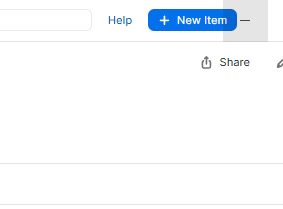
Dear 1Password Team, I would like to share several feedback points regarding usability and flexibility within the 1Password Windows desktop application and its secret sharing feature. First, I noticed a UI issue in the Windows desktop app where the "New Item" button appears overlapped by the window’s minimize control. This creates a confusing visual layout and may affect usability, particularly when navigating quickly. It would be helpful if this overlap could be reviewed and adjusted to ensure consistent spacing and clarity across window sizes or display scaling settings. Second, regarding the secret sharing feature, I would appreciate more flexibility in configuring expiration and viewing limitations: * Custom link expiration duration Currently, the available options for "Link expires after" are limited to fixed presets (1 hour, 1 day, 7 days, 14 days, 30 days). In practical scenarios, more granular control would be very useful — for example: - 30 minutes - 90 minutes - 21 days - any custom duration defined by the user While this may seem like a small enhancement, it would significantly improve usability in real-world workflows where precise timing matters. * Custom number of allowed views At present, the viewing limitation only allows either: - unlimited views - or exactly 1 view It would be very helpful if users could specify custom limits (e.g., 2 views, 3 views, 5 views, etc.), especially when sharing secrets with small teams or temporary collaborators. * Selective field sharing Another improvement that would greatly enhance security flexibility is the ability to choose which fields within an item are shared. For example, in my case, I may want to share GitLab credentials (username and password) but exclude attached files such as recovery codes. Currently, sharing an item also shares all attachments, which may expose sensitive backup data unintentionally. Overall, these enhancements would improve both usability and security control, especially for users who rely on 1Password for professional workflows and credential sharing. Thank you for continuously improving the product, and I hope these suggestions are helpful for future updates. Best regards,33Views0likes1Comment
Security bump is required for devs!
Hi there, I’ve been using 1Password for both websites and various aspects of my personal life. Recently, I’ve been working on developing tools to securely save data on my account instead of my computer or in plain text. This approach actually works and is more secure. However, for this to be effective, I needed to compromise my entire account, including all the vaults, to make them accessible to the CLI tool. I would like to limit the scope of the CLI tools to specific vaults rather than my entire account, which includes shared vaults and detailed information. Is this possible? Thanks15Views0likes1Comment