Our community is getting an upgrade on July 2nd! Learn more in the FAQs →
security
57 Topics
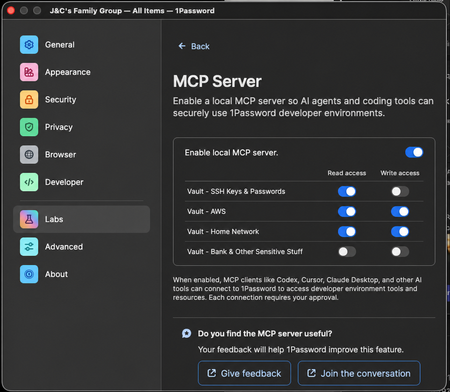
Feature Request - MCP Limiting Controls
I really love using the MCP service with Claude CLI on my Mac, but it bothers me that it can somewhat easily see all my Vaults. Feature Request Please implement in the 1password App's MCP Settings: 1. Ability to toggle read access for individual vaults 2. Ability to toggle write access for individual vaults Mock-up Here's what I'd like in the 1Password App settings - This would be great for easing my mind specifically not that I don't accidentally give it keys to my kingdom (like the bank) (Props @ GPT and my ability to write a simple prompt) Failed Work-Around Attempt I tried creating another family member account in my family org and just shared the Vaults that I wanted my Claude to use with that, but the desktop app won't let me sign in to multiple accounts in the same org at the same time and I'm not really sure this would have been a good enough work-around for me anyway. The feature I'm requesting above would solve this perfectly. Successful Work-Around Attempt - But sucks So as it stands, the best that I guess I can do is login to my 1password desktop app with only to the dedicated account I made for Agentic access. This would not give any read-only support either, which is not epic.41Views0likes0Comments
Feature Request: Can we get a gh auth login style flow for the CLI?
Hi 1Password team, I’m hitting a major wall with the CLI when trying to use it with AI coding agents (like Claude Code, Cursor, or Linear Agents). Right now, op seems to assume that the person running the "op run" command is always sitting right there at a TTY with a keyboard. But when I’m running an agent in a headless container or a remote environment, the CLI just hangs because it’s waiting for a password or a biometric prompt that it can’t reach. I really don't want to use Service Accounts for this. Giving an autonomous agent a long-lived, static token feels like a massive security step backward. I want the agent to be able to "ask" me for permission. What I'm looking for: A way to do something like op login --browser. It would give me a URL/code (exactly like how aws sso login or the GitHub CLI works), I click it on my host machine, auth in my browser with TouchID, and the agent gets its session token. Are there any plans to support an OIDC-style "Device Authorization" flow?181Views3likes3Comments
Service Accounts in the GUI?
Are service accounts supposed to be manageable in the GUI/desktop app? I'm running Linux, and I don't see them in my account, despite being on the subscription that has them and them being available on the website. And if not, is this a feature that is coming soon? Because it's fairly impractical to manage them through the website. I'd also add that it's annoying having to recreate the service account every time I want to change permissions on it (add a vault, remove a vault, adjust a vaults permissions, rename it, etc). I understand that you've made it this way for additional security, but I don't think it's actually buying much added security in most circumstances, and I think it should at least be opt-out.24Views0likes0Comments1Password Connect logging
Hi, we've recently set up a 1Password Connect (OPC) instance and are testing access and integration with several applications. We noticed that though OPC logs the accessed URIs that contain vault id and item id, it does not seem to log, which access token / access token ID did the request. We neither find that information locally in the container logs nor in the 1Password web admin page nor in the forwarded logs that end up in our MS Sentinel. Did we miss something with the configuration (which we left on default settings) or is this something that the tool just does not provide? Thanks Marco11Views0likes0CommentsWe need a way to disable password prompts for a period of time
It would be better if we could disable the password prompt on a particular item for a period of time, rather than unlocking the whole thing. For when automated agents access op:// passwords, it's currently dangerous because then they can access any other credentials for a period of time. Instead, it would be more ideal to say: "Do not ask again for X hours for this password".34Views0likes0Comments
SSH Agent should support host-to-key mapping to avoid MaxAuthTries exhaustion
The 1Password SSH agent currently offers all keys in the vault sequentially for every SSH connection, regardless of which key is relevant to the target host. This triggers an error for a number of hosts: Too many authentication failures Servers configured with MaxAuthTries below the number of SSH certs on in 1Password run the risk of being unreachable thanks to the way that the agent presents the keys. Best practice (https://linuxize.com/post/ssh-hardening-best-practices/) suggests 3-4 for the setting, and according to the man page for sshd indicates that the default is 6 (https://unix.stackexchange.com/questions/418582/in-sshd-config-maxauthtries-limits-the-number-of-auth-failures-per-connection) To reproduce: Have 6+ SSH keys in your 1Password vault Connect to a server with MaxAuthTries 3 (or default) configured The correct key in vault order is greater in count to the setting on the host Result: Received disconnect from [host]: Too many authentication failures Evidence from verbose SSH output: debug1: Offering public key: GitHub ED25519 ... agent debug1: Offering public key: GitLab ED25519 ... agent debug1: Offering public key: K8sFrontEnd ED25519 ... agent Received disconnect: Too many authentication failures The correct key (4th in vault) was never reached since the MaxAuthRetry was set to 3. Workaround: Save the relevant public key to disk and use IdentitiesOnly yes + IdentityFile in ~/.ssh/config to pin a specific key to a host. This works but defeats much of the convenience of the agent. Feature request(if the devs are looking here): Allow users to associate a key with one or more hostnames directly in the 1Password vault item or SSH Agent UI. The Bookmarks tab suggests this infrastructure may already be in progress. If bookmarked hosts could drive key selection, that would solve this entirely. This is a natural extension of what 1Password already does well: matching credentials to their intended destination.23Views0likes0CommentsNew getting-started guides, AI search, and LLM-ready docs for 1Password dev tools at 1password.dev
Hi everyone! We've been investing in making 1Password's developer documentation genuinely useful from the first click, and we wanted to share what's now live over at 1password.dev. 📖 New getting-started guides We've published workflow-based getting-started guides across every major tool area: SSH & Git, 1Password CLI, SDKs (Go, JavaScript, Python), Environments, integrations, and more. Instead of jumping between reference pages, you can follow a clear path from setup to working integration, organized around how you actually build. 🔍 AI-powered search across the docs You can hit Ctrl+K on any page and ask a question in plain language. The built-in AI assistant searches the full documentation set and gives you a direct answer with links to the relevant pages. It’s a much faster way to find what you need, especially if you’re not sure which tool or section to look in. Try it: open 1password.dev, hit ⌘+K, and type “How do I set up git commit signing with multiple GitHub accounts?” 🤖 Docs built for AI dev workflows If you use AI coding assistants like Cursor, Copilot, Windsurf, or Claude, our docs are now natively consumable. Every page is available as Markdown (append .md to any URL), and we serve llms.txt and llms-full.txt at the site root so your tools can reference 1Password docs directly. Details here: Build with LLMs 🏗️ Refreshed docs structure The documentation is now organized around the way developers work, with clearer navigation across SSH & Git, CLI, SDKs, Environments, secrets management, and integrations. If you've found our docs hard to navigate in the past, it's worth another look. 📌 One practical note: our developer docs now live at 1password.dev. All your existing developer.1password.com links and bookmarks redirect automatically, so nothing breaks. We'd love your feedback If you run into any issues or have suggestions, let us know in this thread. You can also reach us in the 1Password Developers Slack. Happy building! 🔐82Views1like0Comments1password-credentials.json invalid?
Hi there I'm trying to setup the operator in my kubernetes cluster however, the connect server is complaining about the credentials. {"log_message":"(E) Server: (unable to get credentials and initialize API, retrying in 30s), Wrapped: (failed to FindCredentialsUni │ │ queKey), failed to loadCredentialsFile: Server: (LoadLocalAuthV2 failed to credentialsDataFromBase64), illegal base64 data at input byte 0","timestamp":"2026-04-30T19:05:07.6488449 │ │ 95Z","level":1} On investigation it seems that the data in the (freshly downloaded) file is not decoding as valid base64. (I'm downloading via windows and accessing file from WSL bash). For instance, this:- jq -r '.encCredentials.data' 1password-credentials.json | basenc --base64url -d > /dev/null && echo OK || echo BAD returns BAD, i.e. thinks that the data property is not decodable. image tags: 1password/connect-api:1.7.3 1password/connect-sync:1.7.3 Any help would be welcome, thanks in advance!Solved28Views0likes1Comment
SSH config managed from 1Password - alternative to SSH Bookmarks
(Mods: feel free to remove this if it's not appropriate here) I gave SSH Bookmarks a try but found it didn't quite cover my needs. No password/OTP auth, no way to use arbitrary SSH directives, no per-machine filtering, ... So I ended up building a small OSS tool called ssh-concierge that takes a similar approach but goes a bit further: it treats 1Password as the single source of truth for your entire SSH config, not just key-to-host mapping. In case it's useful to anyone else: https://github.com/bedezign/ssh-concierge Happy to answer questions!52Views0likes1Comment